CP643E.pdf - 第108页
FK-9F98- 05 CP- 643E Training Text for Service Engineers Edition 5.0 Chapter 7. Camera Adjustment [ 3 / 10] Fuji Machine Mfg. Co., Ltd. Okazaki SMT Equipment Quality Assurance Dept. Technical Support Div. Section No.2 7-…
FK-9F98-05 CP-643E Training Text for Service Engineers
Edition 5.0 Chapter 7. Camera Adjustment [2/10]
Fuji Machine Mfg. Co., Ltd. Okazaki
SMT Equipment Quality Assurance Dept.
Technical Support Div. Section No.2
7-2
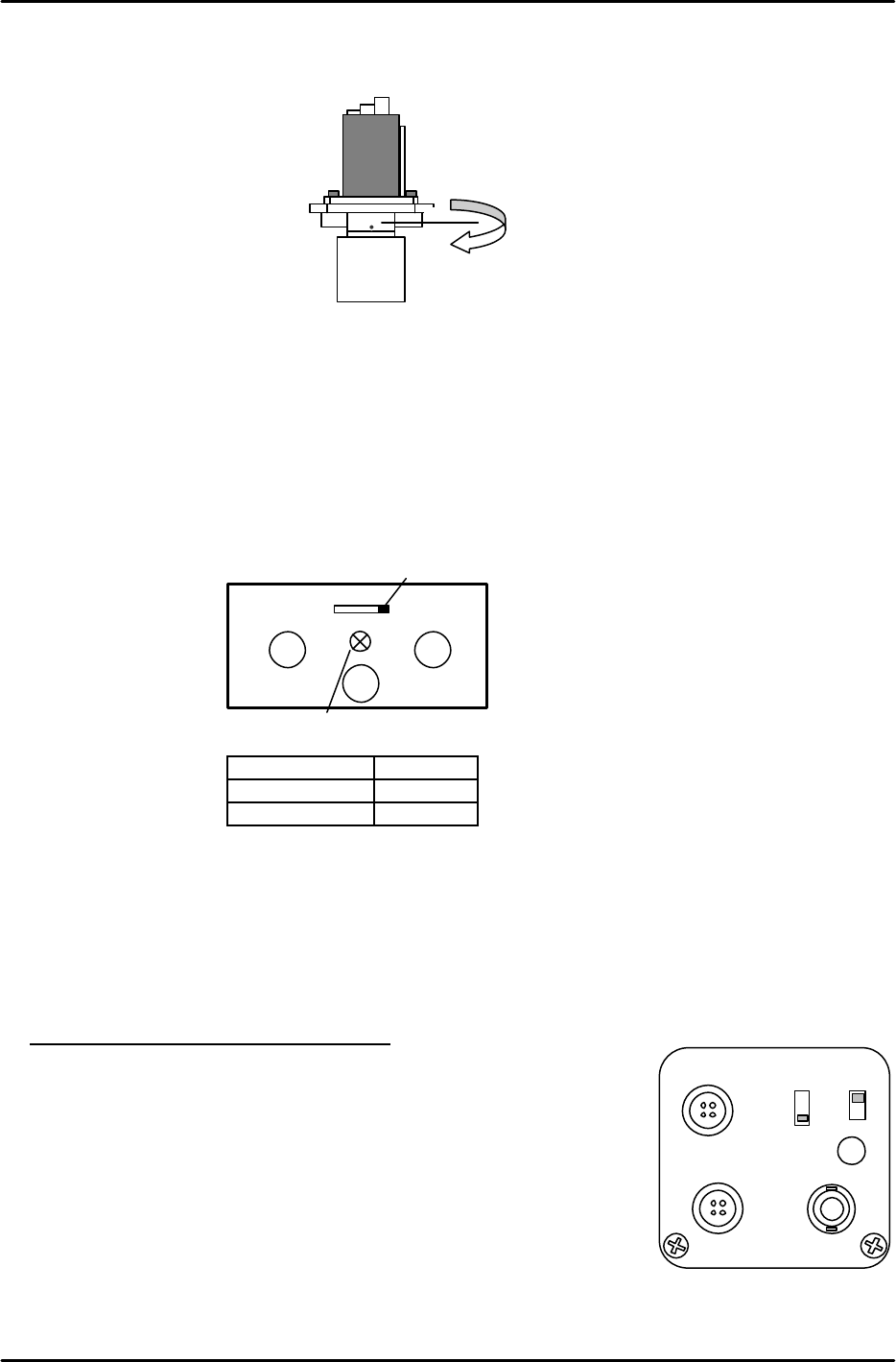
3. Remove the lens assembly by unscrewing it from the CCD module (see figure 3).
7.2 Camera Settings
1. Make the following amplifier and aperture settings prior to returning the cameras to the machine.
These settings are for the standard Wide and Narrow cameras.
Camera Aperture
Wide 4
Narrow 2
2. Where applicable, install the lens assembly to the new CCD module, and then remount the camera
and lens unit to the camera bracket.
3. Install the cameras in the machine.
4. Ensuring that the power supply to the machine is OFF, reconnect the video cables to the cameras.
5. Settings for 0603 Optional Narrow camera:
a. Adjust the set-up of the switch positioned behind the camera.
SELECT switch : 1/30I
GAIN switch : ON
SHUTTER switch : E
Aperture : 2 (Fully open)
b. Set the proper to support 0603.
Machine ID xxxx xxxx xxxx xx1x (x =0 or 1)
Standard narrow camera = 0 0603 camera = 1
c. For the focus, set the 0603 calibration jig. Temporarily adjust the camera height so that the
edge will be clearly seen by the front camera. Focus should be good with 1005R parts.
Manual gain adj. trimmer
GAIN switch
GAIN
A
F
M
LENS
DCIN/SYWC
VIDEO OUT
Top view
Figure 4
DC IN12V
VIDEO
SHUTTER
GAIN
DC IN/SYNC
SELECT
1/30N
1/60N
1/30I
ON
OFF
Figure 5
Figure 3
FK-9F98-05 CP-643E Training Text for Service Engineers
Edition 5.0 Chapter 7. Camera Adjustment [3/10]
Fuji Machine Mfg. Co., Ltd. Okazaki
SMT Equipment Quality Assurance Dept.
Technical Support Div. Section No.2
7-3
7.3 Camera Centering
1. Set a straight 0.7mm nozzle at station 6 and set the cam at 200 degrees.
2. View the raw image of the nozzle using the following commands:
[SET] → [MANUAL] → [VISION] → [ADJUST] → [GET ACQ] → [GET ACQ] → [CHANGE] →
(SELECT CAMERA) → [DSP REAL-IMG]
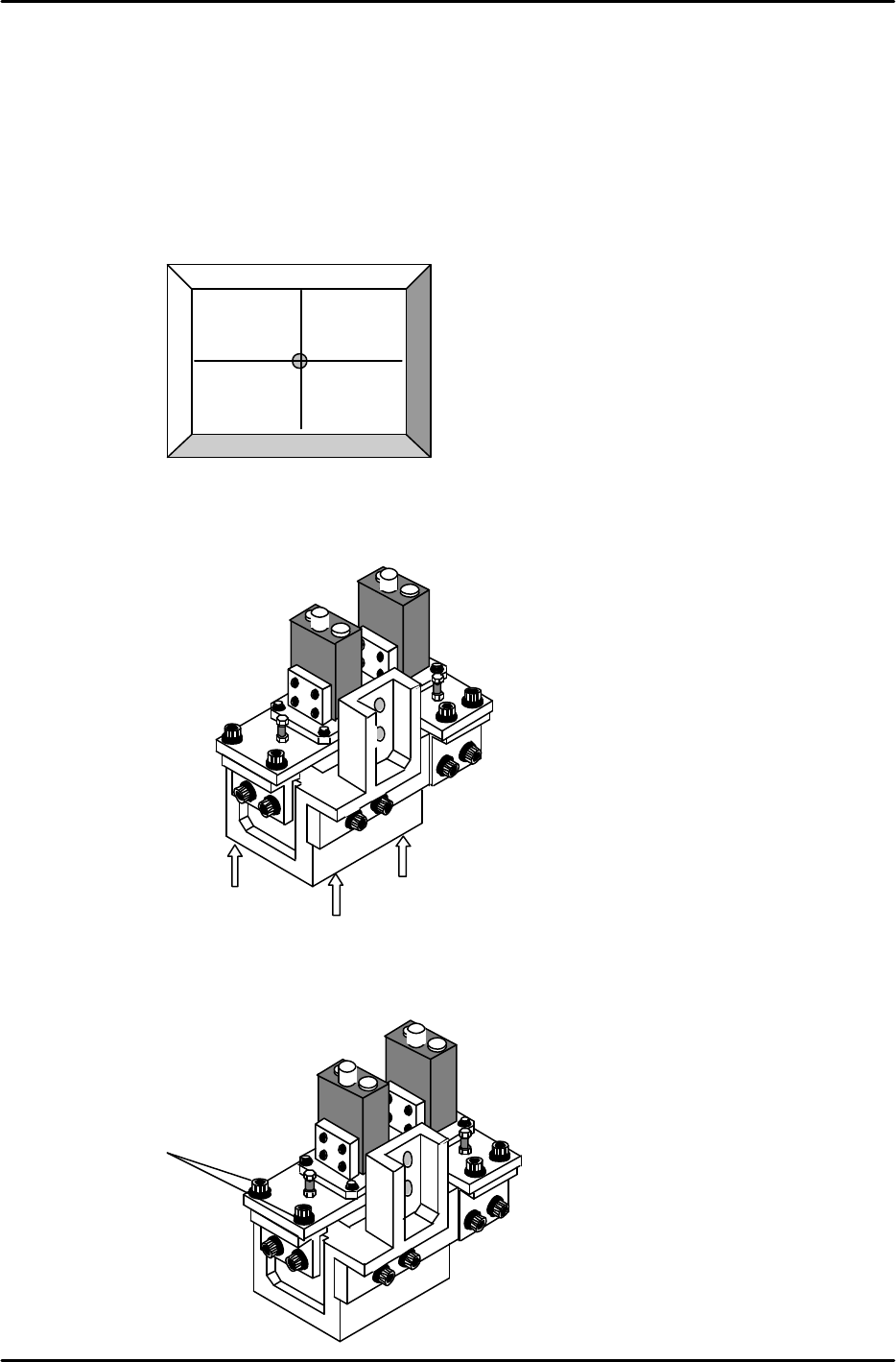
3. The nozzle image and crosshairs will appear on the screen.
4. To align the Wide Camera nozzle image to the crosshairs in the Y-direction, loosen the three bolts
on the underside of the camera assembly and adjust the position of the assembly accordingly (see
figure 7). Once the adjustment is complete tighten the bolts with the required amount of torque
(13Nm).
5. To align the Wide Camera nozzle image to the crosshairs in the X-direction, loosen the X-axis
positioning bolts (Item 1 in figure 8) and adjust the position of the camera accordingly. Once the
adjustment is complete tighten the bolts with the required amount of torque (8 Nm).
Figure 6
Rear View
Figure 7
Rear View
Figure 8
1
13N.m
FK-9F98-05 CP-643E Training Text for Service Engineers
Edition 5.0 Chapter 7. Camera Adjustment [4/10]
Fuji Machine Mfg. Co., Ltd. Okazaki
SMT Equipment Quality Assurance Dept.
Technical Support Div. Section No.2
7-4
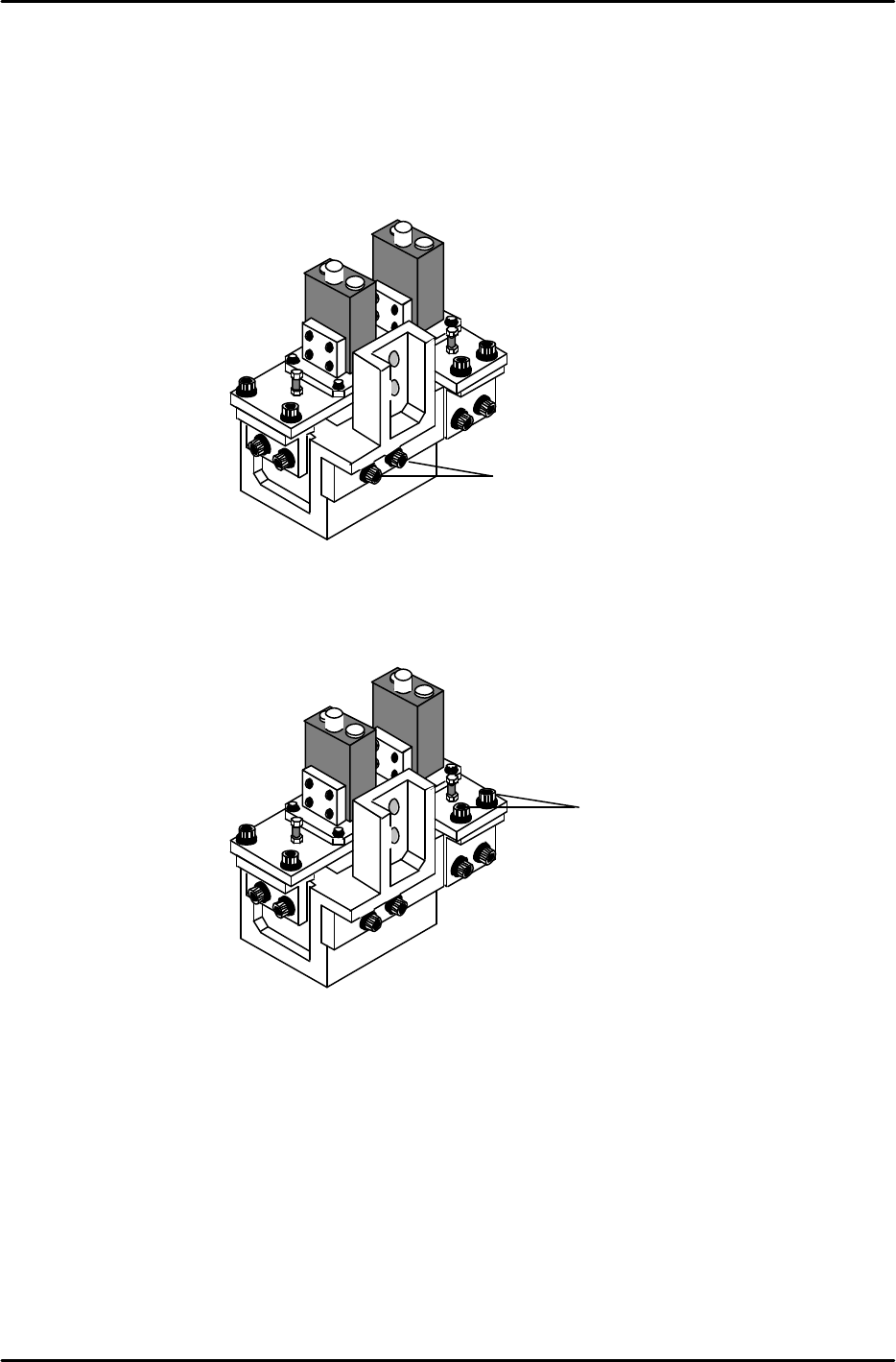
6. As the narrow camera bracket is attached to the wide camera bracket, it is necessary to adjust the
wide camera bracket first when adjusting both cameras. Performing narrow camera adjustments
first will necessitate the adjustment being performed twice.
7. To adjust the narrow camera in the Y-direction, loosen the Y-axis positioning bolts (Item 1 in figure 9)
and adjust the camera position accordingly. Once the adjustment is complete, tighten the bolts with
the required amount of torque (13Nm).
8. To adjust the narrow camera in the X-direction, loosen the X-axis positioning bolts (Item 1 in figure
10) and adjust the camera position accordingly. Once the adjustment is complete tighten the bolts
with the required amount of torque (8Nm).
Rear View
Figure 9
1
Rear View
Figure 10
1