CP643E.pdf - 第53页
FK-9F98-05 CP- 643E Training Text for Service Engineers Edition 5.0 Chapter 4. Station Adjustment [ 8 /18] Fuji Machine Mfg. Co., Ltd. Okazaki SMT Equipment Quality Assurance Dept. Technical Support Div. Section No.2 4- …

FK-9F98-05 CP-643E Training Text for Service Engineers
Edition 5.0 Chapter 4. Station Adjustment [7/18]
Fuji Machine Mfg. Co., Ltd. Okazaki
SMT Equipment Quality Assurance Dept.
Technical Support Div. Section No.2
4-
7
4.6 Station 12 and 15 Clutch Origin Sensor Adjustment
1. Select a nozzle shaft with an average deflection amount. Set the cam angle to 200 degrees at
station 11. Set a dial indicator where the nozzle holder is installed. Align the holder parallel to the
Y-axis. (At this time, the hole in the clutch should be facing outwards)
2. Set the cam angle to 0 degrees. Remove the spring at station 12. (Use something to hold the
lever UP.) Move the aligned nozzle shaft to station 12.
3. Position the fiber sensor to the end of the bracket, and secure with the set screw.
4. At 200 degrees, position the fiber sensor beam in the center of the clutch hole by moving the
mounting bracket right or left.
5. Move the aligned shaft to station 15, (make sure the 13
th
station valve is OFF) and align the top-
bottom and left-right directions in the same manner as with station 12. (It is possible to adjust all
directions at the same time with station 15 since the clutch is not pressed down.)
6. Set the cam back to 0 degrees, reinstall the spring and move the nozzle shaft back to station 12.
Set the cam angle to 200 degrees, and align the fiber sensor appropriately.
7. Set the amplifier under the following two conditions:
1) When the sensor beam is aligned in the clutch hole at station 12 or 15
2) When the sensor beam is out of the clutch hole.
[Setting the amplifier]
1) Set the amplifier mode switch to D-ON
2) Set the mode changing switch to “SET”. ( Digital display shows “1”.)
3) Press the TUNING button when the fiber sensor detects the hole (ON setting)
( Digital display shows “2”.)
4) Press the TUNING button when the fiber sensor does not detect the hole. (OFF setting)
(Digital display shows “9”.)
5) Set the mode changing switch to “RUN”.
6) After set-up, the digital display shows 0 at hole, and 9 in all other cases.
7) Confirm that the sensor does not turn ON where the wrench is set. Check all heads.
8) Confirm each sensor reaction by I/O.
<I/O à Standard I/O à IN>
X052 NOZ ORG ST12
X054 NOZ ORG ST15
FK-9F98-05 CP-643E Training Text for Service Engineers
Edition 5.0 Chapter 4. Station Adjustment [8/18]
Fuji Machine Mfg. Co., Ltd. Okazaki
SMT Equipment Quality Assurance Dept.
Technical Support Div. Section No.2
4-
8
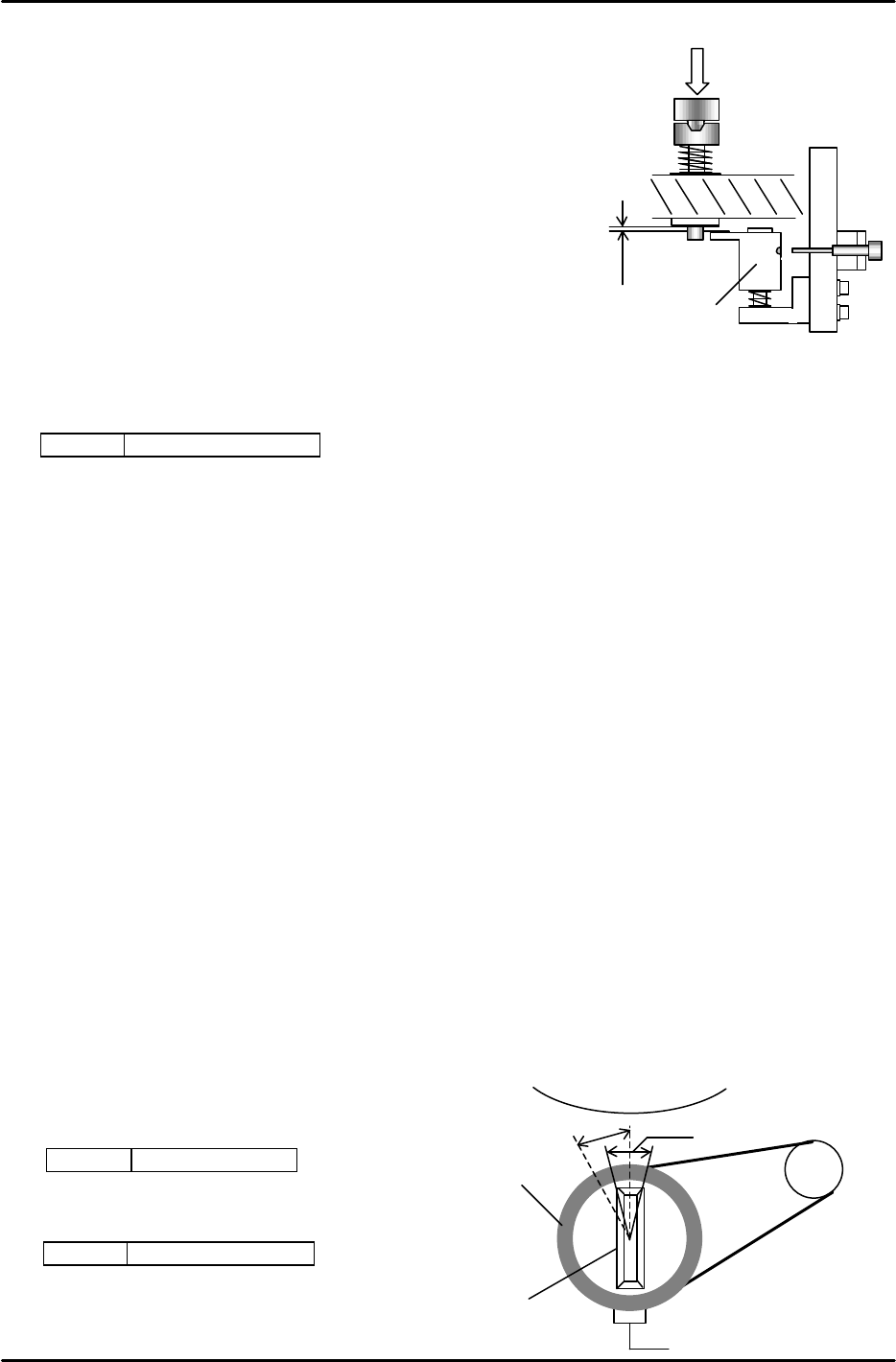
4.7 Station 12 Clutch Engagement Adjustment
1. Use the nozzle shaft with the average deflection value.
Set the cam to 200 degrees. Lower the FRQ clutch and set the
clearance of A to 0.2mm.
2. Align the hole of the dog with the fiber sensor at this position.
(Check the hole position from the top of the dog.)
3. Move the fiber sensor to the end of the bracket, and fix.
4. Set the amplifier to turn OFF when the clutch engages,
and to turn ON when the clutch does not engage and the
dog is pressed down.
5. For sensor amp adjustment, refer to 4.6, [Setting the amplifier]
<I/O à Standard I/O à IN>
X053 NOZ CLUT ST12
4.8 Zero setting the FQ and FRQ axes
(A Zero-signal from the encoder comes ON every 4000 pulses. The encoder has 7200 pulses
per revolution.)
1. Measure the timing belt tension of the FQ and FRQ motors.(Appropriate value : 206 ± 5 Hz)
2. Zero set the FQ axis.
3. Loosen the set-screw of the zero setting dog at the rotor.
4. Set the clearance between the tip of the fiber sensor and the dog (silver area) to 5mm. Then fix
the sensor.
5. For the zero set sensor, normally silver means ON and black means OFF, “L-ON”. However, set
the amplifier to “ D-ON” temporarily. ( Silver = OFF, black = ON ) Turn ON the servo, and zero
set.
6. (Zero set several times. Find position, [1] where the rotor faces around the center of the nozzle
index.)
7. Set the amplifier back to “L-ON”, and fix the dog where the sensor comes ON, silver area. (Fix it
around the center since the ON range is about 300 pulses.)
8. Zero set to confirm that the rotor stops around the center of the nozzle index, [2].
9. Zero set FRQ in the same manner.
<I/O à ETC à Servobrd2 à IN>
SX00E FQ AXIS ZERO
<I/O à Servobrd1 à IN>
SX00A FRQ AXIS ZERO
* For the servo counter; FQ, FRQ proper data,
plus and minus values are acceptable.
A
Dog
“ON” position
Index
[2]
[1]
MotorDog
Rotor
Figure 17
Figure 18

FK-9F98-05 CP-643E Training Text for Service Engineers
Edition 5.0 Chapter 4. Station Adjustment [9/18]
Fuji Machine Mfg. Co., Ltd. Okazaki
SMT Equipment Quality Assurance Dept.
Technical Support Div. Section No.2
4-
9
4.9 FQ, FRQ Origin Calibration
1. Zero set FQ and FRQ.
2. Install the appropriate jig on shaft, A.
3. Set the cam angle to 200 degrees. Align the jig parallel to the X-axis using a dial indicator.
4. Turn the rotor to the position where it engages correctly with the aligned jig.
5. When the jig is aligned with the X-axis, the servo counter represents the origin position.
(Both FQ and FRQ should be within 300 pulses.)
6. FQ data, FRQ data (Calibrate 3 times, use the average value for final data.)
{FQ data} [ ] {FRQ data} [ ]
7. When completed, enter the final origin values for FQ & FRQ at the host computer.
Station 10
Jig
Jig No. 71615WPJ0660
Station 12
Jig
Jig No. 71615WPJ0670