CP643E.pdf - 第51页
FK-9F98-05 CP- 643E Training Text for Service Engineers Edition 5.0 Chapter 4. Station Adjustment [ 6 /18] Fuji Machine Mfg. Co., Ltd. Okazaki SMT Equipment Quality Assurance Dept. Technical Support Div. Section No.2 4- …
FK-9F98-05 CP-643E Training Text for Service Engineers
Edition 5.0 Chapter 4. Station Adjustment [5/18]
Fuji Machine Mfg. Co., Ltd. Okazaki
SMT Equipment Quality Assurance Dept.
Technical Support Div. Section No.2
4-
5
4.5 Mechanical Valve Adjustment at Stations 1 and 11
Raise all spool valves to the upper limit. Calibrate the bottom face using a dial indicator. Identify
the “Low Valve” as the reference. (Previously identified in Chapter 3)
Station 1 Adjustment
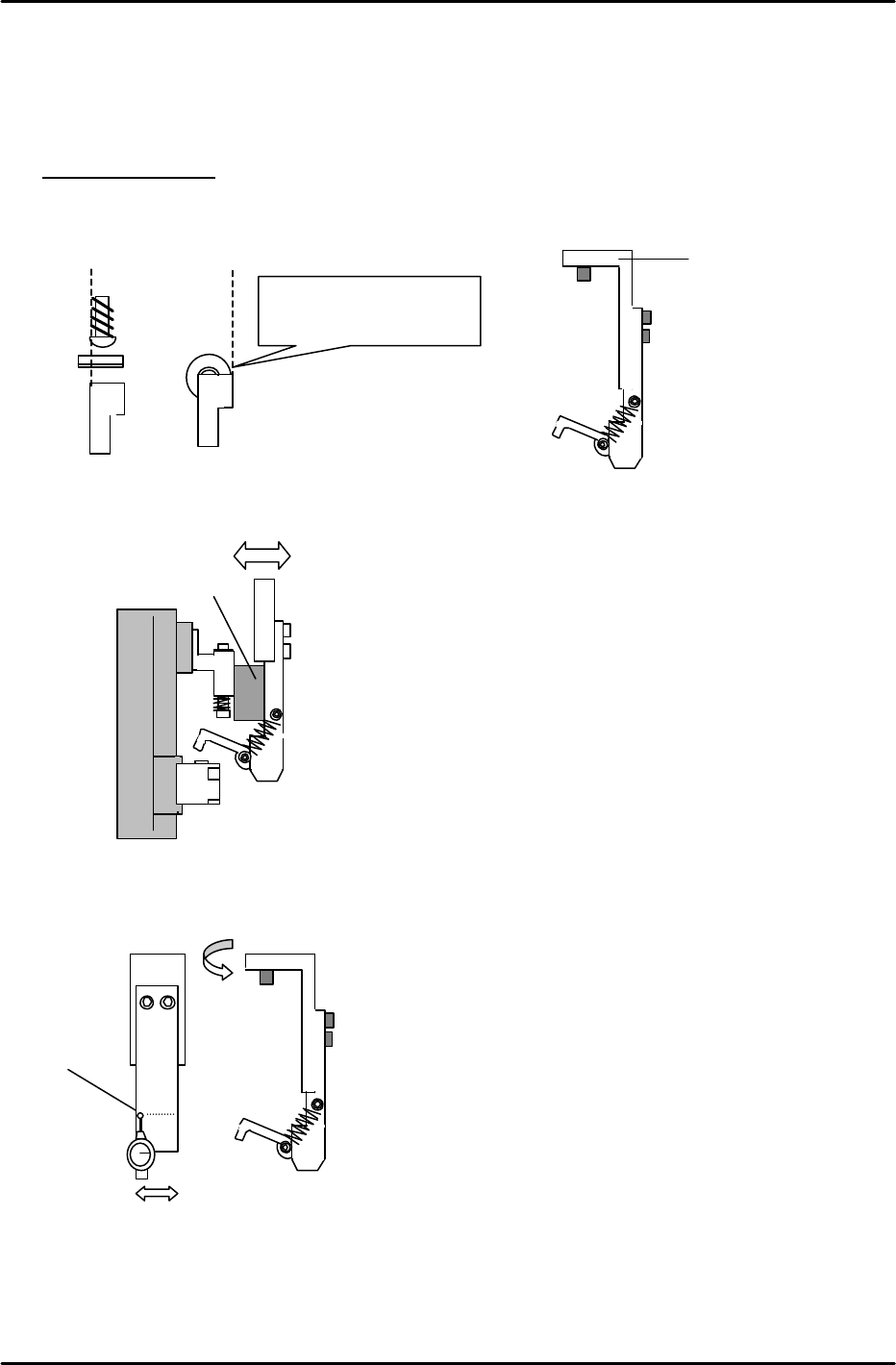
1. Install the “L” bracket at station 1. When installing, ensure the lever and right edge of the spool
valve align as indicated. (Cam at 200 degrees)
2. Set the clearence between the sping pin and “L” bracket to 11mm, by moving the “L” bracket in
or out.
3. Align the “L” bracket parallel to the D-axis using a dial gauge as indicated.
4. After completion, re-check steps 1 to 3 to ensure proper alignment.
1
< 0.1mm
Align the right edge of the
spool valve and lever.
“L” Bracket
11mm spacer jig
Figure 10
Figure 11
Figure 12
Figure 13
FK-9F98-05 CP-643E Training Text for Service Engineers
Edition 5.0 Chapter 4. Station Adjustment [6/18]
Fuji Machine Mfg. Co., Ltd. Okazaki
SMT Equipment Quality Assurance Dept.
Technical Support Div. Section No.2
4-
6
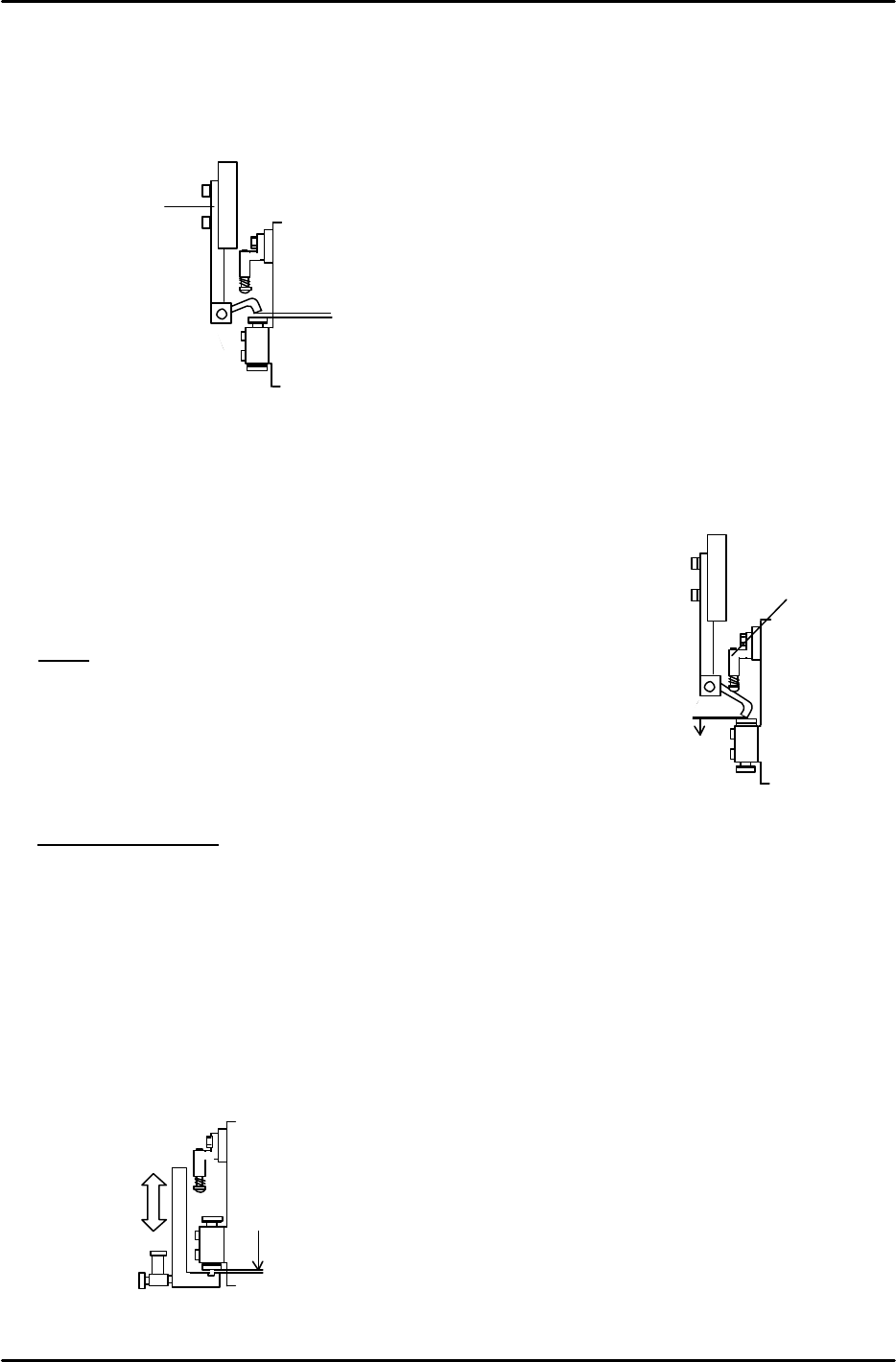
5. Move the “Low Valve” shaft to station 1. Turn OFF the Pick-up Valve. Set the cam angle to
175 degrees. Adjust the clearance between the pushed up spool and lever to 0.7mm by
moving part [A ] vertically.
6. Set the cam angle back to 0 degrees, and turn ON the Pick-up Valve. (Y020)
7. Set the cam angle to 175 degrees. Adjust part, [B] vertically to
set the clearance between the mechanical valve and the lever
at 0 to 0.1mm. (0.07mm best condition) Adjust all other shafts in
the same manner.
NOTE
* Confirm that the spool does not interfere with the lever.
* Do not push the mechanical valve too much.
* Adjust only after completing the pickup height adjustment.
Station 11 Adjustment
1. Move the “Low Valve” shaft to station 11. Set the cam at 0 degrees. Turn ON the Placing
valve. (Y028)
2. Set the cam at 200 degrees and set the clearance between the low valve and bracket at
0.05 to 0.1mm. Align the hole in the lever assembly with the mechanical valve.
3. Confirm that the clearance between the lever and valve is NOT 0 on all shafts
4. Open the speed controller 4.5 revolutions away from the fully closed position.
Place Valve ON
0.05 to 0.1mm
Pick
-
up
Valve
OFF
0.7mm
[A]
Figure 14
Figure 16
Pick-up Valve ON
0 to 0.1mm
Figure 15
[B]

FK-9F98-05 CP-643E Training Text for Service Engineers
Edition 5.0 Chapter 4. Station Adjustment [7/18]
Fuji Machine Mfg. Co., Ltd. Okazaki
SMT Equipment Quality Assurance Dept.
Technical Support Div. Section No.2
4-
7
4.6 Station 12 and 15 Clutch Origin Sensor Adjustment
1. Select a nozzle shaft with an average deflection amount. Set the cam angle to 200 degrees at
station 11. Set a dial indicator where the nozzle holder is installed. Align the holder parallel to the
Y-axis. (At this time, the hole in the clutch should be facing outwards)
2. Set the cam angle to 0 degrees. Remove the spring at station 12. (Use something to hold the
lever UP.) Move the aligned nozzle shaft to station 12.
3. Position the fiber sensor to the end of the bracket, and secure with the set screw.
4. At 200 degrees, position the fiber sensor beam in the center of the clutch hole by moving the
mounting bracket right or left.
5. Move the aligned shaft to station 15, (make sure the 13
th
station valve is OFF) and align the top-
bottom and left-right directions in the same manner as with station 12. (It is possible to adjust all
directions at the same time with station 15 since the clutch is not pressed down.)
6. Set the cam back to 0 degrees, reinstall the spring and move the nozzle shaft back to station 12.
Set the cam angle to 200 degrees, and align the fiber sensor appropriately.
7. Set the amplifier under the following two conditions:
1) When the sensor beam is aligned in the clutch hole at station 12 or 15
2) When the sensor beam is out of the clutch hole.
[Setting the amplifier]
1) Set the amplifier mode switch to D-ON
2) Set the mode changing switch to “SET”. ( Digital display shows “1”.)
3) Press the TUNING button when the fiber sensor detects the hole (ON setting)
( Digital display shows “2”.)
4) Press the TUNING button when the fiber sensor does not detect the hole. (OFF setting)
(Digital display shows “9”.)
5) Set the mode changing switch to “RUN”.
6) After set-up, the digital display shows 0 at hole, and 9 in all other cases.
7) Confirm that the sensor does not turn ON where the wrench is set. Check all heads.
8) Confirm each sensor reaction by I/O.
<I/O à Standard I/O à IN>
X052 NOZ ORG ST12
X054 NOZ ORG ST15