CP643E.pdf - 第81页
FK-9F98-05 CP- 643E Training Text for Service Engineers Edition 5.0 Chapter 5. Loader and Conveyor Adjustment [ 18 / 28 ] Fuji Machine Mfg. Co., Ltd. Okazaki SMT Equipment Quality Assurance Dept. Technical Support Div. S…
FK-9F98-05 CP-643E Training Text for Service Engineers
Edition 5.0 Chapter 5. Loader and Conveyor Adjustment [17/28]
Fuji Machine Mfg. Co., Ltd. Okazaki
SMT Equipment Quality Assurance Dept.
Technical Support Div. Section No.2
5-
17
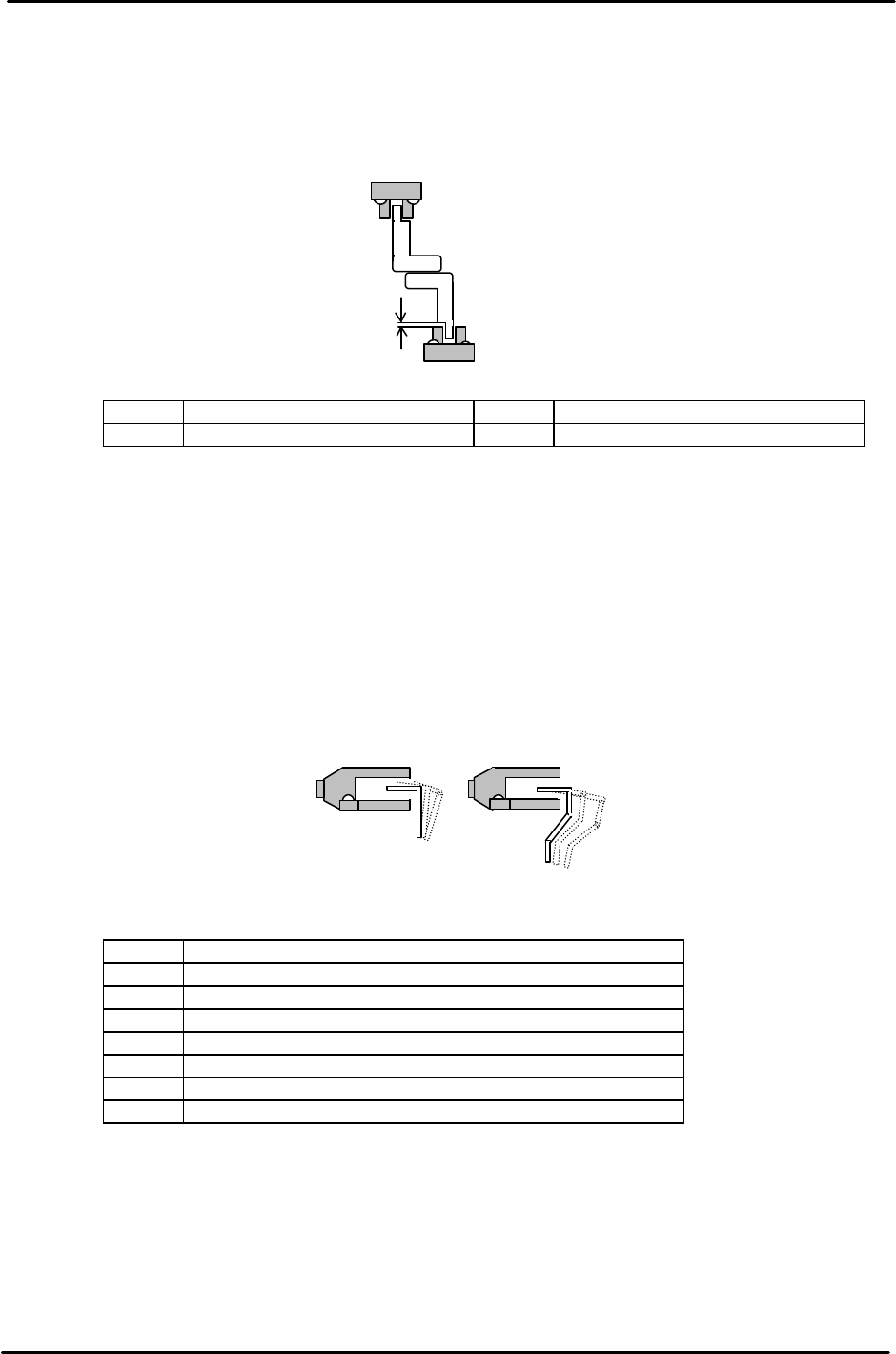
5.18 Advance / Retract End Sensor Adjustment
1. Adjust the Advance and Retract End sensor height so the clearance between the top of the
sensor and dog is 1mm.
2. Align the center of the sensor with the dog in the X and Y directions.
<I/O → Standard → IN>
LX01C In-carrier Forward Limit Check LX03C Out-carrier Forward Limit Check
LX01D In-carrier Retract Limit Check LX03D Out-carrier Retract Limit Check
5.19 Claw Closed-End Sensor Adjustment
1. Close the carrier claws to turn the sensor ON. Move the sensor 1mm toward the ON position
and secure.
2. Align the center of the sensor with the dog in the X- direction.
As for the height, be careful to avoid any interference with the flag and sensor when opening
and closing the carrier claws.
<I/O → Standard → IN>
LX040 In-carrier Retract Limit Clamp Check (Fixed Rail)
LX041 In-carrier Retract Limit Clamp Check (Adjustable Rail)
LX042 In-carrier Forward Limit Clamp Check (Fixed Rail)
LX043 In-carrier Forward Limit Clamp Check (Adjustable Rail)
LX048 Out-carrier Retract Limit Clamp Check (Fixed Rail)
LX049 Out-carrier Retract Limit Clamp Check (Adjustable Rail)
LX04A Out-carrier Forward Limit Clamp Check (Fixed Rail)
LX04B Out-carrier Forward Limit Clamp Check (Adjustable Rail)
1mm
Figure 28
Figure 29
FK-9F98-05 CP-643E Training Text for Service Engineers
Edition 5.0 Chapter 5. Loader and Conveyor Adjustment [18/28]
Fuji Machine Mfg. Co., Ltd. Okazaki
SMT Equipment Quality Assurance Dept.
Technical Support Div. Section No.2
5-
18
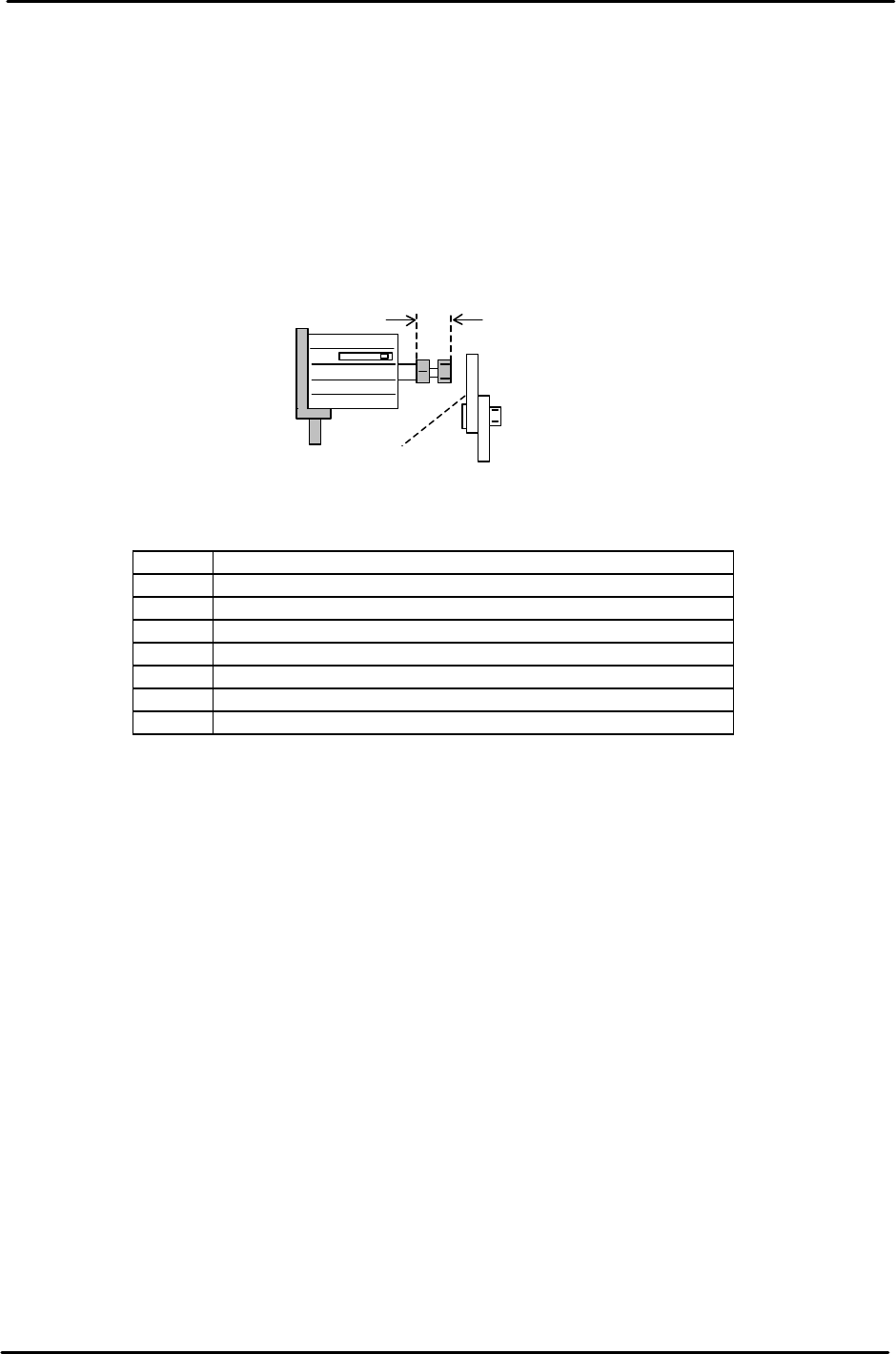
5.20 Claw Open -End Sensor Adjustment
1. Set the carrier at the retract position.
2. Set the length of the cylinder rod to 9mm. (Retract position only)
3. Align the cylinder bolt with the center of the Open-Close lever.
4. Open the carrier claws. Find the edge of the sensor ON position and move the
sensor 0.5mm in the ON direction and secure.
<I/O → Standard → IN>
LX044 In-carrier Retract Limit Unclamp Check (Fixed Rail)
LX045 In-carrier Retract Limit Unclamp Check (Adjustable Rail)
LX046 In-carrier Forward Limit Unclamp Check (Fixed Rail)
LX047 In-carrier Forward Limit Unclamp Check (Adjustable Rail)
LX04C Out-carrier Retract Limit Unclamp Check (Fixed Rail)
LX04D Out-carrier Retract Limit Unclamp Check (Adjustable Rail)
LX04E Out-carrier Forward Limit Unclamp Check (Fixed Rail)
LX04F Out-carrier Forward Limit Unclamp Check (Adjustable Rail)
9mm
Open-close lever
Figure 30
FK-9F98-05 CP-643E Training Text for Service Engineers
Edition 5.0 Chapter 5. Loader and Conveyor Adjustment [19/28]
Fuji Machine Mfg. Co., Ltd. Okazaki
SMT Equipment Quality Assurance Dept.
Technical Support Div. Section No.2
5-
19
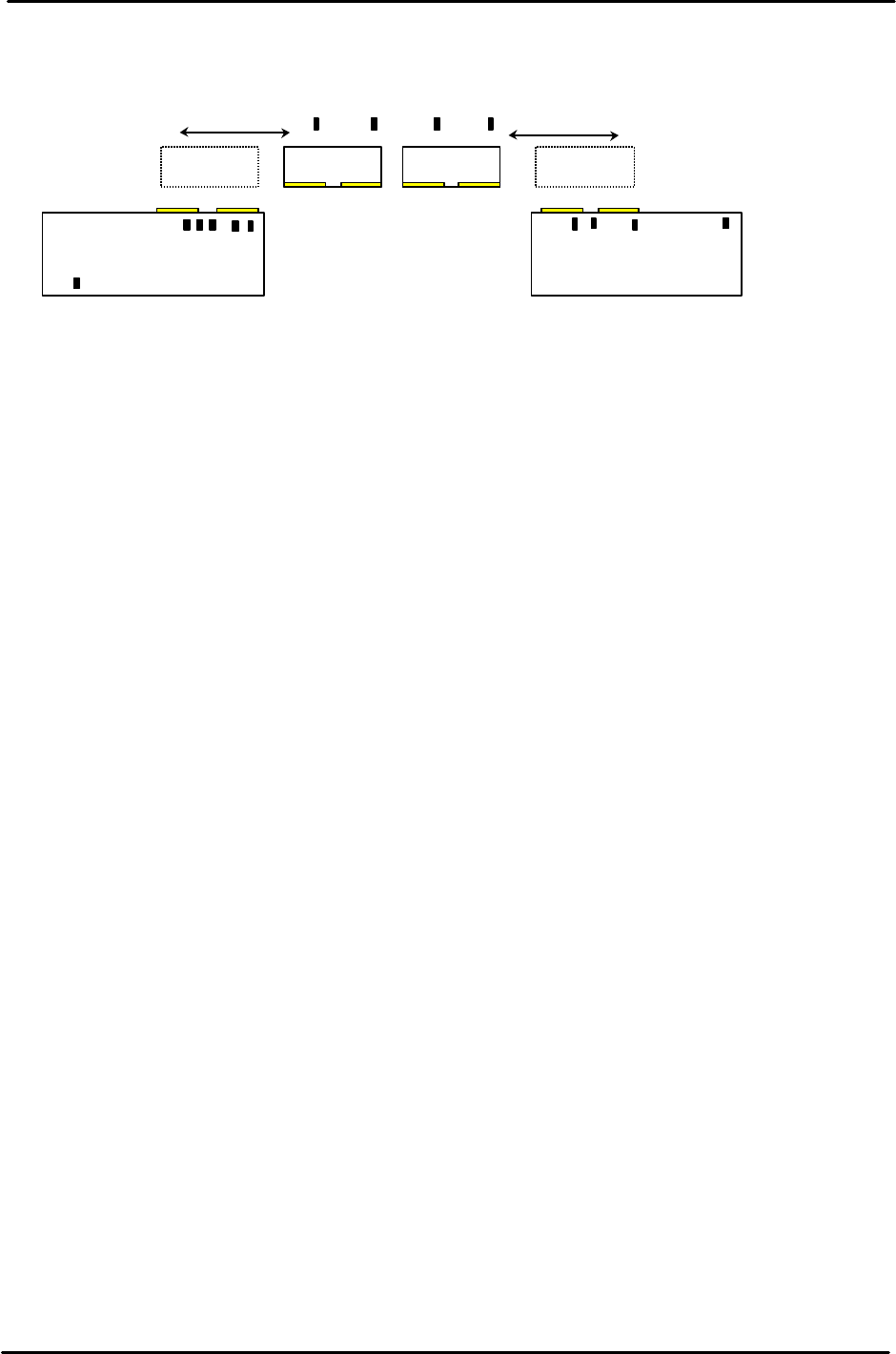
5.21 PCB Check Sensor Arrangement
PCB Check Sensor location and function
1. Prevents boards that are longer than the M/C specification from being processed.
2. IN 2 Speed Reduction Check Sensor
2nd PCB speed reduction
3. IN 2 Arrival Check Sensor
2nd PCB IN Conveyor arrival check.
4. IN PCB Clearance Check Sensor
Checks the clearance between the 1st and 2nd PCB’s.
5. IN 1 Speed Reduction Check Sensor
1st PCB speed reduction
6. IN 1 Arrival Check Sensor
1st PCB IN Conveyor arrival check.
7. IN Carrier 2 Detection Check Sensor
Detects the 2nd PCB on the IN carrier when the IN carrier arrives at the forward end.
8. IN Carrier 1 Detection Check Sensor
Detects the 1st PCB on the IN carrier when the IN carrier arrives at the forward end.
9. OUT Carrier 2 Detection Check Sensor
Detects the 2nd PCB on the OUT carrier when the OUT carrier arrives at the forward end.
10. OUT Carrier 1 Detection Check Sensor
Detects the 1st PCB on the OUT carrier when the OUT carrier arrives at the forward end.
11. OUT 2 Arrival Check
Detects when the 2nd PCB arrives at the OUT conveyor.
12. OUT PCB Clearance Check Sensor
Checks the clearance between the 1st and 2nd PCB’s.
13. OUT 1 Arrival Check Sensor
Checks when the 1st PCB arrives at the OUT Conveyor.
14. Out Conveyor Arrival check Sensor
Checks for PCB’s on the out conveyor. (ready to move to next stage)
IN Conveyor
IN Carrier OUT Carrier
OUT Conveyor
1
2
3
4
5
6
7
8
9
13
10
11
12
14
PCB confirmation Sensors (Front view)
Figure 31