CP643E.pdf - 第79页
FK-9F98-05 CP- 643E Training Text for Service Engineers Edition 5.0 Chapter 5. Loader and Conveyor Adjustment [ 16 / 28 ] Fuji Machine Mfg. Co., Ltd. Okazaki SMT Equipment Quality Assurance Dept. Technical Support Div. S…
FK-9F98-05 CP-643E Training Text for Service Engineers
Edition 5.0 Chapter 5. Loader and Conveyor Adjustment [15/28]
Fuji Machine Mfg. Co., Ltd. Okazaki
SMT Equipment Quality Assurance Dept.
Technical Support Div. Section No.2
5-
15
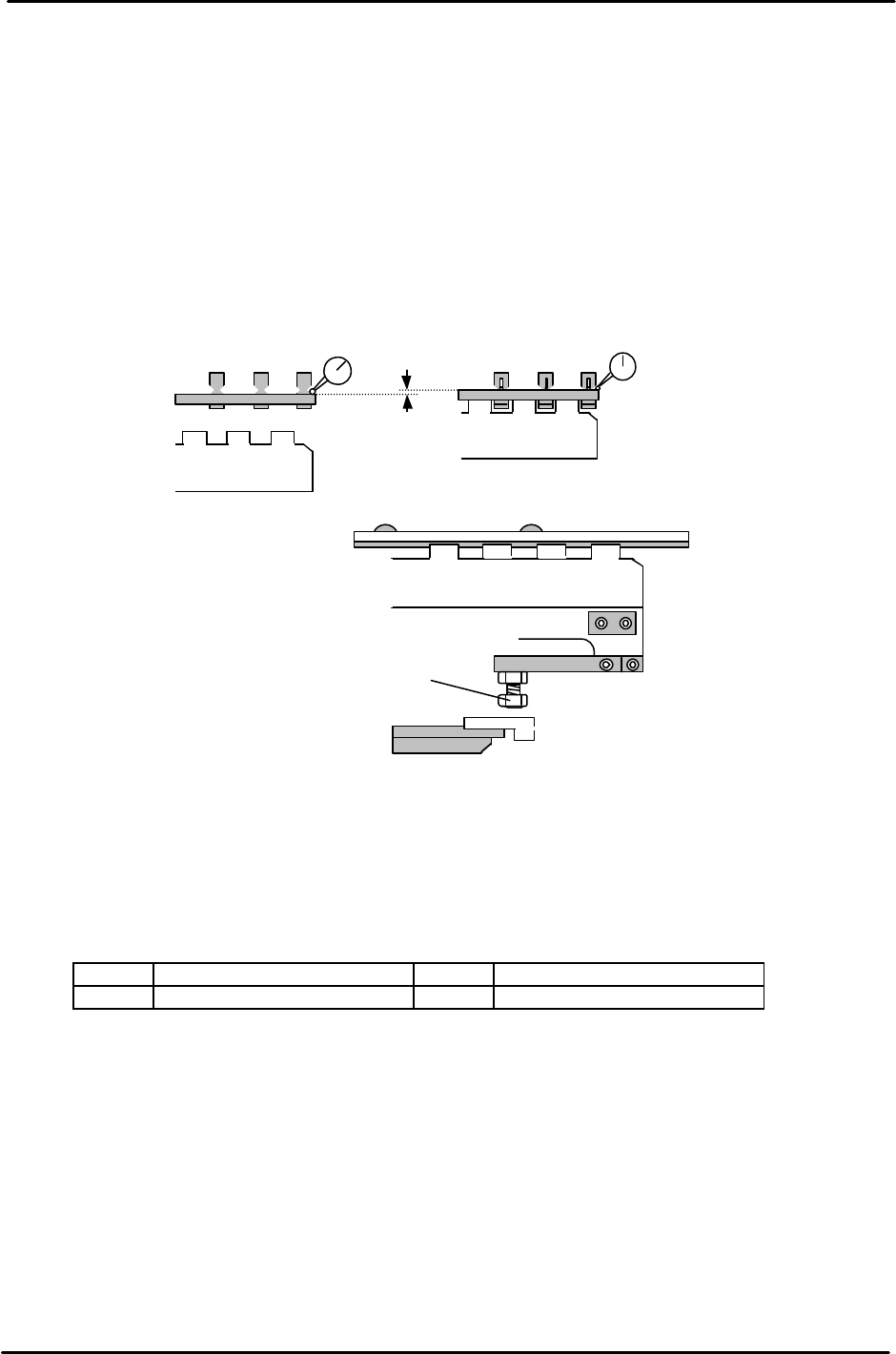
4. To set the lifter height, place a board on the In conveyor, open the carrier claws, raise the lifter,
close the carrier claws and lower the lifter. (The Pcb is now held by the carrier)
5. Raise the lifter when the carrier claw clamps the board.
6. Set a dial gauge on the board as illustrated (two gauges are recommended) Since the dial gauge
cannot normally read 1.2mm, use a 1mm feeler gauge when setting up the dial gauge before
raising the lifter. (Set 1 end first, then the other)
7. When the lifter is raised, the dial gauge should read 0.2 +/-0.1mm. If out of tolerance, adjust the
four bolts as indicated.
8. After adjustment, the lifter should raise the PCB off the carrier claws by 1.2mm.
.
9. For the lifter cylinder sensors, turn both the up and down end sensors ON first. Set the sensors
at a position 0.5mm further in towards the ON position.
10. Check sensor reaction in I/O
<I/O → Standard → IN>
LX01E In-Lifter Upper limit Check LX03E Out-Lifter Upper Limit Check
LX01F In-Lifter Lower Limit Check LX03F Out-Lifter Lower Limit Check
Upper end adjustment bolt (x 4)
Figure 26
1.20mm
<Lifter
Down
>
<Lifter Up>
0 (using 1mm feeler gauge)
0.2 +/- 0.1 (when lifter is raised)
Figure 25
FK-9F98-05 CP-643E Training Text for Service Engineers
Edition 5.0 Chapter 5. Loader and Conveyor Adjustment [16/28]
Fuji Machine Mfg. Co., Ltd. Okazaki
SMT Equipment Quality Assurance Dept.
Technical Support Div. Section No.2
5-
16
5.17 Loader System Sensor Positions
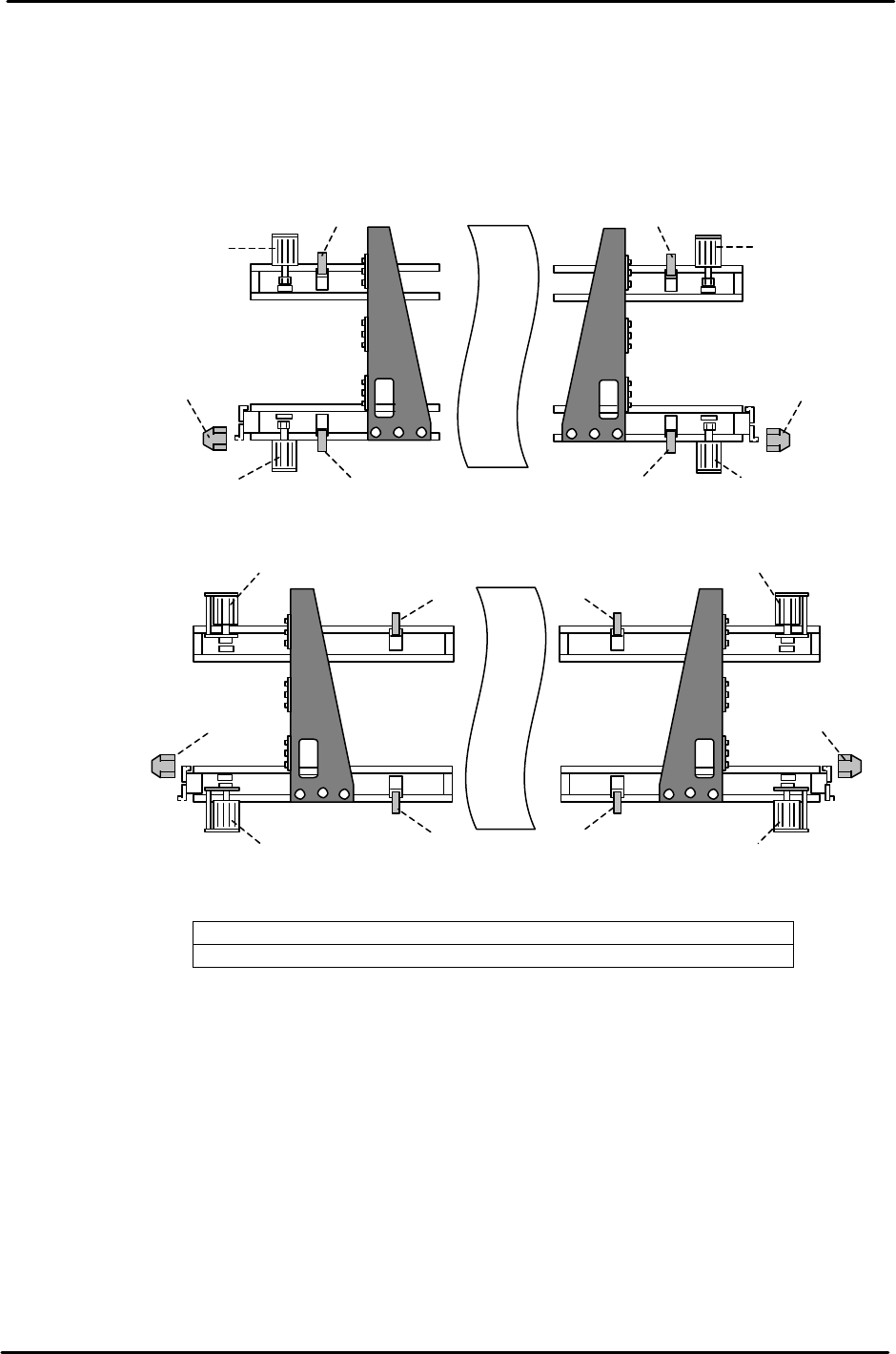
1. Refer to Fig. 27 for sensor locations along the loader system.
<Carrier Sensors>
1. Carrier retract end sensor 3.Carrier claw close- end sensor
2. Carrier claw open-end sensor 4. Carrier advance end sensor
<IN Carrier>
<OUT Carrier>
1
2 3
2
3
1
2
2
3
3
<Carrier at advance position>
2
2
2
2
3
3
3
3
4
4
<Carrier at retract position>
Figure 27
FK-9F98-05 CP-643E Training Text for Service Engineers
Edition 5.0 Chapter 5. Loader and Conveyor Adjustment [17/28]
Fuji Machine Mfg. Co., Ltd. Okazaki
SMT Equipment Quality Assurance Dept.
Technical Support Div. Section No.2
5-
17
5.18 Advance / Retract End Sensor Adjustment
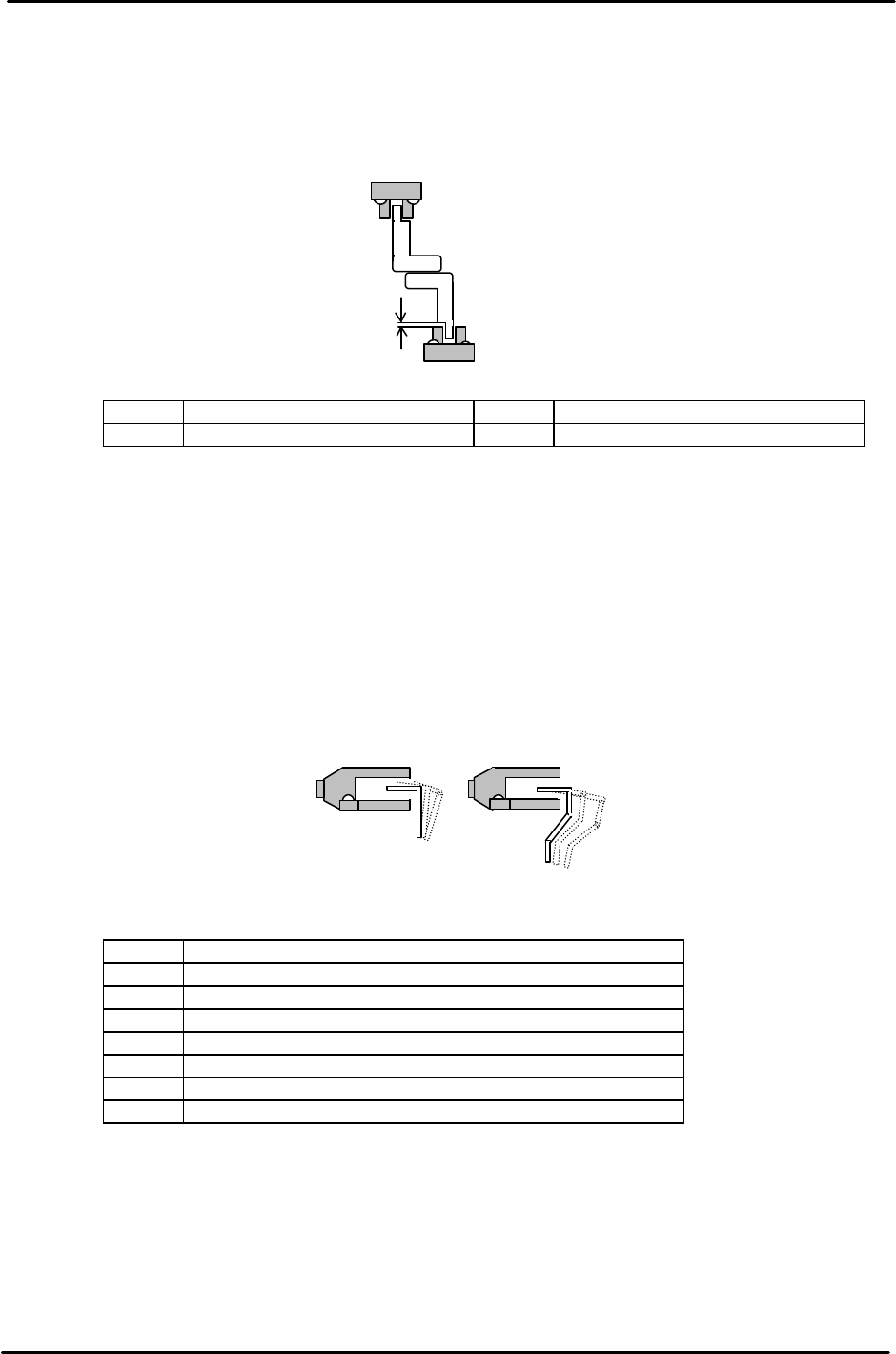
1. Adjust the Advance and Retract End sensor height so the clearance between the top of the
sensor and dog is 1mm.
2. Align the center of the sensor with the dog in the X and Y directions.
<I/O → Standard → IN>
LX01C In-carrier Forward Limit Check LX03C Out-carrier Forward Limit Check
LX01D In-carrier Retract Limit Check LX03D Out-carrier Retract Limit Check
5.19 Claw Closed-End Sensor Adjustment
1. Close the carrier claws to turn the sensor ON. Move the sensor 1mm toward the ON position
and secure.
2. Align the center of the sensor with the dog in the X- direction.
As for the height, be careful to avoid any interference with the flag and sensor when opening
and closing the carrier claws.
<I/O → Standard → IN>
LX040 In-carrier Retract Limit Clamp Check (Fixed Rail)
LX041 In-carrier Retract Limit Clamp Check (Adjustable Rail)
LX042 In-carrier Forward Limit Clamp Check (Fixed Rail)
LX043 In-carrier Forward Limit Clamp Check (Adjustable Rail)
LX048 Out-carrier Retract Limit Clamp Check (Fixed Rail)
LX049 Out-carrier Retract Limit Clamp Check (Adjustable Rail)
LX04A Out-carrier Forward Limit Clamp Check (Fixed Rail)
LX04B Out-carrier Forward Limit Clamp Check (Adjustable Rail)
1mm
Figure 28
Figure 29