cp45ref.pdf - 第144页
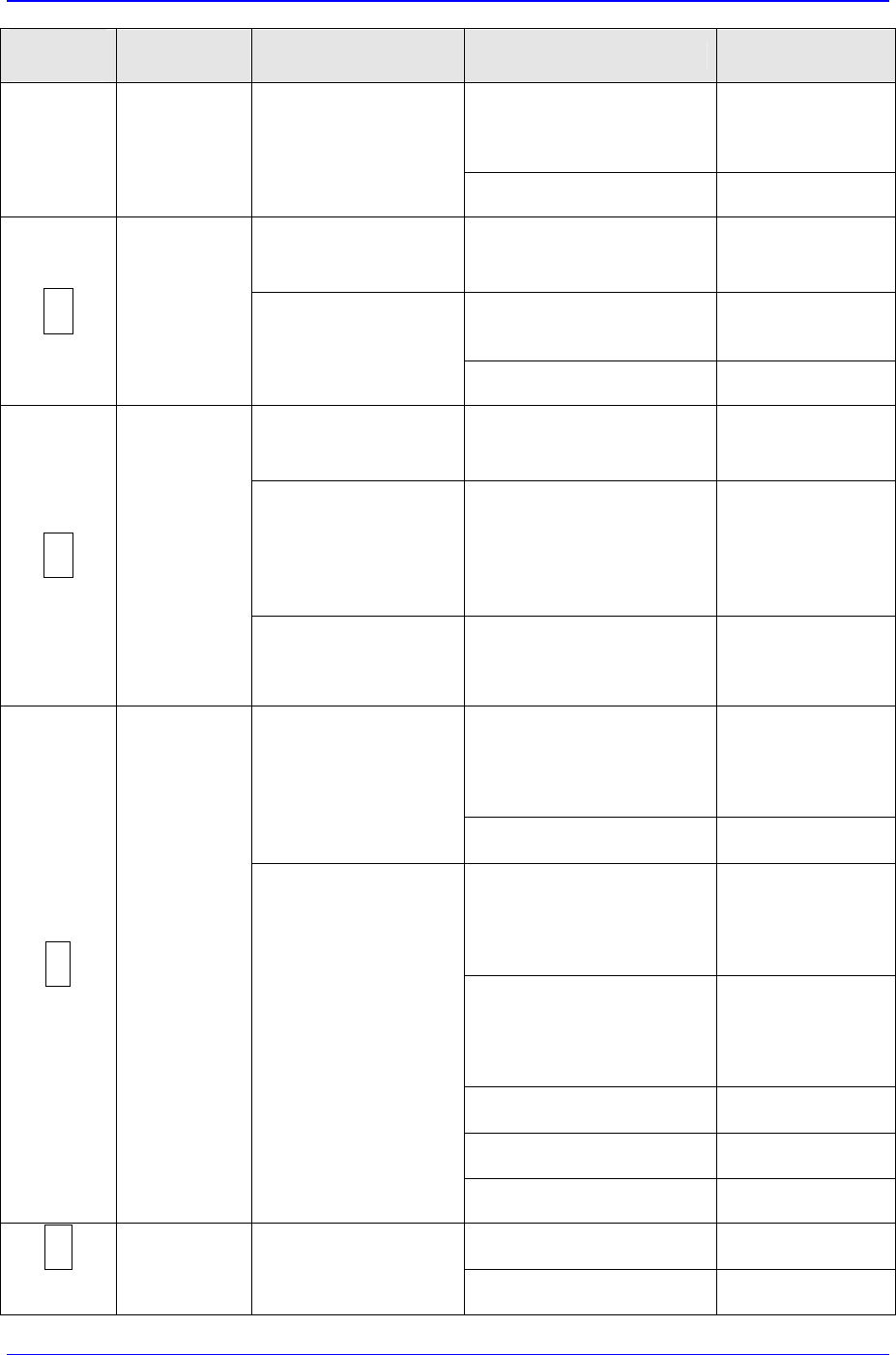
Samsung Component Placer CP-45F(V)/FS Refer ence Manual 3-18 7-segment LED Alarm Name Operating St atus Problem Solution y Faulty external thermal. y Replace the thermal. y Faulty PC board. y Low 5V power . y Replace the…
Hardware Troubleshooting
3-17
7-segment
LED
Alarm Name Operating Status Problem Solution
y Too large input power
variation.
y Lower the
supply voltage
below the
specification.
Comes on while the
motor is in operation.
y Faulty PC board.
y Replace the
Servo Amplifier.
Comes on only by
turning on the control
power.
y Faulty PC board.
y Replace the
Servo Amplifier.
y The 3-phase power
supply has a phase
missing.
y Normalize the
power supply.
A
Main power
supply phase
missing.
Comes on after the
main power is turned
on.
y Insufficient tightening of
input terminal.
y Correct the
wiring.
Comes on after the
control power is
turned on.
y Faulty PC board.
y Replace the
Servo Amplifier.
Comes on with Servo
ON.
y The motor oscillates
(vibrates).
y Perform servo
tuning.
y Replace the
Servo Amplifier.
y Replace the
motor.
C
Velocity
control error.
Comes on when a
velocity command is
entered.
y Improper wiring or
damage to the motor.
y Improper wiring or
damage.
y Correct the
wiring
y A command pulse is
input.
y Stop inputting a
command pulse
and enter
"deviation
clear".
Comes on after the
control power is
turned on
y Faulty PC board.
y Replace the
Servo Amplifier.
y Maximum deviation
value setting is too low.
y Review the
over-deviation
value or
position loop
gain.
y The load inertia is too
large.
y Review the
inertia
calculated in
terms of the
motor shaft.
y The motor is locked.
y Unlock the
motor.
y Improper wiring of the
encoder signals.
y Correct the
wiring.
d
Over-
deviation
Comes on during
operation.
y Command pulse
frequency is too high .
y Lower the
frequency.
y Faulty PC board.
y Replace the
Servo Amplifier.
E
External
over-heating.
Comes on after
turning on the control
power.
y The H1 and H2
terminals are open.
y Correct the
wiring.
Samsung Component Placer CP-45F(V)/FS Reference Manual
3-18
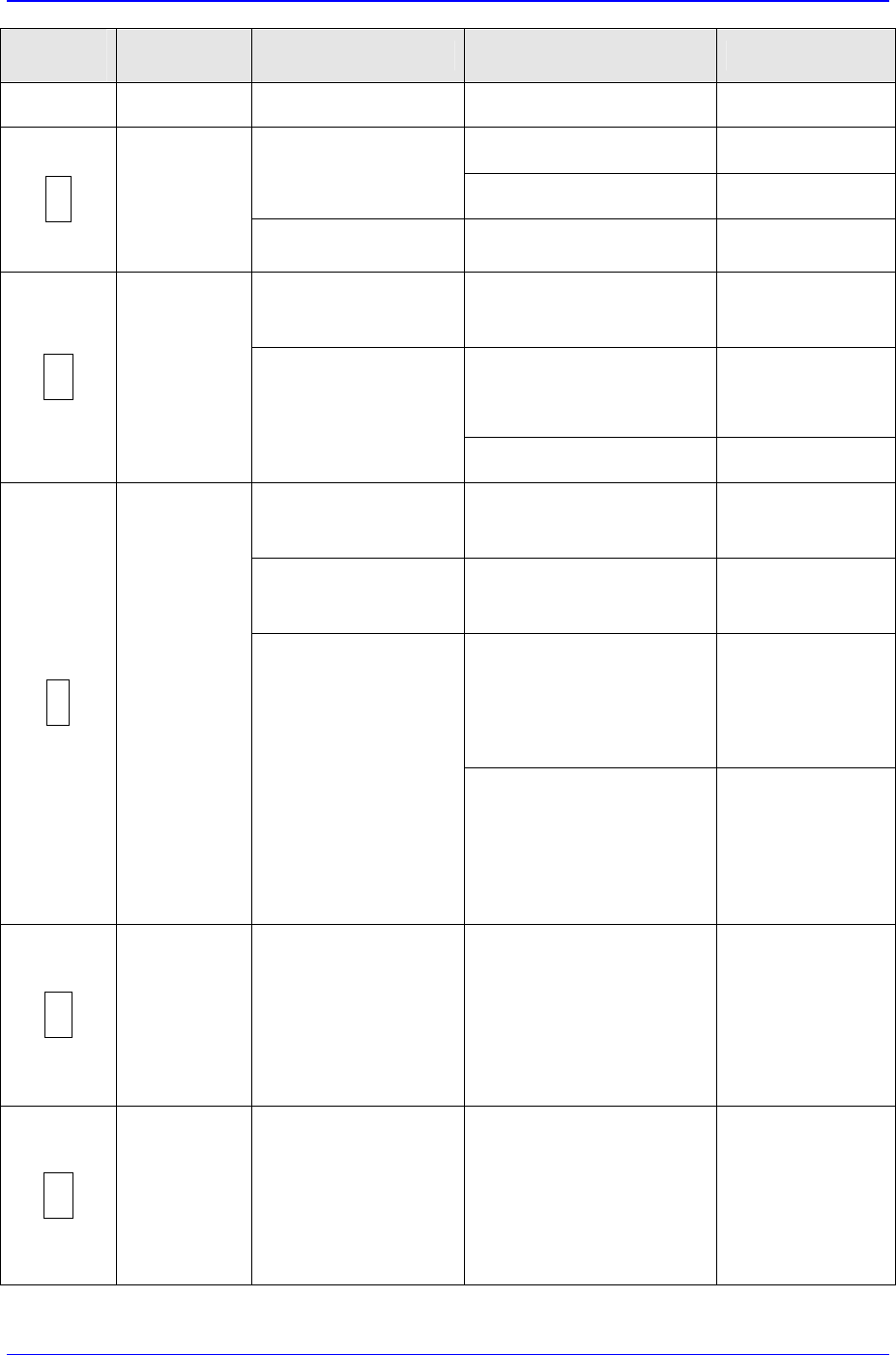
7-segment
LED
Alarm Name Operating Status Problem Solution
y Faulty external thermal.
y Replace the
thermal.
y Faulty PC board.
y Low 5V power.
y Replace the
Servo Amplifier.
Comes on after the
control power is
turned on.
y Faulty servo processor.
y Replace the
Servo Amplifier.
F
Servo
processor
error
Comes on during
operation.
y Faulty servo processor.
y Low 5V power.
y Replace the
Servo Amplifier.
Comes on after the
control power is
turned on.
y Faulty PC board.
y Faulty thermal.
y Replace the
Servo Amplifier.
y Large regenerative
power.
y Install an
external
regenerative
resistor.
H
Over-heating
of internal
regenerative
resistor and
DB resistor.
Comes on during
operation.
y Faulty thermal.
y Replace the
Servo Amplifier.
Comes on with the
control power ON
status.
y Faulty PC board.
y Replace the
Servo Amplifier.
Comes on when the
main power is turned
on.
y Faulty regenerative
transistor.
y Replace the
Servo Amplifier.
y The regenerative
capacity is exceeded.
y Parameter error.
y Install an
external
regenerative
resistor.
y Review the
parameter.
J
Regenerative
error
Comes on during
operation.
y The load inertia is too
large.
y Reduce the
load inertia
below the
specification.
y Increase the
deceleration
time.
P
Memory error
Comes on after the
control power is
turned on.
y Faulty PC board.
y Improper motor
combination.
y Memory IC error.
y Replace the
Servo Amplifier.
y Set the
Servomotor
code again.→
Turn power off
once, then on
again.
U
Absolute
encoder
battery alarm
Comes on after the
control power is
turned on.
y Unstable absolute
encoder counter (multi-
revolution) resulting
from a low battery, low
battery status continued
for 20 hours or more, or
disconnection/no
conduction.
y Replace the
battery.→Enter
the ECLR
signal for at
least 4
seconds.
Hardware Troubleshooting
3-19
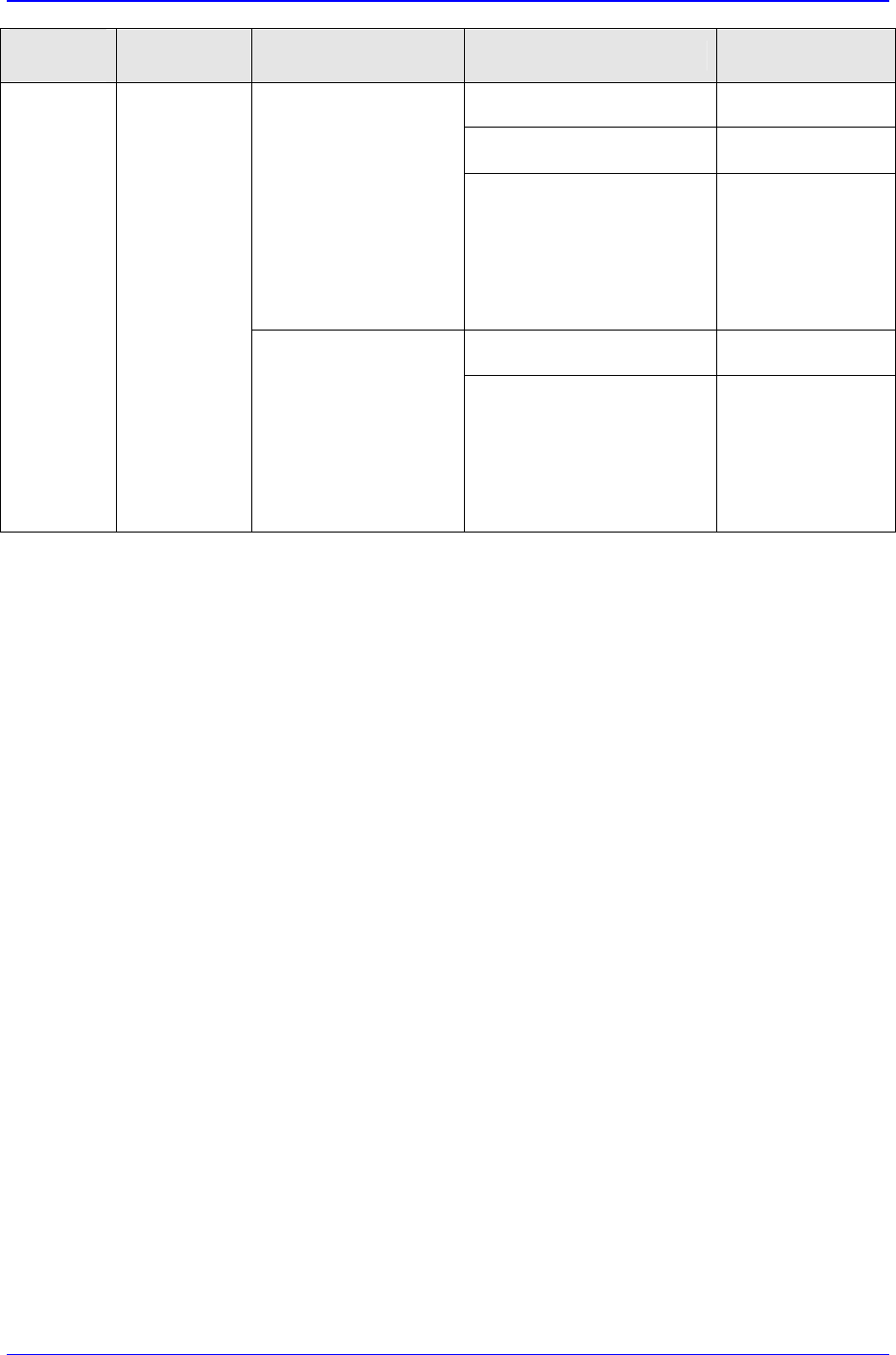
7-segment
LED
Alarm Name Operating Status Problem Solution
y Low 5V power
y Replace the
Servo Amplifier
y Faulty PC board.
y Replace the
Servo Amplifier
Remains off after the
control power has
been turned on
y CPU error
y Turn the control
power off once,
then on again.
If the error
recurs, replace
the Servo
Amplifier.
y Low 5V power
y Replace the
Servo Amplifier
No light CPU error
Comes off during
operation
y CPU error
y Turn the control
power off once,
then on again.
If the error
recurs, replace
the Servo
Amplifier.