UV-9+Cure+Module+7269348_B+Manual.pdf - 第33页
2.10.1 Emergency Shutdown Situations As a minimum, activate the E- Stop in the following situations: • If anyone is in im media te danger of be ing injured by moving pa rts, UV ra diation, or ele ctrical shock. • If valu…
2.10 Emergency Shutdown
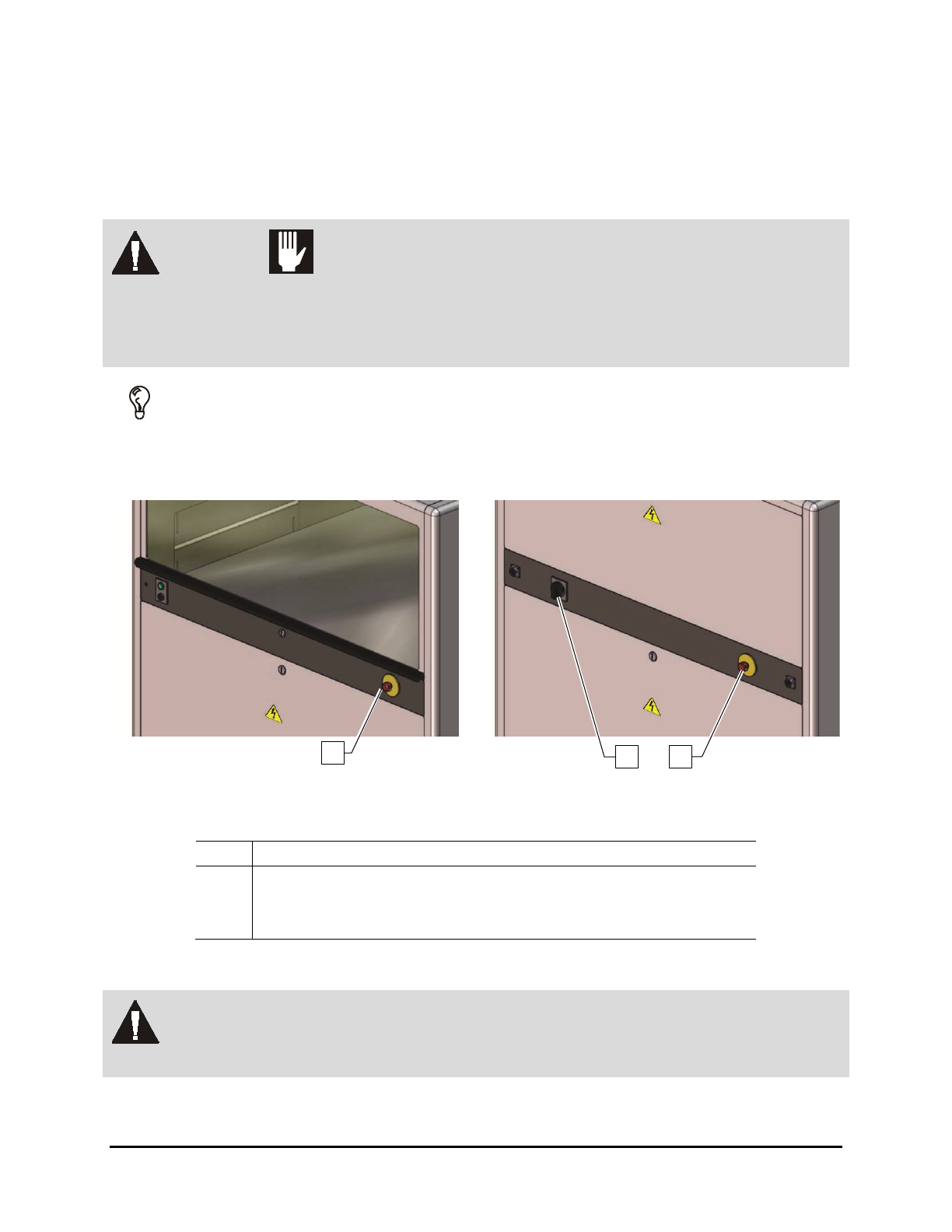
In the event of an emergency or malfunction, press the E-Stop button. The UV-9 Cure Module has two E-
Stop buttons. The E-Stop buttons are the large red buttons located on the operator’s front control panel
and one at the rear of the oven (Figure 2-5). Activating the E-Stop immediately halts conveyor movement
and turns off the UV lamp.
WARNING! CAUTION!
The E-Stop buttons do not cut power to the equipment. Do not restart the
equipment until the condition that caused the emergency shutdown has been
corrected. Failure to comply could cause serious injury to the user and/or serious
damage to the oven.
TIP If the operator or technician is unable to reach the E-Stop button, the Main Circuit
Breaker (Figure 2-5), which is located on the back of the system, can be used for
emergency shutdown.
Front Panel
Rear View
Item
Description
1 Front E-Stop Button
2 Main Power Switch
3 Rear E-Stop Button
Figure 2-5 EMO/Main Circuit Breaker Locations
WARNING! In an emergency, failure to completely shut down power to the cure module with
the E-Stop can cause serious injury to the user and/or damage to the cure module.
2
3
1
2-12 Safety

2.10.1 Emergency Shutdown Situations
As a minimum, activate the E-Stop in the following situations:
• If anyone is in immediate danger of being injured by moving parts, UV radiation, or electrical
shock.
• If valuable UV-9 Cure Module components or the workpieces are in danger of
being damaged.
2.10.2 Emergency Shutdown Recovery
WARNING! CAUTION!
Do not restart the curing operation until the condition causing the emergency
shutdown has been corrected. Failure to comply could cause serious injury to the
user and damage to the cure module.
NOTE If the Main Circuit Breaker has been tripped, you will need to restart the dispensing
system. Refer to 5.4 System Startup for instructions.
To recover after an emergency shutdown:
1. Clear the conveyor of all workpieces.
2. Lock out/tag out all system power. See 2.12 Lockout/Tagout of Electrical Energy for
specific details.
3. Locate and remedy the cause of the emergency shutdown. See Section 7 – Troubleshooting
for more details.
4. Reset the Main Circuit Breaker inside the electronics enclosure if it has been tripped.
5. Turn the red E-Stop button clockwise until it pops back into position.
6. Remove all warning tags and locking devices.
7. Restart the UV-9 Cure Module. Refer to 5.4 System Startup for instructions.
2.11 Service Shutdown
Before performing any service or parts replacement, the cure module should be shut down as follows:
1. Shutdown the cure module as described in 5.6 System Shutdown.
2. Perform a “Lockout/Tagout of Electrical Energy” as described below.
Safety 2-13
2.12 Lockout/Tagout of Electrical Energy
UV-9 Cure Module electrical components have been designed in accordance with industry-wide safety
standards. However, precautions must still be taken whenever personnel may be exposed to the
unexpected power-up of the equipment or release of hazardous electrical, ultraviolet energy.
WARNING! All personnel working on or near the UV-9 Cure Module should know the location
of all electrical power supply sources.
WARNING! CAUTION!
Lock out and tag out electrical power before performing service or maintenance
work on the UV-9 Cure Module. Failure to do so could cause serious injury to the
user and/or serious damage to the cure module.
To lock out/tag out AC power:
1. Turn the Main Power Switch located on the rear of the equipment to the
OFF (0) position.
2. Unplug the main power cable from the facility source and lock it in a locked box for safety.
2.13 Integrated Safety Systems
The UV-9 Cure Module has built-in safety systems that automatically protect personnel from being
injured by the UV radiation and movement of the conveyor. This system consists of the following:
• Hood Interlock
• Low Voltage Indicator Light
• Light Beacon
2.13.1 Hood Interlock
The hood interlock sensor detects the hood status (open or closed). It prevents the UV-9 Cure Module
from starting if the hood is open and automatically stops the curing process if it is opened during
operation. A key is required to open the hood. A safety relay shuts down the UV lamp and the conveyor.
The lamp will remain hot for several minutes.
CAUTION! If the hood is opened while the lamp is on, wait several minutes for the lamp to
cool down before restarting the oven.
To recover from a shutdown triggered by the Hood Interlock:
1. Wait several minutes to allow the UV lamp to cool down.
2. Close all access panels and the hood.
2-14 Safety