UV-9+Cure+Module+7269348_B+Manual.pdf - 第81页
5.7.4.2 Language Screen To select a new display language: 1. Login with your ID . 2. Select My Ov en and then Language . The Main Menu ope ns ( Figure 5- 19 ). Figure 5- 19 Main Menu – Language Change 3. Select the app…

5-18 Operation
Adding, Modifying or Deleting a User
To create a new user ID:
1. Login with a Admin level ID. Default password is: AD1.
2. Select
My Oven and then Password.
The Password screen opens (Figure 5-18).
3. Double click the last cell in the “user” column. The background of the cell becomes white.
4. Enter the name of the operator or engineer (3 characters minimum).
5. Double click the Password cell to the right side of the Name cell and enter the password,
confirm it and validate.
6. Double click the Group cell to the right side of the Password cell and select a Group for this
user.
The new user access profile is created.
To modify a user ID:
1. Login with a Admin level ID. Default password is: AD1.
2. Select
My Oven and then Password.
The Password screen opens (Figure 5-18).
3. Double click in the cell to be modified. The background of the cell becomes white.
4. Enter the new selection for that cell.
The user access profile has been updated.
To delete a user ID:
1. Login with a Admin level ID. Default password is: AD1.
2. Select
My Oven and then Password.
The Password screen opens (Figure 5-18).
3. Double click in the User ID to be deleted.
The background of the cell becomes white.
4. Delete the contents of the cell and press enter.
The user access profile has been deleted.

5.7.4.2 Language Screen
To select a new display language:
1. Login with your ID.
2. Select
My Oven and then Language.
The Main Menu opens (Figure 5-19).
Figure 5-19 Main Menu – Language Change
3. Select the appropriate language (French, English, or German) by clicking on the flag
corresponding to the language.
Operation 5-19
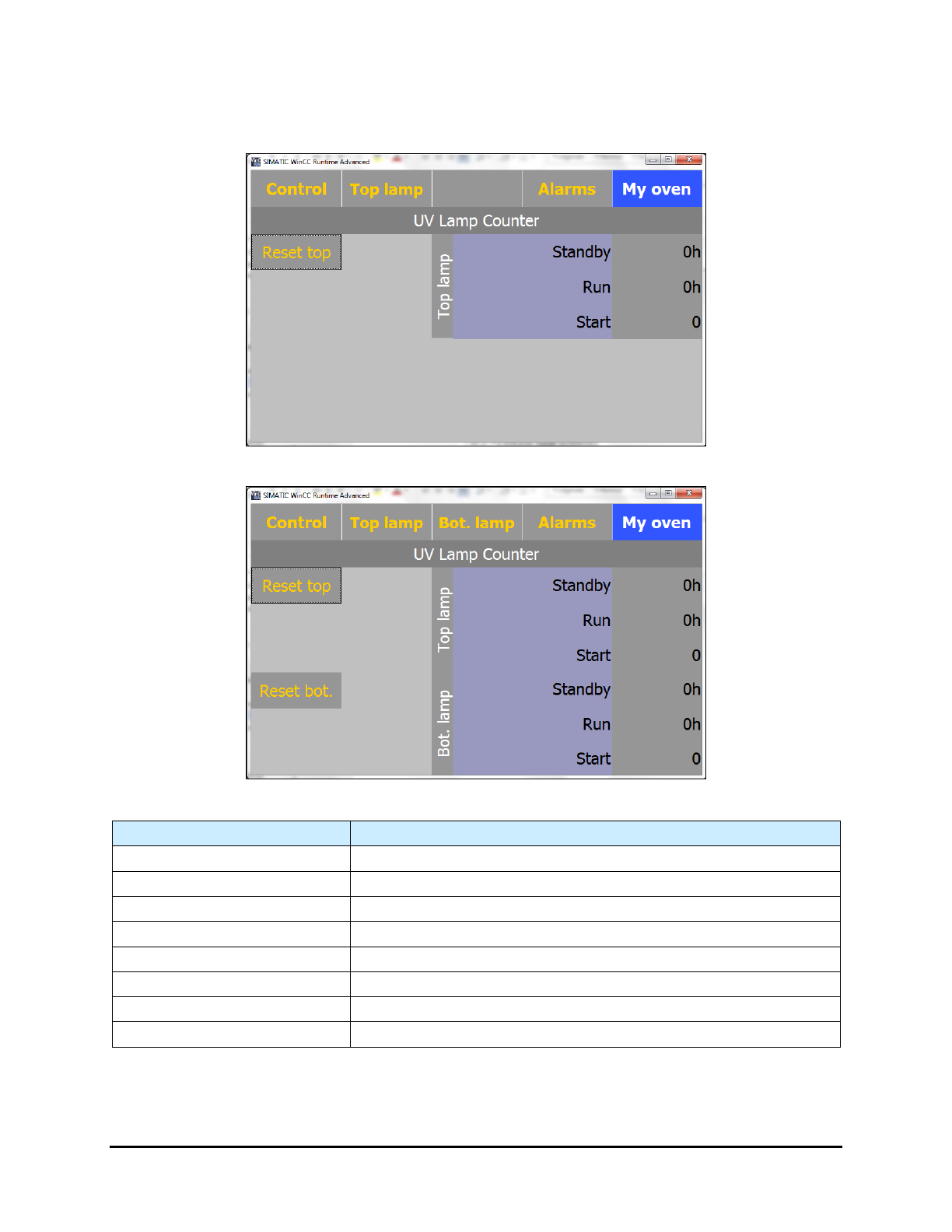
5.7.4.3 UV Lamp Counter Screen
Click on Counter in the "My Oven" menu to open the Counter screen.
Top Lamp Only
Top and Bottom Lamps
Name
Description
Reset top
Resets the top UV lamp counter to zero.
Reset bottom
Resets the bottom UV lamp counter to zero.
Top Lamp – Standby (mn)
Displays the Top Lamp running time in standby mode.
Top Lamp – Run (mn)
Displays the Top Lamp running time in run (production) mode.
Top Lamp - Start
Displays the number of starts for the Top Lamp.
Bottom Lamp – Standby (mn)
Displays the Bottom Lamp running time in standby mode.
Bottom Lamp – Run (mn)
Displays the Bottom Lamp running time in run (production) mode.
Bottom Lamp - Start
Displays the number of lamp starts for the Bottom Lamp.
Figure 5-20 UV Lamp Counter
NOTE It is recommended that you reset the counters when the lamps are changed.
5-20 Operation