UV-9+Cure+Module+7269348_B+Manual.pdf - 第47页
3.14 Anchoring the Oven To prevent m ovement t hat could caus e injury to personnel and damage to the cure m odule and facility, each cure module leveler (f oot) should be anchor ed to the floor w ith two bolts ( Figure …
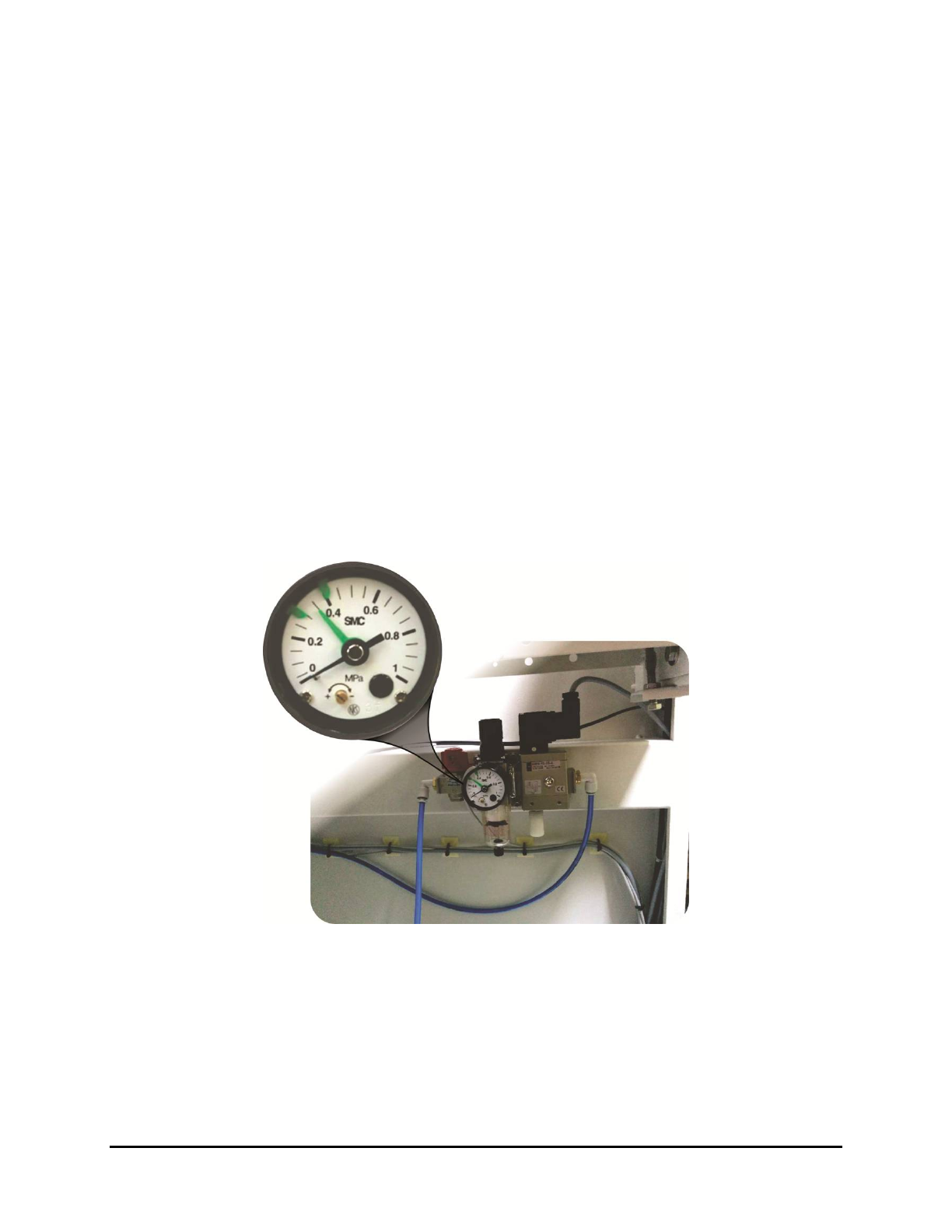
3.12 Pneumatic Connection (Shutter Option)
If the UV-9 Cure Module is equipped with shutter (entrance and/or exit), it must be connected to the
pneumatic system.
1. Pneumatic specifications are listed below:
• Air pressure: 0.6 MPa (87 psi)
• Connecting pipe: 6 mm
• Consumption: < 0.02 m
3/H
2. Set the pressure regulator to 0 MPa.
3. Verify the facility air pressure is off (0).
4. Connect the facility air hose to the pressure regulator.
5. If not already connected, connect the air hose to the facility air supply.
6. Set the facility air supply to 0.6 MPa (97 psi).
7. Set the pressure regulator to 0.35 MPa (50 psi).
The “green” needle is for the pressure sensor; the black needle is the actual set pressure
with the filter regulator.
Figure 3-10 Shutter Pneumatics
3.13 Post-installation Functional Testing
After installation has been completed, the Nordson ASYMTEK service technician will perform all testing
necessary to ensure quality performance of your UV-9 Cure Module.
NOTE As a precaution, the UV lamp is not pre-installed at the factory. It will be installed on-site
by the Nordson ASYMTEK technician. See 6.5.2 UV Lamp Replacement.
3-10 Installation
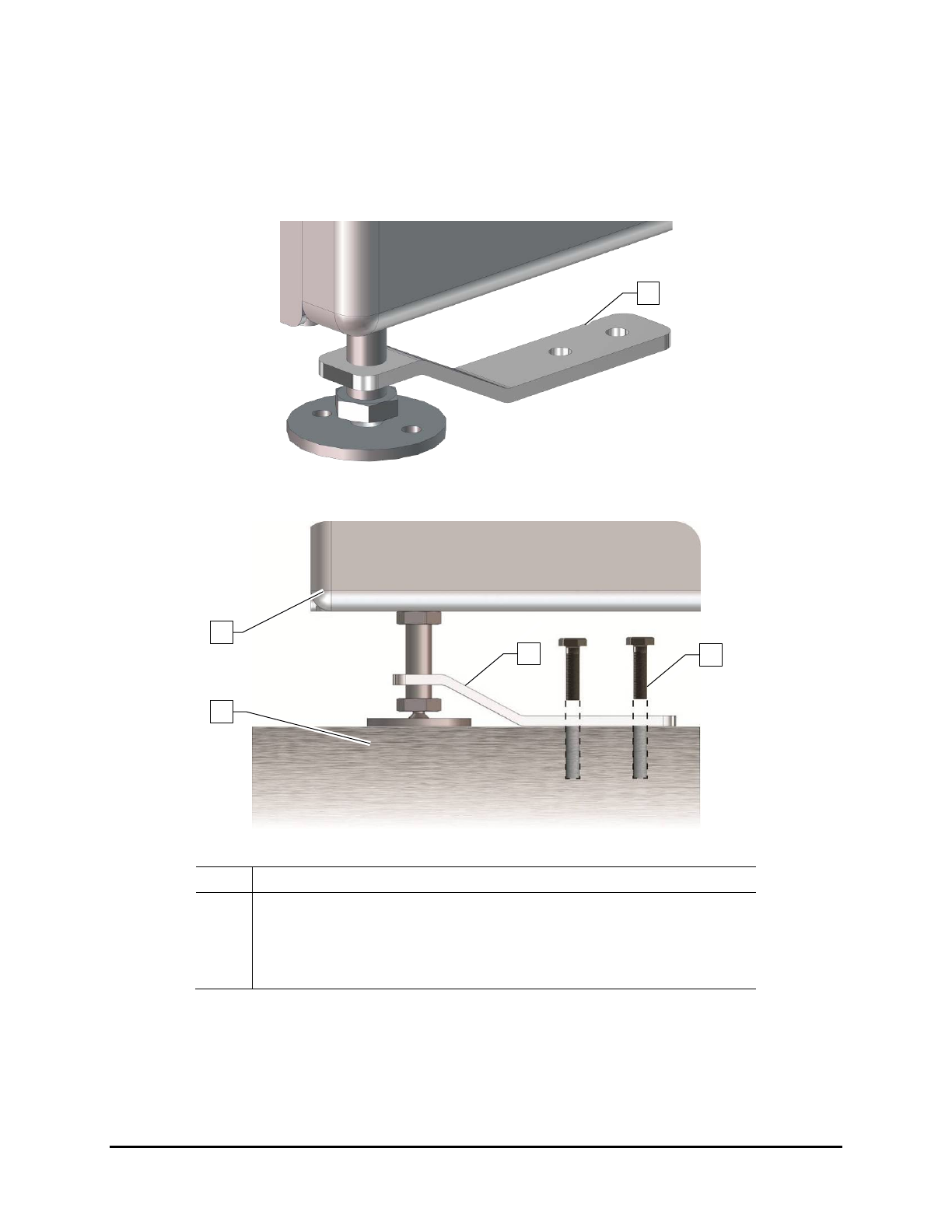
3.14 Anchoring the Oven
To prevent movement that could cause injury to personnel and damage to the cure module and facility,
each cure module leveler (foot) should be anchored to the floor with two bolts (Figure 3-11 and
Figure 3-12). The anchor joint (the point between each anchor bolt and the floor) must be able to
withstand at least 220 lbs (100 kg) of pullout force.
Figure 3-11 Seismic Brackets
Item Description
1 Cure Module
2 Leveler
3 Seismic Bracket
4 Anchor Bolts
Figure 3-12 Anchoring the UV-9 Cure Module
2
1
3
4
3
Installation 3-11

3.15 Initial Startup
CAUTION! Only qualified technicians trained by Nordson ASYMTEK should perform initial
startup, otherwise the warranty could be null/void.
For daily production, it is important to follow the order described in this manual to prevent:
• The "safety mode", which will delay the operational mode of the oven.
• The damage of equipment over the long term.
NOTE As a precaution, the UV lamp is not pre-installed at the factory. It will be installed on-site
by the Nordson ASYMTEK technician. See 6.5.2 UV Lamp Replacement.
1. Verify the following before initial start up:
a. The facility electrical network is compatible with the UV-9 Cure Module electrical
requirements. The UV-9 must be TT or NT.
The UV-9 is NOT compatible with neutral IT.
b. The main electrical power is connected. See 3.8 Connecting the Power.
c. The Main Power Switch, located at the rear of the equipment, is in the
ON position (I).
d. The SMEMA cables are connected to the ports on the rear panel of the UV-9 Cure
Module. See 3.9 Connecting SMEMA Cables.
e. The system exhaust is connected to the facility exhaust and the customer-supplied flow
safety switch operates correctly. See 3.11 Connecting the Exhaust.
f. The rotation direction of the blower motor located at the rear of the electrical cabinet.
An arrow on the blower body indicates the rotation direction. If necessary, invert two
(2) phases on the Main Power Switch. See 3.11.1 Exhaust Fan Rotation Direction.
g. The UV-9 Cure Module is level.
2. Make sure the E-Stop button is not activated.
If it is activated, turn the button clockwise until it pops out.
3. Press the green
ON button on the Control Panel to power on the unit (Figure 3-13).
NOTE Pressing the green ON button does not turn on the oven. You must press the black
Start/Stop button for one (1) second to turn on the oven. You can also start the oven
through the software. See 5.5.2 Starting the Oven.
3-12 Installation