drt2_devicenet_q102-e1_20_22_csm2147.pdf - 第147页
127 Configurator/Software DeviceNet Config urator Software Version 2. @ ....... ...................... ................. 128 WS02-CFDC1 DeviceNet Configurator PC Card (Software Incl uded) .............. .................…
126 Network Configurator WS02-CFSC1-E
General Specifications
Note 1: PC cannot be put into a standby state with the NE1A series connected via USB cable.
2: DeviceNet interface card does not conform to 64-bit operating system.
3: One or more USB port is required on a communications port of the maintenance tool.
4: Windows is a registered trademark of Microsoft.
*1. Final order entry date: The end of March, 2020
Safety Precautions
●
Be sure to read the following operation manual for precautions and other details required for correct use of the Safety Network
Controller.
CIP Safety on DeviceNet Safety Network Configurator Operation Manual
(Cat. No. Z905)
Unit Versions and Network Configurator Versions
Network Configurator version 2.0@ or higher must be used when using a NE1A-SCPU01-V1 or NE1A-SCPU02 Safety Logic Controller with unit version 2.0.
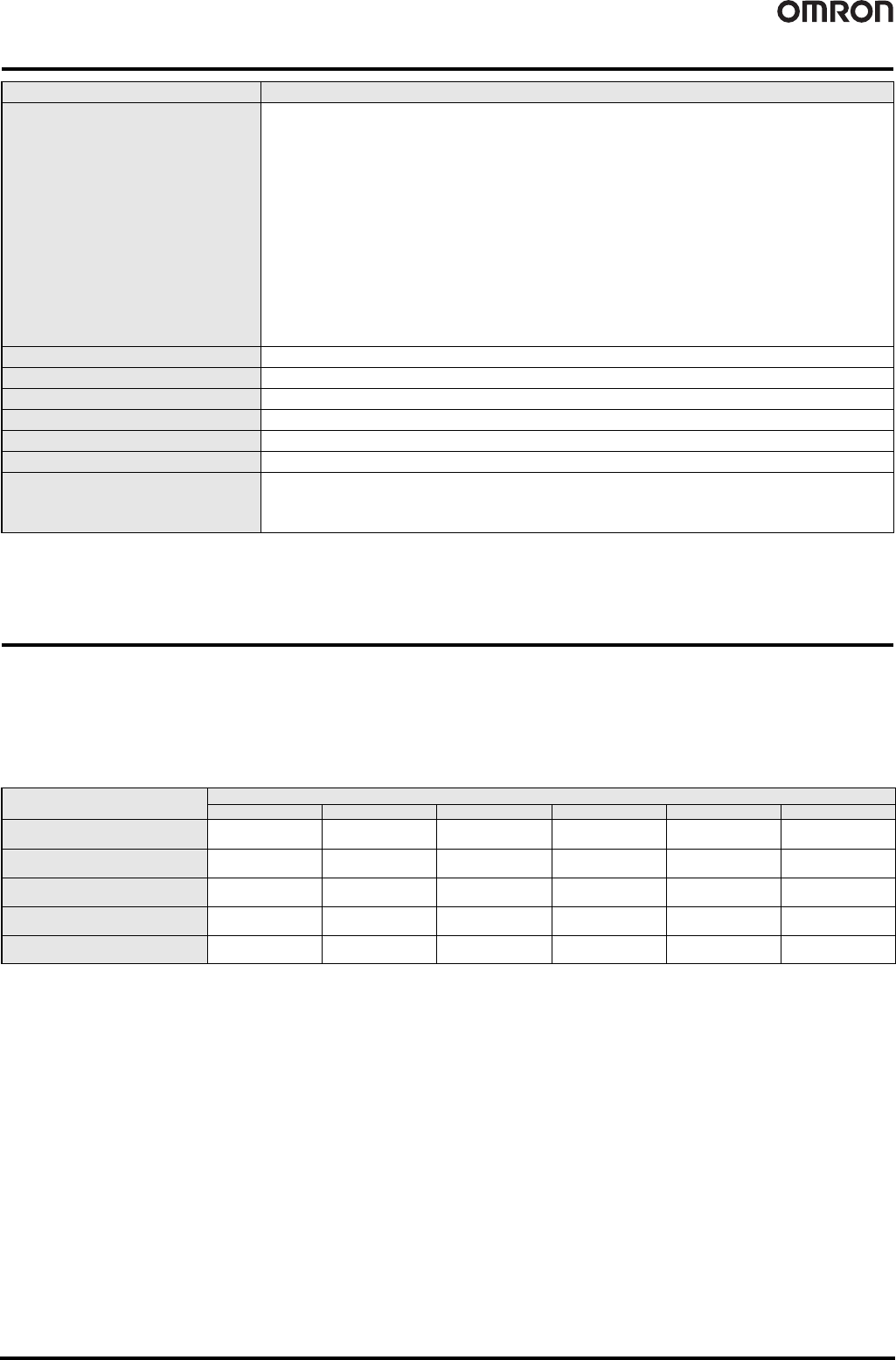
The following table shows the relationship between unit versions and Network Configurator versions.
❍ : Applicable, ✕: Not applicable
*1. It can be used as unit version 1.0.
Note 1: Users who use Network Configurator version 1.5@ or earlier can upgrade to version 1.6@ at no charge.
2: When using Network Configurator version 1.6@, there are no operational differences in the NE1A-SCPU01-V1 and NE1A-SCPU02 Safety Logic Controllers that derive
from the unit version.
Item Overview
OS
Japanese or English version
■ Ver. 2.2@ or earlier
Windows 2000 Professional (Service Pack 4 or later)
Windows XP (Service Pack 2 or later, except for 64-bit version)
Windows Vista (Service Pack 1 or later, except for 64-bit version)
■ Ver. 3.30 or later
Windows XP (Service Pack 3 or later, except for 64-bit version)
Windows Vista (Service Pack 2 or later)
Windows 7
■ Ver. 3.4 or later
Windows XP Service Pack 3 (32-bit edition)
Windows Vista Service Pack 2 (32-bit edition, 64-bit edition)
Windows 7 (32-bit edition, 64-bit edition)
Windows 8 (32-bit edition, 64-bit edition)
Windows 8.1 (32-bit edition, 64-bit edition)
Windows 10 (32-bit edition, 64-bit edition)
Note: Administrator rights are required for installation.
Main unit Personal computer with processor recommended by Microsoft
Memory Memory capacity recommended by Microsoft
Hard disk drive At least 200 MB of hard disk space
Monitor SVGA (800 x 600 resolution) or higher with 256 colors minimum
Disk device CD-ROM drive
Mouse Windows-supported mouse or other pointing devices
Communications port (Note)
One of the following communications port is required:
• USB port: When using a USB port (USB 1.1) of NE1A-SCPU series or NE0A series to connect online
• Ethernet port: When using Ethernet to connect online
• DeviceNet interface card (3G8F7-DRM21 or 3G8E2-DRM21-V1 *1): When using DeviceNet to connect online
Model
Network Configurator
Ver. 1.3@ Ver. 1.5@ Ver. 1.6@ Ver. 2.0@/2.1@ Ver.2.2@ Ver.3.3@
NE1A-SCPU01
Pre-Ver. 1.0
❍❍❍❍❍❍
NE1A-SCPU01-V1
Unit version 1.0
✕ ✕❍❍❍❍
NE1A-SCPU02
Unit version 1.0
✕ ✕❍❍❍❍
NE1A-SCPU01-V1
Unit version 2.0
✕✕ ❍ (*1) ❍❍❍
NE1A-SCPU02
Unit version 2.0
✕✕ ❍ (*1) ❍❍❍

127
Configurator/Software
DeviceNet Configurator Software Version 2.@ .............................................. 128
WS02-CFDC1
DeviceNet Configurator PC Card (Software Included) .................................. 128
3G8E2-DRM21-V1
DeviceNet Analyzer....................................................................................... 130
WS02-ALDC1
NX-Server...................................................................................................... 131
WS02-NX@C1
Device Inspector............................................................................................ 132
WS02-DIPC1
128 DeviceNet Configurator WS02-CFDC1/3G8E2-DRM21-V1
DeviceNet Configurator Software Version 2.@
WS02-CFDC1
DeviceNet Configurator PC Card (Software Included)
3G8E2-DRM21-V1 Final order entry date: The end of March, 2020
Easily Build and Maintain Multi-vendor
DeviceNet Networks.
• Easily build networks using graphical screen operations.
• Make connections from a DeviceNet Card for personal computers or from a serial port.
• Monitor devices while connected online.
• Build maintenance systems with Smart Slaves.
Ordering Information
*1. To use the software on Windows Vista or Windows 7, download the version upgrade program from the following OMRON website and apply it: www.fa.omron.co.jp/
*2. The DeviceNet Configurator Software is included with the 3G8E2-DRM21-V1.
*3. Final order entry date: The end of March, 2020
Supported OS
Name Applicable OS Model
DeviceNet Configurator Software
Windows 2000 (Service Pack2 or higher)/XP/Vista/7 (32bit)
*
1
WS02-CFDC1-E
DeviceNet Configurator PC Card *2 Windows 2000 (Service Pack2 or higher)/XP 3G8E2-DRM21-EV1
*
3
Name
OS
2000/XP Vista/7
DeviceNet Configurator Software Supported Supported
OMRON DeviceNet Board
PCI Board Supported Supported (32bit)
PC Card Supported Not Supported
Molex DeviceNet Network Interface Cards
USB Interface Module
Supported Supported (32bit)
Specifications
Virtual network management, device settings (I/O allocations,
connection settings), device monitoring, device (EDS file)
management, and online connections to DeviceNet devices
Processor recommended by Microsoft.
CPU
System Requirements
Either of the following software applications is required to connect online to
DeviceNet devices.
OMRON DeviceNet Board
• Special PCI Board: 3G8F7-DRM21
• Special PC Card: 3G8E2-DRM21-V1
Molex DeviceNet Network Interface Cards
• USB Interface Module Part Number: 1120760001
(Old Part Number: SST-DN4-USB)
OMRON CS/CJ-series PLC equipped with DeviceNet Unit
• Peripheral port *1
• Serial communications port or Serial Communications Unit *1
• Ethernet Unit *2
*1: An RS-232C COM port is required on the computer.
*2: An Ethernet port is required on the computer.
Hardware for Network Connection
Created Files
Files created
by exporting
data
Basic
Functions
Configurator network configuration files (*.npf)
Configurator device parameter files (*.pvf)
I/O comments: CSV-format files (*.csv)
NetXServer DDE settings file (*.nxd)
NetXServer ONC settings files (*.ini)
ONC DRM Unit settings files (*.ini)
Windows 2000 (ServicePack2 or higher)/XP/Vista/7 (32bit) *
OS
* To use the software on Windows Vista or Windows 7, download the version
upgrade program from the following OMRON website and apply it:
www.fa.omron.co.jp/
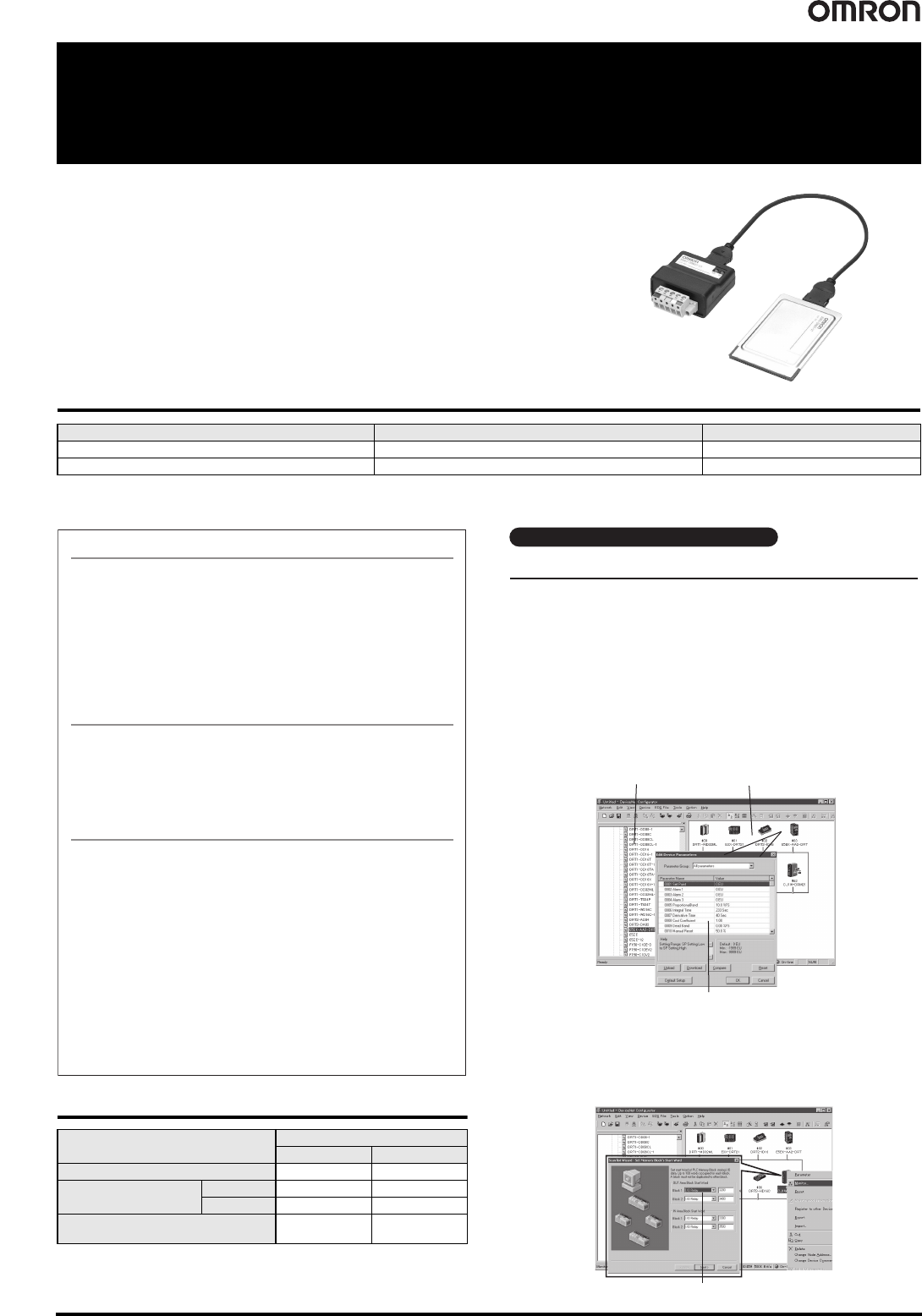
Device parameters
Hardware list
Network Configuration Window
● Creating a Scan List with the Wizard (Conversational Settings)
You can use the wizard to easily allocate I/O and register Slaves to the
Master to create a scan list.
And, you can easily check allocations to registered Slaves.
Scan List Wizard
You can build a network and make device settings on a computer by
dragging and dropping devices selected from the hardware list for virtual
networks (equivalent to network configuration files) in the Configurator.
Also, configurations can be downloaded to devices online and saved in
files.
● Setting Device Parameters
You can configure a network and edit device parameters by dragging and
dropping device files in the virtual network in the Configurator when it is
offline. This improves design efficiency.
Easy to Build Networks Using Graphical Screen Operations
Building and Setting Networks