drt2_devicenet_q102-e1_20_22_csm2147.pdf - 第149页
DeviceNet Configurator WS02-CFDC1/3G8E2-DRM21-V1 129 Maintenance System Maintenance System Control System Control System Connections can be made online using a DeviceNet Board, DeviceNet Card, or OMRON CS/CJ-series PLC f…
128 DeviceNet Configurator WS02-CFDC1/3G8E2-DRM21-V1
DeviceNet Configurator Software Version 2.@
WS02-CFDC1
DeviceNet Configurator PC Card (Software Included)
3G8E2-DRM21-V1 Final order entry date: The end of March, 2020
Easily Build and Maintain Multi-vendor
DeviceNet Networks.
• Easily build networks using graphical screen operations.
• Make connections from a DeviceNet Card for personal computers or from a serial port.
• Monitor devices while connected online.
• Build maintenance systems with Smart Slaves.
Ordering Information
*1. To use the software on Windows Vista or Windows 7, download the version upgrade program from the following OMRON website and apply it: www.fa.omron.co.jp/
*2. The DeviceNet Configurator Software is included with the 3G8E2-DRM21-V1.
*3. Final order entry date: The end of March, 2020
Supported OS
Name Applicable OS Model
DeviceNet Configurator Software
Windows 2000 (Service Pack2 or higher)/XP/Vista/7 (32bit)
*
1
WS02-CFDC1-E
DeviceNet Configurator PC Card *2 Windows 2000 (Service Pack2 or higher)/XP 3G8E2-DRM21-EV1
*
3
Name
OS
2000/XP Vista/7
DeviceNet Configurator Software Supported Supported
OMRON DeviceNet Board
PCI Board Supported Supported (32bit)
PC Card Supported Not Supported
Molex DeviceNet Network Interface Cards
USB Interface Module
Supported Supported (32bit)
Specifications
Virtual network management, device settings (I/O allocations,
connection settings), device monitoring, device (EDS file)
management, and online connections to DeviceNet devices
Processor recommended by Microsoft.
CPU
System Requirements
Either of the following software applications is required to connect online to
DeviceNet devices.
OMRON DeviceNet Board
• Special PCI Board: 3G8F7-DRM21
• Special PC Card: 3G8E2-DRM21-V1
Molex DeviceNet Network Interface Cards
• USB Interface Module Part Number: 1120760001
(Old Part Number: SST-DN4-USB)
OMRON CS/CJ-series PLC equipped with DeviceNet Unit
• Peripheral port *1
• Serial communications port or Serial Communications Unit *1
• Ethernet Unit *2
*1: An RS-232C COM port is required on the computer.
*2: An Ethernet port is required on the computer.
Hardware for Network Connection
Created Files
Files created
by exporting
data
Basic
Functions
Configurator network configuration files (*.npf)
Configurator device parameter files (*.pvf)
I/O comments: CSV-format files (*.csv)
NetXServer DDE settings file (*.nxd)
NetXServer ONC settings files (*.ini)
ONC DRM Unit settings files (*.ini)
Windows 2000 (ServicePack2 or higher)/XP/Vista/7 (32bit) *
OS
* To use the software on Windows Vista or Windows 7, download the version
upgrade program from the following OMRON website and apply it:
www.fa.omron.co.jp/
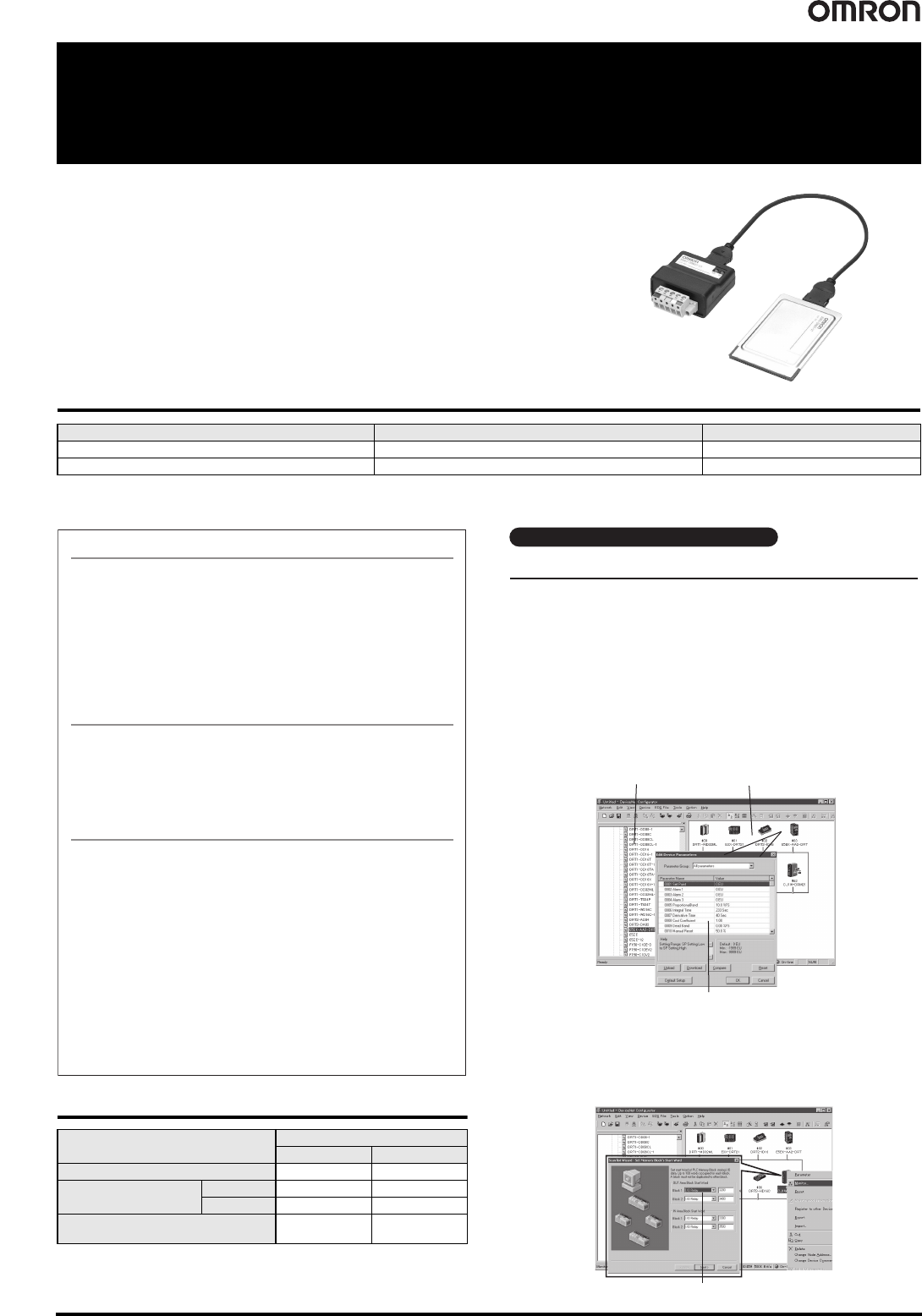
Device parameters
Hardware list
Network Configuration Window
● Creating a Scan List with the Wizard (Conversational Settings)
You can use the wizard to easily allocate I/O and register Slaves to the
Master to create a scan list.
And, you can easily check allocations to registered Slaves.
Scan List Wizard
You can build a network and make device settings on a computer by
dragging and dropping devices selected from the hardware list for virtual
networks (equivalent to network configuration files) in the Configurator.
Also, configurations can be downloaded to devices online and saved in
files.
● Setting Device Parameters
You can configure a network and edit device parameters by dragging and
dropping device files in the virtual network in the Configurator when it is
offline. This improves design efficiency.
Easy to Build Networks Using Graphical Screen Operations
Building and Setting Networks
DeviceNet Configurator WS02-CFDC1/3G8E2-DRM21-V1 129
Maintenance System
Maintenance System
Control System
Control System
Connections can be made online using a DeviceNet Board, DeviceNet
Card, or OMRON CS/CJ-series PLC from the computer.
● You can directly connect to DeviceNet devices by using an OMRON PCI
Board or PC Card through a DeviceNet Board or DeviceNet Card.
(Nodes are allocated to the Board/Card.)
● Computer RS-232C COM Port Connection
Connections can be made using a peripheral port or a serial port on a
Serial Communications Board/Unit of an OMRON CS/CJ-series PLC that
has a DeviceNet Unit connected to the COM port on a computer.
● Computer Ethernet Port Connection
Connections can be made using an Ethernet Unit of an OMRON
CS/CJ-series PLC that has a DeviceNet Unit connected to the Ethernet
port on a computer.
Connection from a DeviceNet Board for PC or Serial Port
● Support for Network Downloading and Monitoring for Devices*
The following items can be monitored using an OMRON CS/CJ-series
PLC.
• Overall communications status of network
• Status of Masters and Slaves
• Unit status
• Communications cycle time
• Error history
* This applies only to devices with the monitor function.
Monitor Devices While Connected Online
DeviceNet
Configurator
OMRON
CS/CJ-series PLC
DeviceNet
Configurator
Ethernet port
RS-232C port
PCI Board
PC Card
Online Connections
Device Management and Monitoring
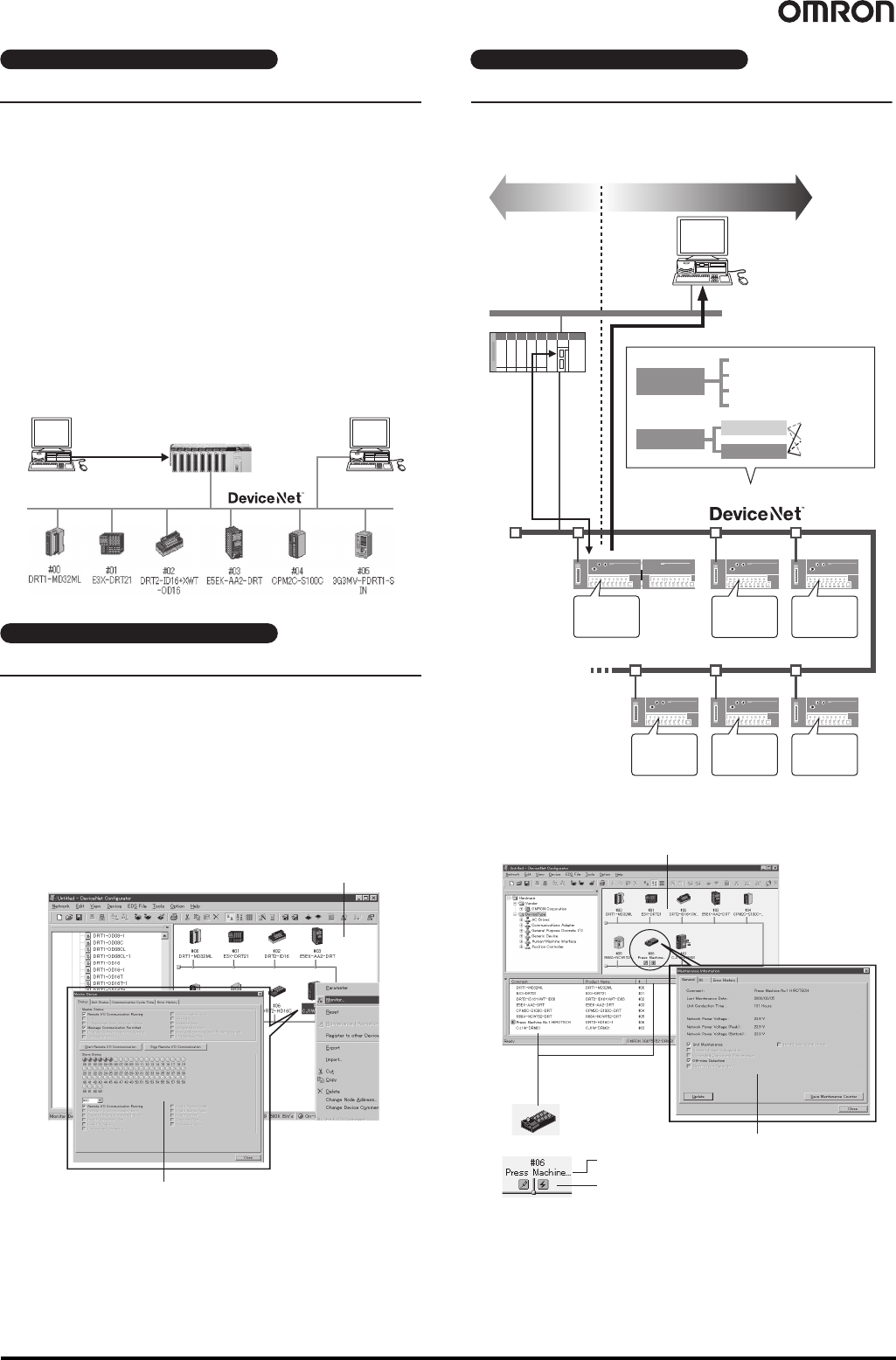
Maintenance Systems Built with Smart Slaves
DRT2-series
Smart Slave
DeviceNet
Configurator
Ethernet
Maintenance information
PLC
Control
data
Operation time monitor
Contact operation counter
Power ON time monitor
Unit comments and comments for
connected devices
I/O power supply
status monitor
Communications
power supply voltage
status monitor
Communications
error history monitor
Reliable equipment
startup
Preventive
maintenance for
equipment
Faster startup
Less downtime
“Time to inspect
the switches?”
“Time for motor
maintenance?”
“The cylinder
speed is
strange.”
● Contact Operation
Counter *
*You cannot use the contact operation counter and the power ON
time monitor at the same time.
● Power ON Time
Monitor *
● Operation Time
Monitor
“What’s the
communications
voltage?”
“Is the I/O
power supply
ON?”
● Communications
Power Supply
Voltage Status Monitor
“Is there an
error?”
● Communications
Error History Monitor
● I/O Power Supply
Status Monitor
Device Monitor
Upload Window
Building Maintenance Systems
● Software only: WS02-CFDC1-E
● PC Card with software included: 3G8E2-DRM21-V1 *1
(Applicable OS: Windows 2000 (ServicePack2 or higher)/XP)
*1. Final order entry date:The end of March, 2020
Configurator List
Maintenance Mode Window
Maintenance information
Unit comment
You can check the status with the status icons.
● Smart Slave Maintenance Information
Maintenance information stored in Smart Slaves can be read and use to
build a maintenance system that functions separately from the control
system.
130 DeviceNet Analyzer WS02-ALDC1
DeviceNet Analyzer
WS02-ALDC1
Perform Diagnosis and Analysis for Networks by Directly
Connecting to an OMRON DeviceNet PCI Board.
Helps Improve Efficiency of Device Development and System
Startup.
• Capture messages frames flowing on DeviceNet.
• Translate and display the captured message frames to easily perform diagnosis and analysis.
• Functionality is provided in the capture filter to display only messages that match the specified conditions.
• Set the trigger conditions for starting and stopping capture.
• Combine multiple conditions (e.g., AND, OR, THEN) for the trigger conditions.
• Display the traffic (load percentage) in a trend graph for each time interval (100 ms) to determine changes in the communications cycle
time and to help determine system distribution.
• Display the percentage of a specified message frame relative to all message frames.
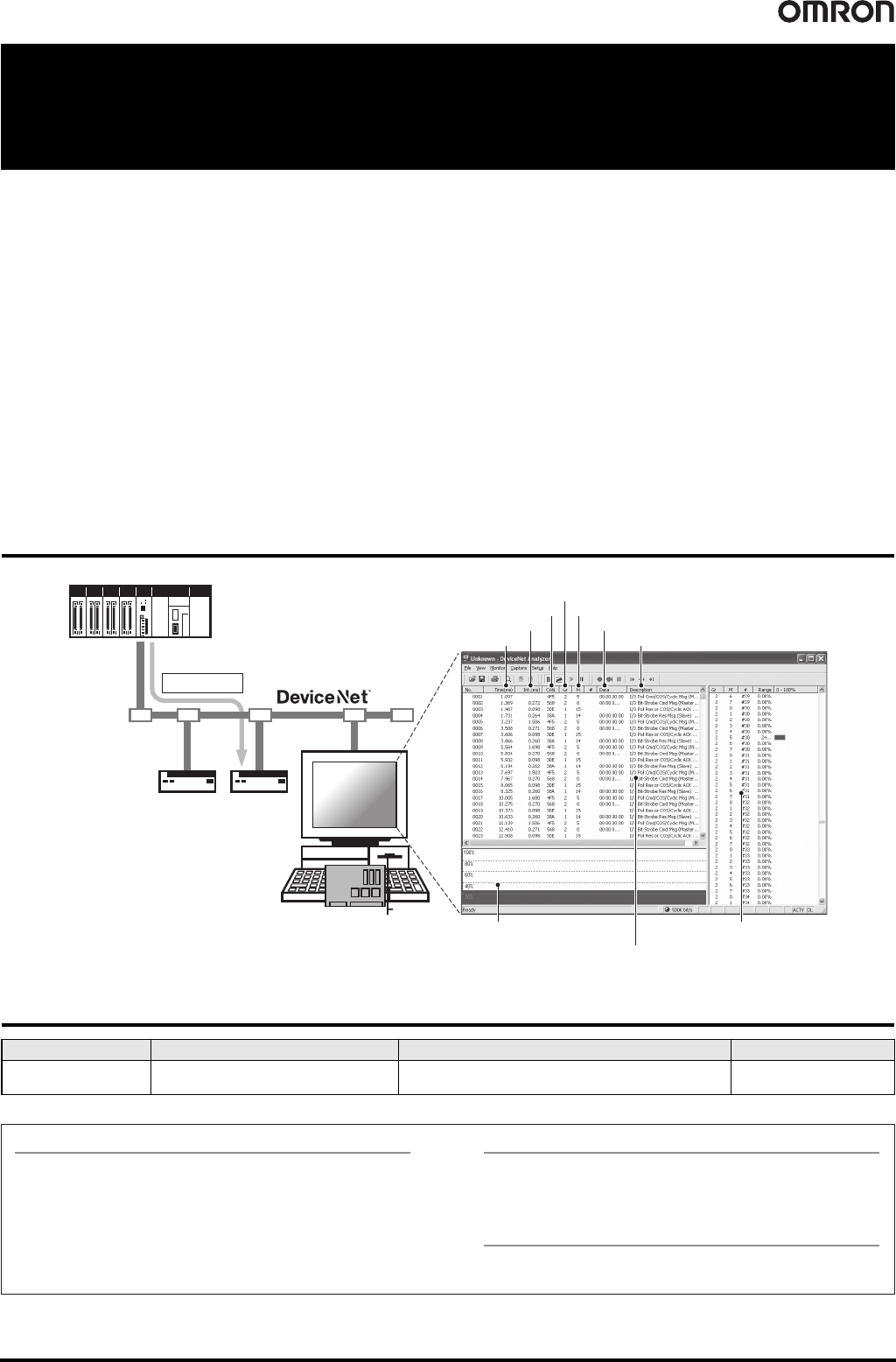
System Configuration
Ordering Information
Name Applicable OS Description Model
DeviceNet Analyzer Windows 2000 (Service Pack2 or higher)/XP
This software captures the required messages that flow on
DeviceNet to diagnose and analyze the network.
WS02-ALDC1-E
Master
Slave
Slave
PCI Board
DeviceNet
Analyzer
0011 1111 0011 0011
Message frame
CAN ID
Time between frames
Receive time
Network Traffic Pane
Displays network traffic trends.
Capture Pane
Displays captured message frames.
Message Group
Send data
Translated DeviceNet messages
Message Frame Traffic Pane
Displays traffic in CAN ID segments.
Message ID
Translation, capture buffer size settings, capture filter, capture
trigger, capture export, frame time measurement, network
traffic monitor, message frame traffic monitor
Basic Functions
Processor recommended by Microsoft.
CPU
System Requirements
OMRON DeviceNet Board
Special PCI Board: 3G8F7-DRM21
Compatible Hardware
Specifications
NetInspector capture files (*.alz)
Contents: Capture data files (saved or loaded), CSV-format of
text (.txt) files, capture data export files
Created files
Windows 2000 (ServicePack2 or higher)/XP
OS
Final order entry date: The end of March, 2020