创建组件识别数据的方法.pdf - 第132页
132/178 IM-SMT-VSNDI C-0002 -000 Figure 106 In the actual exam ple sho wn in Figur e 107, the “Cut Outside Noise” function prevents the lead part and bod y p art from separating each other in ord er to perf orm stable re…
131/178
IM-SMT-VSNDIC-0002-000
Items to be set Set value Explanation
Surface Type
Selects from reflecting component or non-reflecting
component. If the component looks white, select
“Reflecting component”, if not, select “Non reflecting
component”.
Cut Outer Noise Select from 0 through 7.
Cut Inner Noise Select from 0 through 7.
Noise Cut Order “Inner” / “Outer”
Table 91
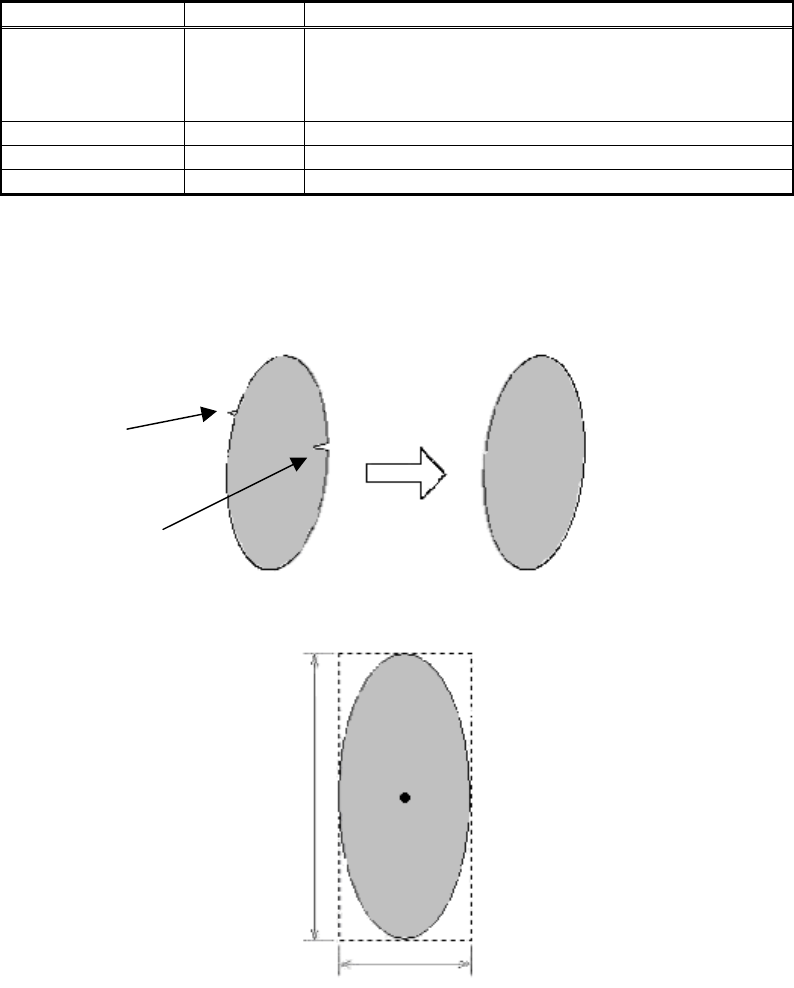
The functions for cutting noise both inside and outside the component are used when the
noise is detected as shown in
Figure 104
, which eliminate the effects from the noise.
Please refer to ”Appendix 1. Noise processing” for the details of the noise elimination process.
Figure 104
Figure 105
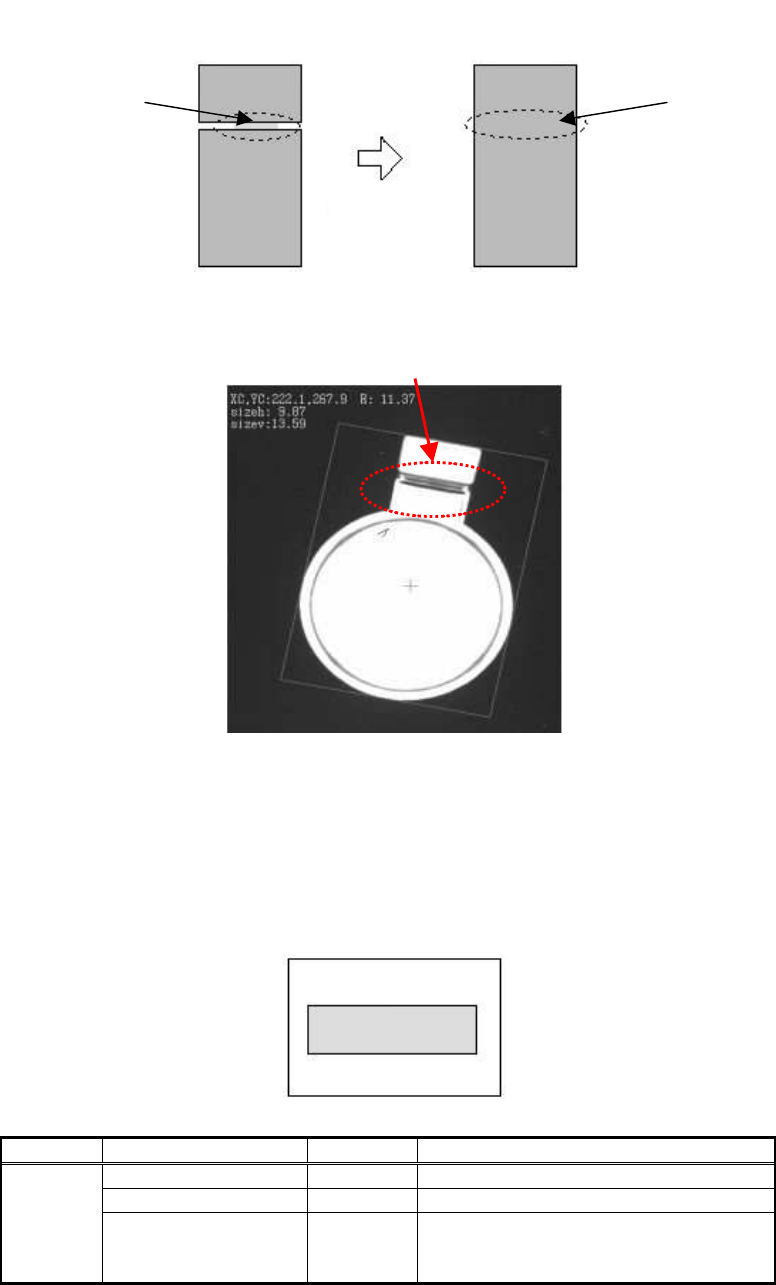
Also, if the component is divided into two parts and the boundary between the parts is not
clearly seen due to the lighting level, component lot, or another factor as shown in
Figure 106
(the figure on the left), the noise cut function can be used in order to perform stable
recognition.
In the example in
Figure 106
, the “Cut Inner Noise” function is used in order to perform the
stable recognition by combining the two separate objects together.
“Cut Outer Noise”
“Cut Inner Noise”
Body Size Y
Body Size X
132/178
IM-SMT-VSNDIC-0002-000
Figure 106
In the actual example shown in Figure 107, the “Cut Outside Noise” function prevents the lead
part and body part from separating each other in order to perform stable recognition.
Figure 107
2.12.3-2. Mark Line
This is used to recognize rectangles consisting of a single part, as shown in Figure 108.
Components are detected from among objects that have been binarized and detected. Either
fixed or automatic threshold values can be used for the binarization. The component center
and inclination are determined by setting the detection line. White objects are normally
recognized, but it is also possible to detect black objects on a white field.
Figure 108
Items to be set Set value
Explanation
Alignment Group Special
Alignment Type Special
Common
Data
Comp. Threshold
Sets the binarization level. (If 0 is
specified, the threshold is set
automatically.)
This part cannot be
seen clearly.
Combined
“Cut Inner
Noise” function

133/178
IM-SMT-VSNDIC-0002-000
Items to be set Set value
Explanation
Comp. Tolerance
Specifies the tolerance of the shape
as a percentage.
Search Area (mm) Sets the range of the detection.
Body Size X (mm) Sets the size of the outer edge.
Body Size Y (mm) Sets the size of the outer edge.
Body Size Z (mm) Sets the size of the outer edge.
Cntr. Offset X (mm)
Sets the offset amount in the X
direction from the center position.
Cntr. Offset Y (mm)
Sets the offset amount in the Y
direction from the center position.
Cntr. Offset R (mm)
Sets the offset amount of the angle of
rotation.
Ruler Width 3 Not used.
Algorithm Special 1
Base Alignment As Mark
Vision Option 1
0
*4
Designates the detection direction
0: Auto, 1: left side/upper side only,
2: right side/lower side only, 3: both
sides
(With Auto detection, the direction in
which the component extends beyond
the search frame is not detected.)
Vision Option 2 0
Vision Option 3 0
Vision Option 4
0
*1
Specifies the priority to perform “Cut
Inner Noise “/”Cut Outer Noise”
function and the object type.
Items to be set
Set
value
Explanation
Lead Group E 0 or 1
When “0” is specified, the
offset of the detection line is
automatically set to 1/4 of the
detection size.
Common
Ruler Offset E --
Lead Number: 1E 0
Reflect LL.: 1E (mm) 0.0
Lead Width: 1E (mm) 0.0
Lead Pitch: 1E (mm) 0.0
Find Pos X: 1E (mm)
*2
When the number of Lead
Groups is 1, this sets the
detection line at the
position that is offset from the
contour of the circumscribed
rectangle by the amount of
this value.
E
Direction
Group 1
Find Pos Y: 1E (mm)
*3
When the number of Lead
Groups is 1, this sets the
detection line to the position
that is offset from the center
line by the amount of this
value.