OptimaUserManual.pdf - 第109页
OPT IMA PAL SO FTW ARE Opti ma User M anual 103 The area titled Devi ce Ac ti on cont ains sev eral controls that provi de quick access to th e mos t co mmonly us ed pr ogra mming ac t ions , s uc h a s Pr ogram , Read D…
OPTIMA PAL SOFTWARE
Optima User Manual
102
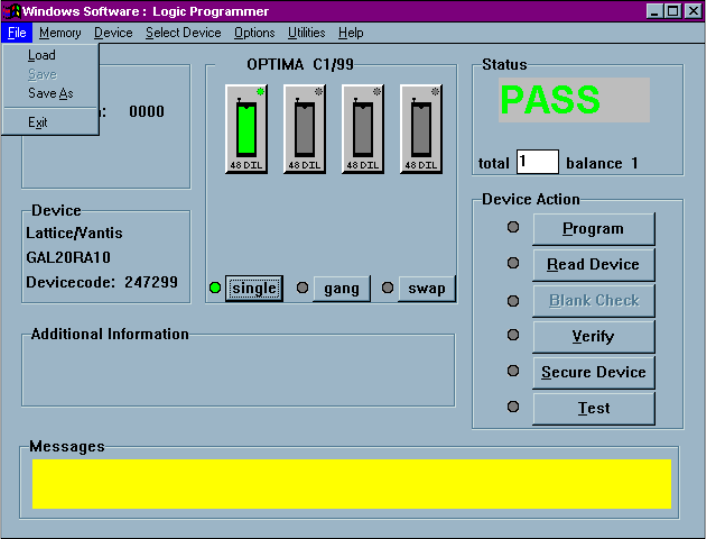
The Main Programming screen is divided into these areas:
x File—contains information regarding the checksum of the data currently in RAM
and the usable address range of the device
x Device—contains information related to the device to be processed. The
Devicecode: field contains a unique identification code for the device selected.
This code is used by the optional TaskLink Windows software.
x OPTIMA Xx/XX—contains information about the PAL software version, the
TOPs installed on the programmer base, and the programming mode (single,
gang, or swap).
x Status—provides the status of the last device programmed
(PASS/FAIL/CHECK), the total number of devices to be processed (this field is
editable), and the number of devices remaining to be processed.
x Device Action—provides quick access to the most commonly used operations.
There are buttons for Program, Read Device, Blank Check, Verify, Secure Device
and Test operations.
x Additional information—contains any additional information that may be
required to process the selected devices, such as a specialized adapter, etc.
x Messages—contains any additional messages that describe various conditions
related to the processing of the selected device. Messages that may appear
include references to specialized adapters, settings that have been changed to
their non-default conditions, and others.
The area titled Optima Xx/XX contains several controls that determine the site(s) to
be used for programming, the TOPs installed on the site(s), and the programming
modes of operation. This section contains a virtual layout of the programmer in use.
If the programmer is an Optima Light, then one programmer site is shown, and the
TOP that has been installed is shown. If the programmer is an Octal, then eight sites
are displayed (arranged numerically from left to right, top to bottom, with Site #1 at
the upper left and Site #8 at the lower right), as well as indicators of the TOPs
installed on each site. If no TOPs are installed on one or more of the sites, those sites
will be displayed as NO TOP.
OPTIMA PAL SOFTWARE
Optima User Manual
103
The area titled Device Action contains several controls that provide quick access to
the most commonly used programming actions, such as Program, Read Device,
Blank Check, Verify, Secure Device, and Test. These controls function identically
to the controls found in the Device menu, and are conveniently located on the Main
Programming screen for quick access.
OPTIMA PAL SOFTWARE
Optima User Manual
104
The File Menu
The first menu on the Main Programming screen is the File menu. The File menu has
two primary functions: loading data into RAM, and saving data from RAM.
Additionally, the PAL software can be terminated from this menu using the Exit
function.
The File menu