OptimaUserManual.pdf - 第135页
SINGLE, GANG , AND SW AP PROG RAMM ING Opti ma User M anual 129 Processing Devi ces in the Si ngle Program ming M ode In the diagram below , t he programm er in use is a Quad, w ith four T OPs installed: A Quad programme…
SINGLE, GANG, AND SWAP PROGRAMMING
Optima User Manual
128
SINGLE, GANG, AND SWAP PROGRAMMING
Optima programmers allow you to program devices one at a time or several at a time.
This flexibility greatly increases programming efficiency.
In single programming mode, one device at a time is programmed. Single
programming can be done on either Singlestye (Optima, Optima Light, or Plus 48) or
Multisyte (Dual, Quad, or Octal) programmers, using any of the optional TOPs.
In gang programming mode, multiple devices can be programmed simultaneously,
with the same data programmed into all devices. Up to eight devices can be
programmed using a single site TOP, and up to 32 devices can be programmed using
the FLASH TOP or TOP432.For gang programming, you need two or more identical
TOPs installed on your Multisyte programmer.
In swap programming mode, up to eight devices can be programmed in alternate (or
swap) cycles, with the same data programmed into all devices. For swap
programming, you need two or more identical TOPs installed on your Multisyte
programmer.
SINGLE, GANG, AND SWAP PROGRAMMING
Optima User Manual
129
Processing Devices in the Single Programming Mode
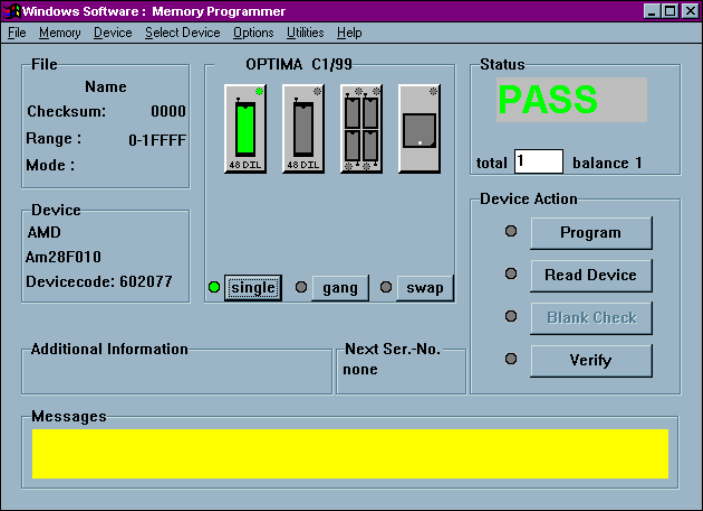
In the diagram below, the programmer in use is a Quad, with four TOPs installed:
A Quad programmer with two TOP48s, a TOP432, and a TOP84PLC installed
A Multisyte programmer (Dual, Quad, or Octal) is quite flexible as it allows several
different styles of TOPs to be installed simultaneously. While different TOPs styles
cannot be used simultaneously to program different devices, each TOP can, however,
be selected directly from the user interface when a different device style is required.
In the above configuration two TOP48s, a TOP432, and a TOP84PLC are installed.
The TOP48 on Site #1 (left-most site) is selected, and the programmer is set to
operate in Single mode. As it is currently configured, the programmer will process
devices one at a time on the selected TOP. If you require the use of the another TOP,
SINGLE, GANG, AND SWAP PROGRAMMING
Optima User Manual
130
simply select the TOP on Site #2, #3 or #4 by clicking its icon with the mouse cursor.
The newly selected site will be highlighted, indicating that it is the active site.
Note: If the programmer has different styles of TOPs installed,
selecting a site with a different style of TOP will prompt you
to select a new device. This is normal, as the software must
set up the programmer to process the different style of
device.