OptimaUserManual.pdf - 第110页
OPT IMA PAL SO FTW ARE Opti ma User M anual 104 The File M enu Th e f ir st men u on th e M ain P ro grammin g sc re en is t he File menu. The File menu has two pri mary functions: loading data into RA M, and saving data…
OPTIMA PAL SOFTWARE
Optima User Manual
103
The area titled Device Action contains several controls that provide quick access to
the most commonly used programming actions, such as Program, Read Device,
Blank Check, Verify, Secure Device, and Test. These controls function identically
to the controls found in the Device menu, and are conveniently located on the Main
Programming screen for quick access.
OPTIMA PAL SOFTWARE
Optima User Manual
104
The File Menu
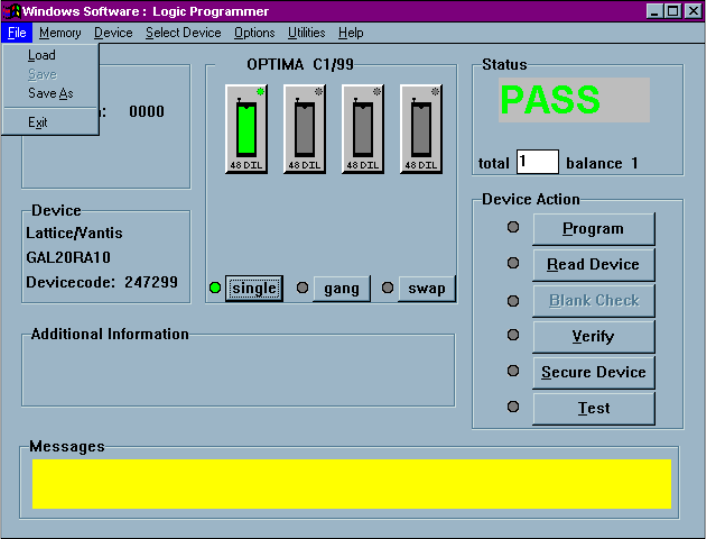
The first menu on the Main Programming screen is the File menu. The File menu has
two primary functions: loading data into RAM, and saving data from RAM.
Additionally, the PAL software can be terminated from this menu using the Exit
function.
The File menu
OPTIMA PAL SOFTWARE
Optima User Manual
105
File>Load
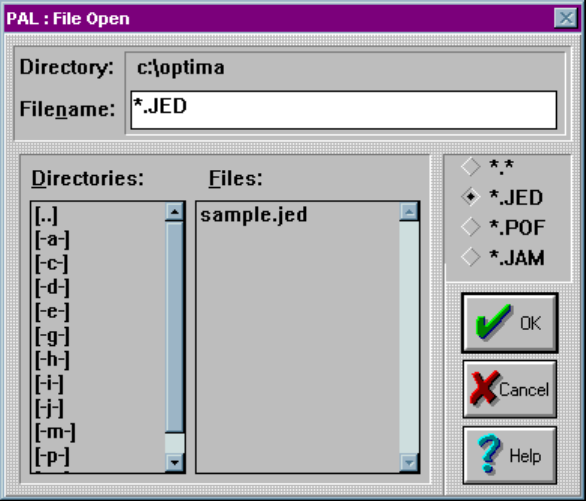
Selecting File > Load will produce the File Open dialog screen:
The File Open dialogue
The File Open dialogue allows the use of several different data formats including:
x JEDEC standard (*.jed)
x Altera POF format (*.pof)
x Altera JAM format (*.jam)
Navigate the computer or network for the required data file, and select the <OK>
button. Once the file is loaded, the device may be programmed.