OptimaUserManual.pdf - 第144页
SET PRO GRAM MING ON T HE TO P432 Opti ma User M anual 138 8 Bit Mode Sel ect the 8 Bit mode w hen a large data file needs to be program med ov er multipl e memory devices. In the example bel ow the 64K file data is prog…
SET PROGRAMMING ON THE TOP432
Optima User Manual
137
TOP432s installed on the programmer. In this mode, all devices inserted into all of
the TOPs will receive the same programming information.
The TOP432 is unique because it has both gang and set programming capabilities. By
default the TOP432 is in the gang programming mode, where each device is
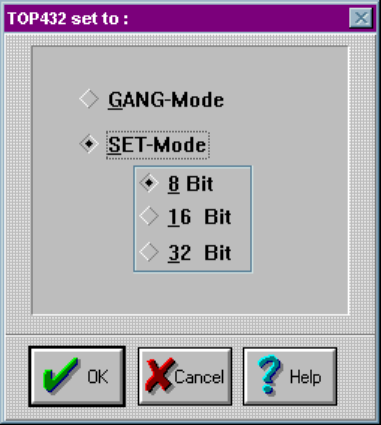
programmed with the same data. If you want to change to set programming, click on
the TOP432 icon. When the TOP432 icon appears, select SET-Mode programming.
In set mode, you have the option of 8, 16 or 32 bit programming mode:
Gang/Set mode screen

SET PROGRAMMING ON THE TOP432
Optima User Manual
138
8 Bit Mode
Select the 8 Bit mode when a large data file needs to be programmed over multiple
memory devices. In the example below the 64K file data is programmed into four
16K memory devices. The first 16K (0000-3FFF) is programmed into socket 1, the
second 16K (4000-7FFF) into socket 2, the third 16K (8000-BFFF) into socket 3, and
the fourth 16K (C000-FFFF) into socket 4.
The TOP432 creates the division of data automatically. The file is downloaded, the 8
Bit mode is selected and the programming operation is started.
Device Size Socket 1 Socket 2 Socket 3
Socket 4
27C64 0, 1, 2… 2000, 2001… 4000, 4001… 6000, 6001…
27C128 0, 1, 2… 4000, 4001… 8000, 8001… C000, C001…
16 Bit Mode
Select the 16 Bit mode when a 16 Bit data file needs to programmed into two 8 Bit
devices. In the example below the file data is a 16 Bit format. As the file data is read
during the programming operation, the TOP432 software places the low order bytes in
sockets 1 and 3. The high order bytes are placed in sockets 2 and 4.
Note: Often low order bytes are referred to as EVEN bytes and high
order bytes as ODD bytes.
The TOP432 creates the division of data automatically. The file is downloaded, the 16
Bit mode is selected and the programming operation is started.
Device Size Socket 1 Socket 2 Socket 3
Socket 4
27C64 0, 2, 4… 1, 3, 5… 4000, 4002… 4001, 4003…
27C128 0, 2, 4… 1, 3, 5… 8000, 8002… 8001, 8003…

SET PROGRAMMING ON THE TOP432
Optima User Manual
139
32 Bit Mode
Select the 32 Bit mode when a 32 Bit data file needs to programmed into four 8 Bit
devices. In the example below the file data is a 32 Bit format. As the file data is read
during the programming operation, the TOP432 software places low order data bytes
(D0-D7) in socket 1. Data bytes (D8-D15) are placed in socket 2, data bytes (D16-
D23) are placed in socket 3, and the high order bytes (D24-D310) are placed in
socket 4.
The TOP432 creates the division of data automatically. The file is downloaded, the 32
Bit mode is selected and the programming operation is started.
Device Size Socket 1 Socket 2 Socket 3
Socket 4
any 0, 4, 8… 1, 5, 9… 2, 6, A… 3, 7, B…