OptimaUserManual.pdf - 第79页
OPTIMA PROM SOF TW AR E Opti ma User M anual 73 M emory> Spec ial De vice Func tions… The Special Device Functi ons… menu item is used to set featur es unique to the devi ces under test. T his feature is enabled only …
OPTIMA PROM SOFTWARE
Optima User Manual
72
Memory>Checksum Options…
The Checksum Options…menu item is used to set the number of characters
representing the data checksum, ranging from four to eight characters.
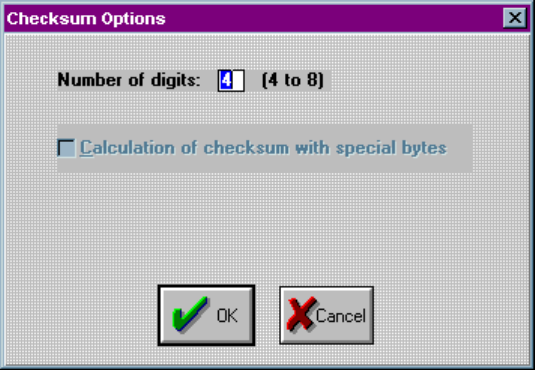
Selecting Memory>Checksum Options… will produce this screen:
Setting the checksum options
Here you have the option to select a 4 to 8 digit hexadecimal checksum. Checking the
Calculation of checksum with special bytes adds the special bytes to the displayed
checksum.
OPTIMA PROM SOFTWARE
Optima User Manual
73
Memory>Special Device Functions…
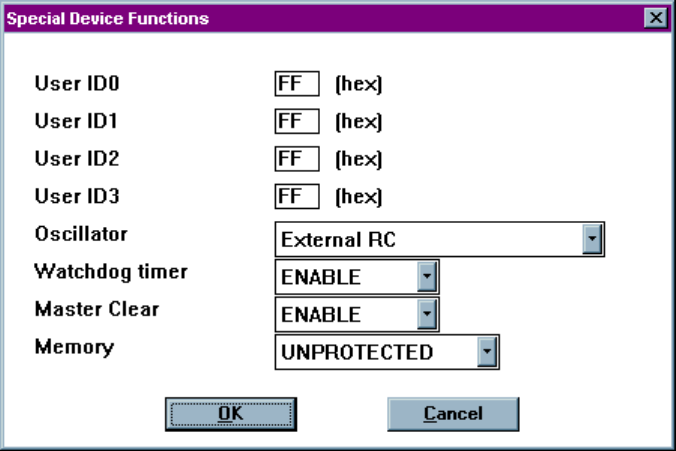
The Special Device Functions…menu item is used to set features unique to the
devices under test. This feature is enabled only for devices with special features.
Additionally, these features vary from device to device.
Setting special device functions
OPTIMA PROM SOFTWARE
Optima User Manual
74
Memory>Device Serialization Options…
The Device Serialization Options…allows you to assign unique electronic serial
numbers to each device being programmed. When serializing devices, the serial
number is automatically incremented for the next device each time the Optima
software completes a programming operation. When serializing with Multisyte
programmers (Dual, Quad, and Octal) in gang mode, sequential serial numbers are
automatically generated for devices inserted into adjacent TOPs.
Note: Serialization is only supported with single-socket TOPs, such
as the TOP48, TOP84PLC, and other similar TOPs. It is not
supported on the TOP432
or Flash TOP.
To set up this feature, refer to the figures below and perform the following process:
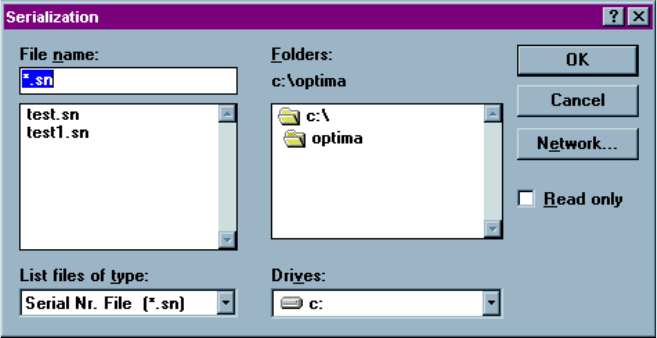
1. Select Memory > Device Serialization Options… The following screen will
appear:
Selecting the serial number file
2. Choose the path and serial number file you would like to use, or if creating a new
serial number file, type in the desired name of the file in the File name field. For
clarity, use DOS standard 8.3 file names. The default file extension for serial
number files is *.sn, but can be anything you like. To locate files with extensions