OptimaUserManual.pdf - 第59页
OPTIMA PROM SOF TW AR E Opti ma User M anual 53 The File M enu Th e f ir st men u on th e M ain P ro grammin g sc re en is t he File menu. The File menu has two pri mary functions: loading data into RA M, and saving data…
OPTIMA PROM SOFTWARE
Optima User Manual
52
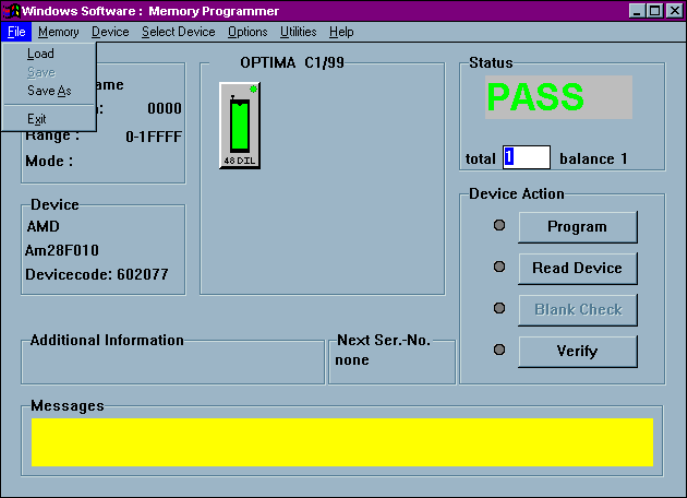
The Main Programming screen is divided into these areas:
x File—contains information regarding the checksum of the data currently in RAM
and the usable address range of the device. If a TOP432 is installed, the Mode:
item will display its GANG or SET mode settings.
x Device—contains information related to the device to be processed. The
Devicecode: field contains a unique identification code for the device selected.
This code is used by the optional TaskLink Windows software.
x OPTIMA Xx/XX—contains information about the PROM/PROM432 software
version, the TOPs installed on the programmer base and the status of each, and
the programming mode (single, gang, or swap).
x Status—provides the status of the last device programmed
(PASS/FAIL/CHECK), the total number of devices to be processed (this field is
editable), and the number of devices remaining to be processed.
x Device Action—provides quick access to the most commonly used operations.
There are buttons for Program, Read Device, Blank Check, and Verify
operations.
x Additional information—contains any additional information that may be
required to process the selected devices, such as a specialized adapter, etc.
x Next Ser.-No.—contains the next serial number to be applied to the device if the
serialization option has been enabled.
x Messages—contains any additional messages that describe various conditions
related to the processing of the selected device. Messages that may appear
include references to specialized adapters, settings that have been changed to
their non-default conditions, and others.
OPTIMA PROM SOFTWARE
Optima User Manual
53
The File Menu
The first menu on the Main Programming screen is the File menu. The File menu has
two primary functions: loading data into RAM, and saving data from RAM.
Additionally, the PROM software can be terminated from this menu using the Exit
function:
The File menu
OPTIMA PROM SOFTWARE
Optima User Manual
54
File>Load
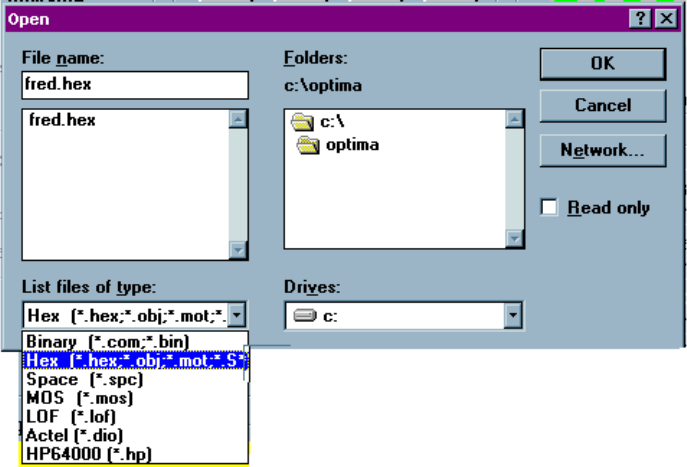
Selecting File>Load will produce the Open dialog screen:
The Open dialogue
The Open dialogue allows the use of these different data formats:
x Binary (*.com, *.bin)
x Hex (*.hex, *.obj, *mot, *.S*) which supports data formats in Motorola
Exorciser, Motorola ExorMax, Motorola 32 (S3), Intel Intellec 8/MDS, Intel
MCS-86 Hex, Intel OMF 286, and Intel Hex-32
x Space (*.spc) which supports ASCII Hex Space
x MOS (*.mos) which supports MOS Technology
x LOF (*.lof) which supports Quick Logic
x Actel (*.dio)
x HP64000 (*.hp) which supports HP64000 Absolute and HP Unix
Note: If Hex or HP Format is selected, the Optima software
automatically selects the appropriate format.