OptimaUserManual.pdf - 第98页
OPTIMA PROM SOF TW AR E Opti ma User M anual 92 If you see S xxx beside the dev ice name, that devi ce is not suppor ted by the TOP you have i nstalled. F or example, the TOP48 does not support Hitachi HD647325, as show …
OPTIMA PROM SOFTWARE
Optima User Manual
91
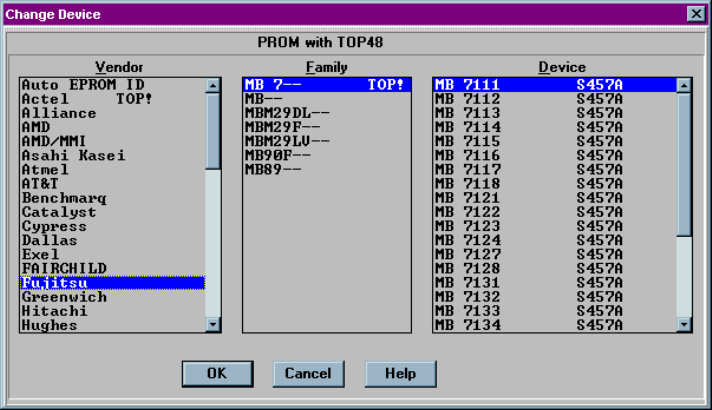
If you see TOP! beside the family name, devices in that family are not supported by
the TOP you have installed. For example, the TOP48 does not support the family of
MB 7 devices. By reading the Sxxx number beside the device listed, you can
determine which TOP does support the device you wish to program:
MB 7 device family not supported by this TOP
OPTIMA PROM SOFTWARE
Optima User Manual
92
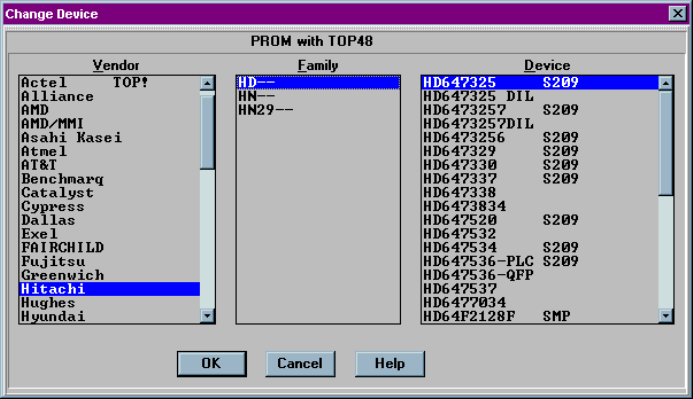
If you see Sxxx beside the device name, that device is not supported by the TOP you
have installed. For example, the TOP48 does not support Hitachi HD647325, as
shown here:
Device not supported by this TOP
OPTIMA PROM SOFTWARE
Optima User Manual
93
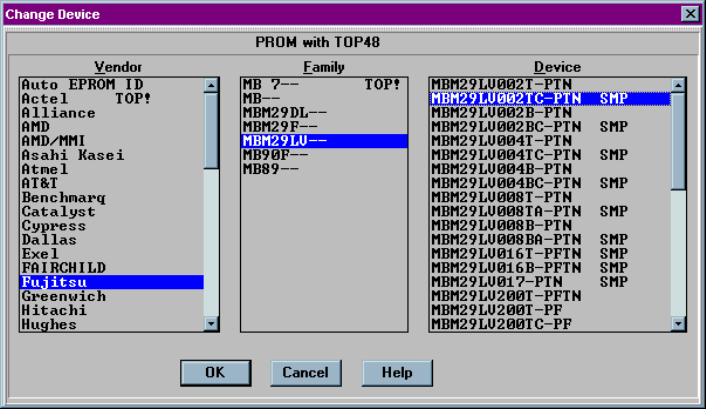
If you see SMP beside the device name, your current level of support does not include
this device and needs to be updated. To update your level of support, see the
SOFTWARE MAINTENANCE PLAN section of the Optima User Manual.
Level of support does not include this device