OptimaUserManual.pdf - 第83页
OPTIMA PROM SOF TW AR E Opti ma User M anual 77 x By te Ord er —Used to sel ect the order that the serial number data is pl aced in the devi ce as related to the dat a file; choices i nclude Bi g Endi an (Hi by te/Lo by …
OPTIMA PROM SOFTWARE
Optima User Manual
76
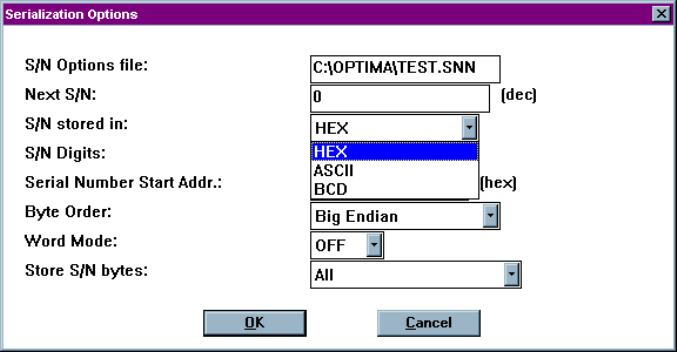
x S/N stored in—Selects the format that the serial number data will be written to
the device; choices are HEX (each digit from 0h to Fh), ASCII (each digit from
30h to 39h), and BCD (0000
2
to 1001
2
).
Selecting the format to store serial number data
x S/N Digits—Selects the number of characters, in decimal, used for the serial
number format. The maximum number of characters is:
q 8 for S/Ns stored in HEX (FFFFFFFFh); S/Ns 0 through 4,294,967,295
q 9 for S/Ns stored in ASCII (393939393939393939h); S/Ns 0 through
999,999,999
q 8 for S/Ns stored in BCD (99999999h); S/Ns 0 through 2,576,980,377
Note: The S/N Digits value indicates the number of hex characters
that are permitted to exist as a serial number in the memory
array. The exception to this rule is the ASCII format, in
which the number represents hex bytes. While this appears
complicated, as long as the serial number limits are not
exceeded, no errors will occur.
x Serial Number Start Addr.—The hexadecimal address in the memory array
where the first byte of the serial number will be placed. All characters of the
serial number must fit within the memory array of the device or serialization will
not take place.
OPTIMA PROM SOFTWARE
Optima User Manual
77
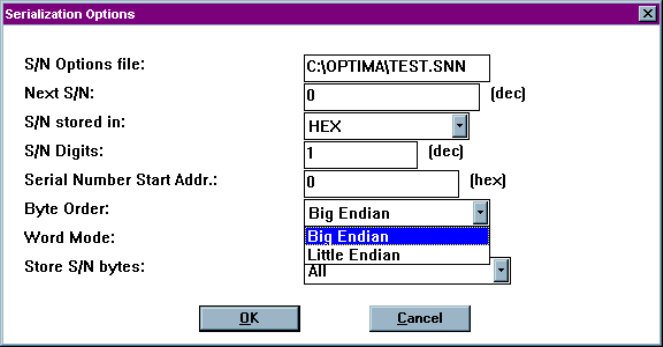
x Byte Order—Used to select the order that the serial number data is placed in the
device as related to the data file; choices include Big Endian (Hi byte/Lo byte—
Motorola) and Little Endian (Lo byte/Hi byte—Intel).
x Word Mode—Set when a serial number byte is to extend to the word width of
the device. If word mode is set to:
q Off—The default byte width of 8 bits is used.
q On—One byte of the serial number data will occupy the width of the
data path. If the data width of the device is 16 bits wide, then one byte
of the serial number will also be 16 bits wide. For unique devices, such
as some Microchip Technology devices, the word width may be 12 or 14
bits.
Selecting the byte order of a data file
OPTIMA PROM SOFTWARE
Optima User Manual
78
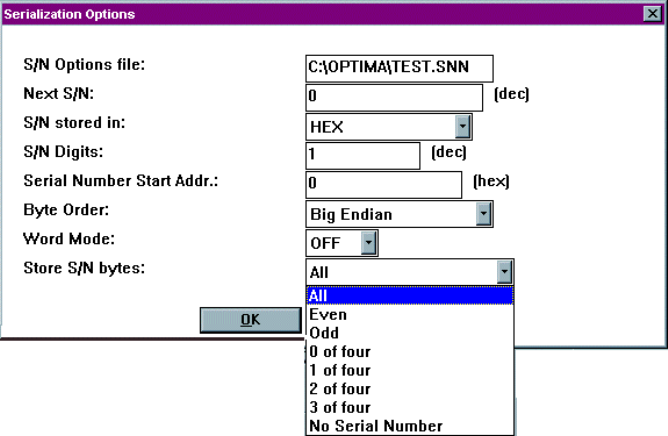
x Store S/N bytes—This setting specifies which bytes are written to the memory
array and in which order. The selections are:
q All—All bytes of the serial number are written to the memory array.
q Even—Only the even bytes of the serial number are written. If this
option is selected, then the number of serial number digits (selected in
S/N Digits) must be even (2, 4, 6, or 8).
q Odd—Only the odd bytes of the serial number are written. If this option
is selected, then the number of serial number digits must be even (2, 4, 6,
or 8).
q 0 of four, 1 of four, 2 of four, 3 of four—Only bytes in the
corresponding byte position in the serial number are written. For
example, if a HEX serial number of 00BC614Eh is generated, when 1 of
four is selected, BCh (byte #1 of four bytes total) is written to the
designated start address. The largest hexadecimal serial number allowed
is FFFFFFFFh, or 4,294,967,29510. The largest BCD serial number
allowed is 99999999h, or 2,576,980,37710
Selecting the method of storing serial number bytes
Note: The X of four mode works only with hexadecimal and BCD
serial number types as selected in the S/N stored in field.