OptimaUserManual.pdf - 第99页
OPTIMA PROM SOF TW AR E Opti ma User M anual 93 If yo u see SMP beside the device nam e , your current level of support does not include this devi ce and needs to be updated. T o update your lev el of support , see the S…
OPTIMA PROM SOFTWARE
Optima User Manual
92
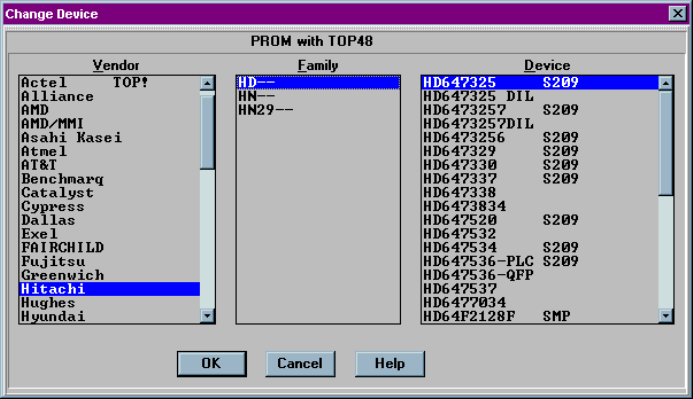
If you see Sxxx beside the device name, that device is not supported by the TOP you
have installed. For example, the TOP48 does not support Hitachi HD647325, as
shown here:
Device not supported by this TOP
OPTIMA PROM SOFTWARE
Optima User Manual
93
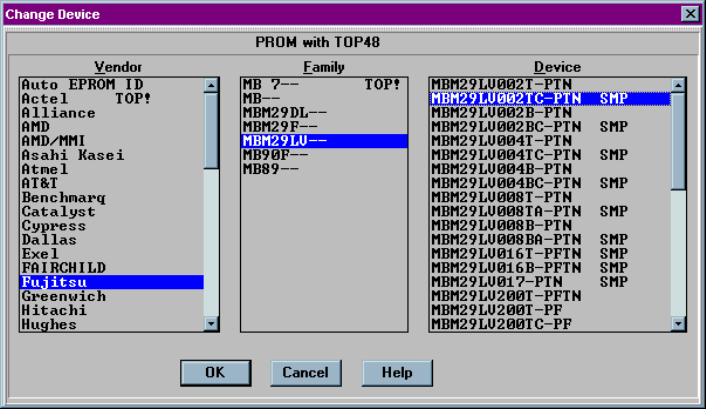
If you see SMP beside the device name, your current level of support does not include
this device and needs to be updated. To update your level of support, see the
SOFTWARE MAINTENANCE PLAN section of the Optima User Manual.
Level of support does not include this device
OPTIMA PROM SOFTWARE
Optima User Manual
94
The Options Menu
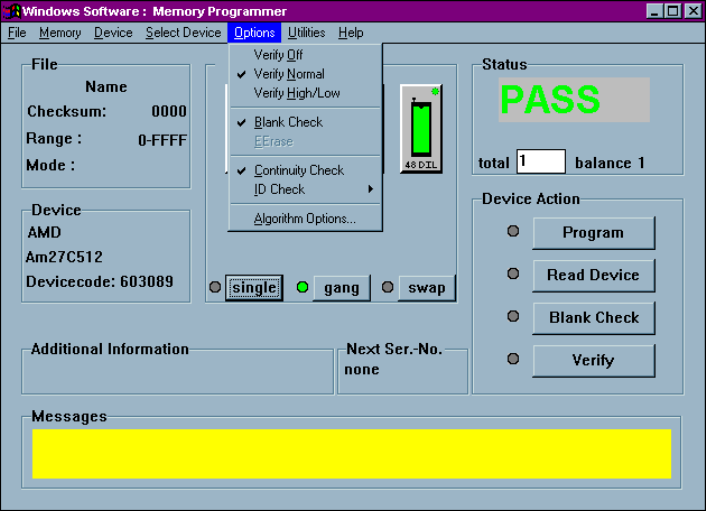
The fifth menu on the Main Programming screen is the Options menu.
The Options menu
Many programming operations are adjustable through the Options menu. Among
these are verify operation parameters, blank check, electronic erase, continuity checks,
electronic ID checks, specific algorithm parameters, checksum options, and various
special functions.
Note: Many of the options displayed in the Options menu are
device specific and may not be available for all
programming operations. In the example above, a UV
erasable device has been selected, and the EErase menu item
is not available.