OptimaUserManual.pdf - 第149页
SOFT W ARE M AINT ENANCE PLAN Opti ma User M anual 143 Once de vices ha ve be en r emo ved, pr es sing a ny key will begin a s er ies of pr int er po rt te st s t o det e rmin e t he co mput er ’s abilit y t o co mmun ic…
SOFTWARE MAINTENANCE PLAN
Optima User Manual
142
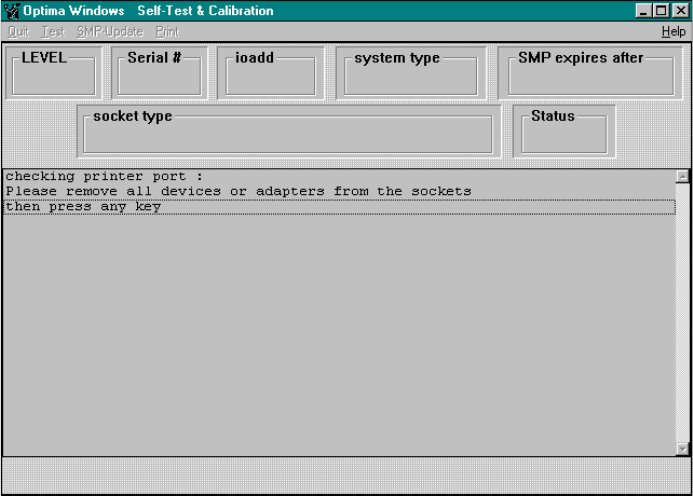
When selected, the following screen will appear:
Self-Test and Calibration screen
As prompted by the message, remove all devices or adapters from the sockets and
press any key to continue.
SOFTWARE MAINTENANCE PLAN
Optima User Manual
143
Once devices have been removed, pressing any key will begin a series of printer port
tests to determine the computer’s ability to communicate with the programmer. When
the printer port tests are complete, you will be prompted to perform a Self Test.
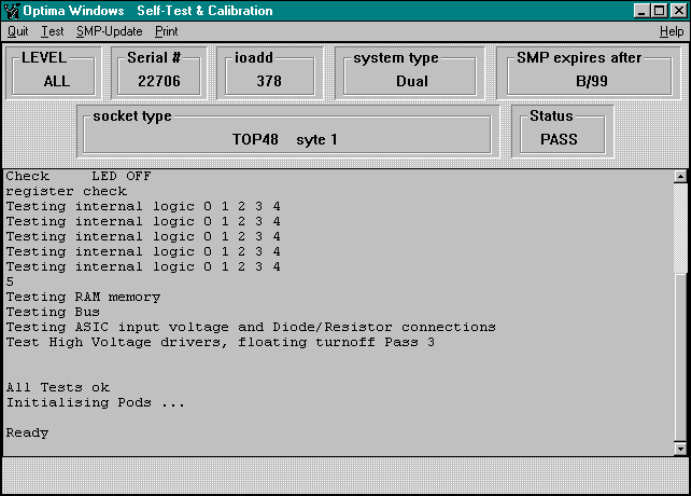
Selecting the <YES> button will begin the Self Test. When the Self Test is complete,
the following screen is visible:
Self-Test and Calibration report
SMP expires after—The date that the current algorithm support expires. In this
case, after B/99.

SOFTWARE MAINTENANCE PLAN
Optima User Manual
144
To update, select SMP Update from the menu bar. The following dialogue will
appear:
Enter the new Update Code Number here, and then select <OK>.
To verify that the SMP has been updated, exit the Optima Calibration Utility using the
Quit menu function, and re-start Optima TEST. Perform the steps as outlined above,
and ensure that the new features have been installed.