OptimaUserManual.pdf - 第35页
QUICK ST ART Opti ma User M anual 29 5. Click OK to save that selection and di splay the Main P rogram m ing screen:
QUICK START
Optima User Manual
28
Programming a Logic Device By Reading A Master Device
If you wish to program a logic-based device and you will be reading a Master Device,
follow this procedure.
S
ELECT THE DEVICE YOU WISH TO PROGRAM
:
Programming begins by selecting the device you wish to program. To select the
device, follow these steps:
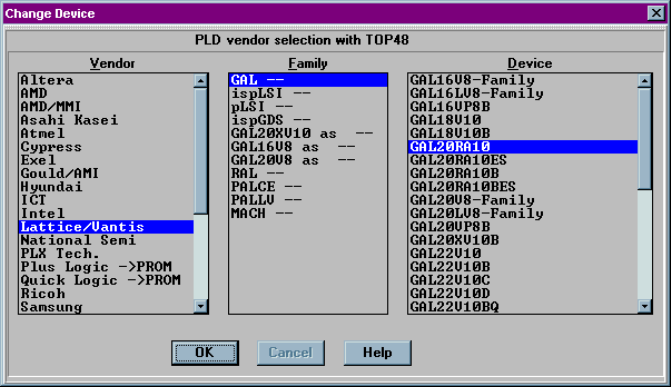
1. Double click the Optima PAL icon on the Windows desktop. The Change
Device window displays a device list for the specific TOP you are using.
2. Click on the name of the Vendor. When you do that, the Family and Device lists
may change.
3. Click on the general Family of devices. The Device list may change again based
of the Family you chose.
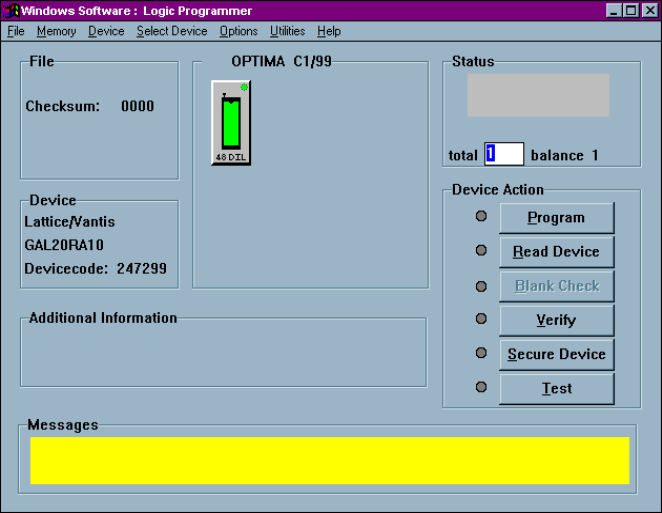
4. Click on a device part number from the Device list. In this example, a Lattice
GAL20RA10 is selected:
QUICK START
Optima User Manual
29
5. Click OK to save that selection and display the Main Programming screen:
QUICK START
Optima User Manual
30
R
EAD A
M
ASTER
D
EVICE
:
After you have selected the device, you are ready to read the Master Device. To read
the Master Device, follow these steps:
1. Insert the Master Device in the TOP lit with the green LED.
2. Click Read Device.
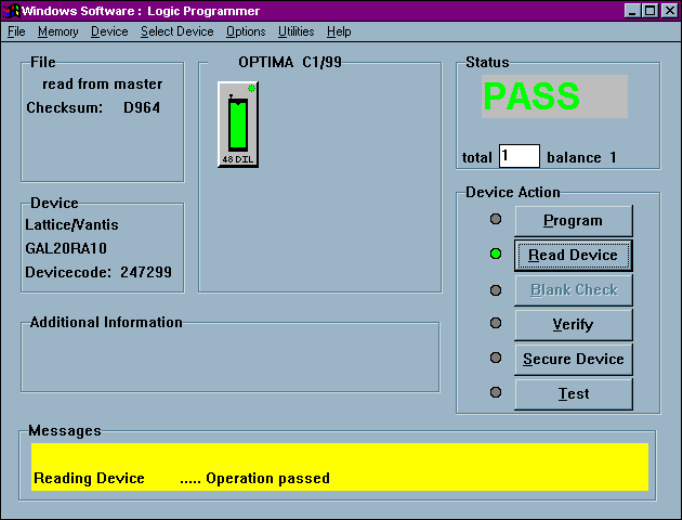
Data from the Master Device is loaded into the programmer’s RAM. When the
load operation is complete, the Status area in the Main Programming screen
displays the word PASS and the checksum for the data loaded into RAM is
displayed: