OptimaUserManual.pdf - 第137页
SINGLE, GANG , AND SW AP PROG RAMM ING Opti ma User M anual 131 Processing Devi ces in the Gang Program ming M ode P ro grammin g one devic e a t a time ca n b e t ime c on sumin g. T o e xpe dit e p ro gra mming devic e…
SINGLE, GANG, AND SWAP PROGRAMMING
Optima User Manual
130
simply select the TOP on Site #2, #3 or #4 by clicking its icon with the mouse cursor.
The newly selected site will be highlighted, indicating that it is the active site.
Note: If the programmer has different styles of TOPs installed,
selecting a site with a different style of TOP will prompt you
to select a new device. This is normal, as the software must
set up the programmer to process the different style of
device.
SINGLE, GANG, AND SWAP PROGRAMMING
Optima User Manual
131
Processing Devices in the Gang Programming Mode
Programming one device at a time can be time consuming. To expedite programming
devices, gang programming can be used with the Multisyte line of programmers
(Dual, Quad, and Octal):
A Quad programmer with four TOP48s installed
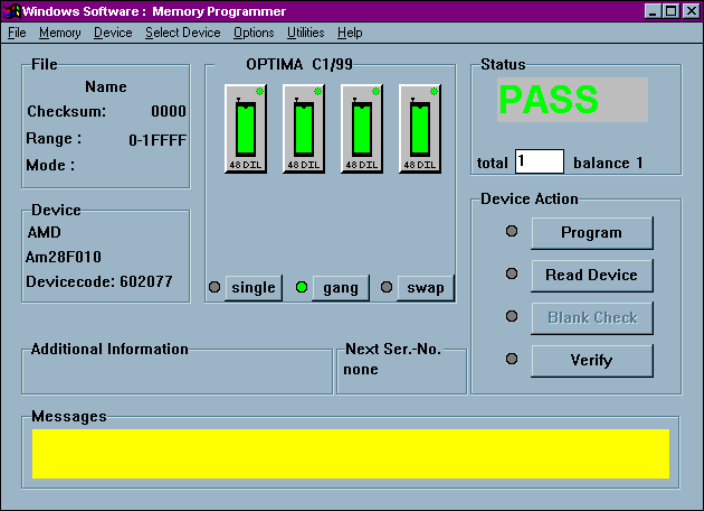
Here a Multisyte Quad is set to operate in gang mode. All four identical TOPs are
highlighted, indicating that they can be used simultaneously to program devices. It is
not necessary that all TOPs on the programmer are identical, but you do need at least
two identical TOPs for gang programming.
SINGLE, GANG, AND SWAP PROGRAMMING
Optima User Manual
132
To enter the gang-programming mode, perform the following:
1. Select the <single> button to enter the single programming mode.
2. Select the TOP style to be used for programming in the gang mode by choosing
the appropriate TOP on any site.
3. Select the <gang> button.
The LED to the left of the <gang> button will turn yellow, indicating it is waiting
for the next operation.
4. Select another identical TOP.
The software will automatically select all of the TOPs of the same style installed
on the programmer.
Note: The majority of devices are supported in gang more, but a
few devices, particularly logic devices, may not be
supported. Once you select gang programming, go to Select
Device and make sure the device is supported in gang
programming mode. You can also get this information from
Create a Device List.
Note: If you decide to change TOPs while the Optima software is
running, the programmer and software will not recognize
that the new TOP has been installed. To properly initialize
the TOP, end the current session and restart the Optima
software. Removing and replacing TOPs while the
programmer is turned on will not damage the programmer
or the TOPs.
Once the gang programming mode is properly configured, all of the selected sites are
used for simultaneous programming. When beginning the programming operation,
devices can be inserted into all of the selected sockets for programming.