OptimaUserManual.pdf - 第76页
OPTIMA PROM SOF TW AR E Opti ma User M anual 70 M emory>Address Range For dev ices that suppor t partial operations, or if the data f ile i s required to begin at a specific l ocation, the Address Range… menu item m a…
OPTIMA PROM SOFTWARE
Optima User Manual
69
NOTE: The Fill memory menu item accepts values in relation to the
device to be processed. It is often necessary to know the
block size of the specific device being used. Many devices
do not support partial programming operations. Therefore,
partially filling RAM with a data pattern is not supported
with those devices. Because of this, an error will occur if
you attempt to fill RAM with less data than the device
supports. Also, filling RAM beyond the block size of the
device will produce a similar error.
x Swap bytes—Allows you to transpose high and low order bytes within the data
file
x Search for byte—Allows you to search the memory array for a specific data
string.
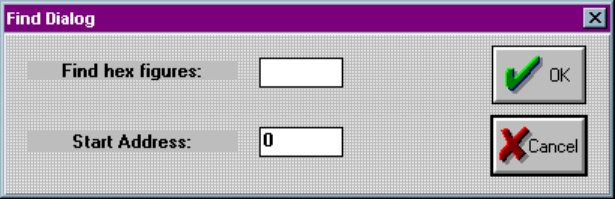
Selecting Search for Byte produces this window:
“Search for byte” allows you to locate a hex string within memory array
x Repeat search—Performs the Search for byte operation again with the
previously entered search data
You may also select Memory>Fill to fill memory with a hexadecimal data pattern.
Once selected, the following screen will appear:
Memory>Swap Bytes
In cases where the data bytes must be reversed in the data file to accommodate a
specific device, select Memory> Swap Bytes (or select Memory>Edit and right
click to select Swap Bytes). This function allows you to transpose odd and even order
bytes within the data file.
OPTIMA PROM SOFTWARE
Optima User Manual
70
Memory>Address Range
For devices that support partial operations, or if the data file is required to begin at a
specific location, the Address Range… menu item may be used to establish the
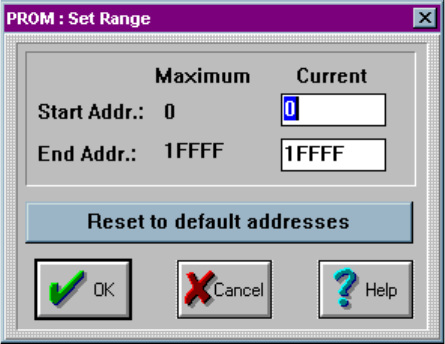
programming area of the device. Selecting the Memory>Address Range… produces
the following dialogue:
Setting the device address range
OPTIMA PROM SOFTWARE
Optima User Manual
71
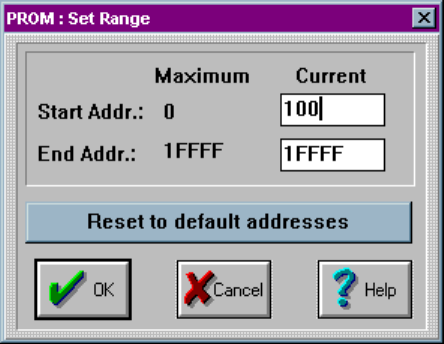
In this dialogue, you can specify the starting and ending addresses. In the example
shown, the start address is set to 100:
Start address set to 100
The file load operation will cause data to be loaded starting at address location hex
100. If a programming operation is performed, data will be programmed from location
100 to 1FFFF