OptimaUserManual.pdf - 第139页
SINGLE, GANG , AND SW AP PROG RAMM ING Opti ma User M anual 133 Processing Devi ces in the Sw ap Program ming M ode In some ca se s t h e s wap-pr ogr amming mo de f ur t he r in cr ea se s e ff icie nc y in a production…
SINGLE, GANG, AND SWAP PROGRAMMING
Optima User Manual
132
To enter the gang-programming mode, perform the following:
1. Select the <single> button to enter the single programming mode.
2. Select the TOP style to be used for programming in the gang mode by choosing
the appropriate TOP on any site.
3. Select the <gang> button.
The LED to the left of the <gang> button will turn yellow, indicating it is waiting
for the next operation.
4. Select another identical TOP.
The software will automatically select all of the TOPs of the same style installed
on the programmer.
Note: The majority of devices are supported in gang more, but a
few devices, particularly logic devices, may not be
supported. Once you select gang programming, go to Select
Device and make sure the device is supported in gang
programming mode. You can also get this information from
Create a Device List.
Note: If you decide to change TOPs while the Optima software is
running, the programmer and software will not recognize
that the new TOP has been installed. To properly initialize
the TOP, end the current session and restart the Optima
software. Removing and replacing TOPs while the
programmer is turned on will not damage the programmer
or the TOPs.
Once the gang programming mode is properly configured, all of the selected sites are
used for simultaneous programming. When beginning the programming operation,
devices can be inserted into all of the selected sockets for programming.
SINGLE, GANG, AND SWAP PROGRAMMING
Optima User Manual
133
Processing Devices in the Swap Programming Mode
In some cases the swap-programming mode further increases efficiency in a
production environment. The swap mode is a modified gang mode, because it allows
you to load, unload, and label devices on half of the TOPs on the programmer while
the other half programs devices. As in gang programming, swap programming
requires that you have at least two identical TOPs installed on your Multisyte
programmer.
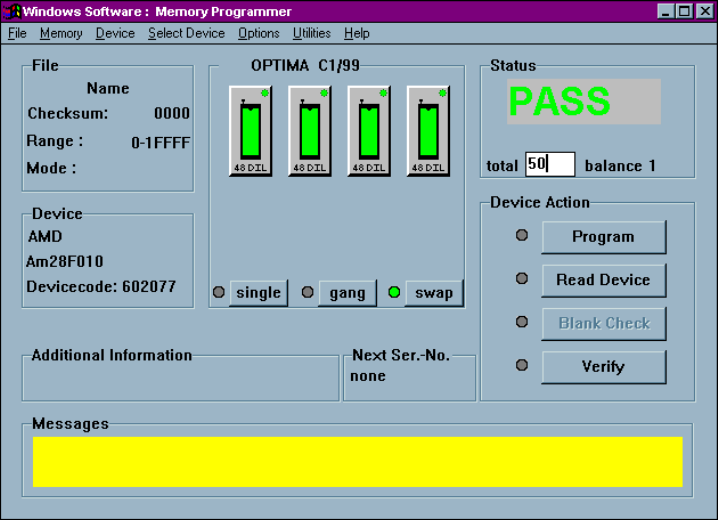
A Quad programmer with four TOP48s installed for swap programming
To enter the swap programming mode, perform the following:
1. Select the <swap> button.
The LED beside it will turn yellow, indicating it is waiting for some user action.
SINGLE, GANG, AND SWAP PROGRAMMING
Optima User Manual
134
2. Select one of the installed TOPs on the programmer.
The programmer will then select all of the TOPs that match the one chosen. The
indicator beside the <swap> button will turn green, indicating that the
programmer is ready for operation in the swap mode.
3. In the Status section of the screen, enter the total number of devices to be
programmed in the text field labeled “total.”
Note: If the total number of devices to program is smaller than the
number of sites on the programmer, then the swap mode will
not be activated. The purpose of this mode is to enhance
productivity when processing a large number of devices.
The swap mode is purposely deactivated when processing
small quantities of devices.
4. From the Device Menu, select Program, or select <Program> to begin the
programming operation.
5. A window will appear instructing you to insert devices into the sockets with
flashing indicators; insert the devices, then select <OK>.
6. While the first set of devices is being programmed, other sets may be prepared,
labeled, etc.
7. When the programming of the first set of devices is complete, the software will
instruct you to remove the programmed devices, insert the new devices, and
select <OK>; the removed devices can then be labeled, prepared, etc.