OptimaUserManual.pdf - 第127页
OPT IMA PAL SO FTW ARE Opti ma User M anual 121 This option is not avai lable w ith electrical ly -erasable dev ices.
OPTIMA PAL SOFTWARE
Optima User Manual
120
Options>Continuity Check
If enabled, this selection checks for proper device alignment in the socket before a
programming operation. Alignment errors will present the standard continuity
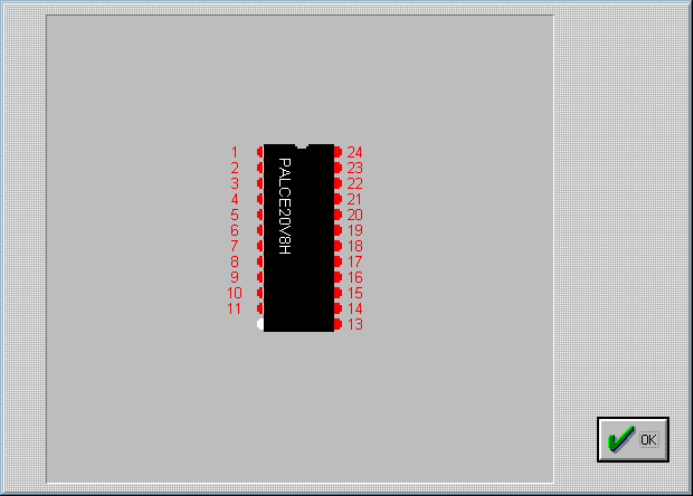
warning message and allow you to <Display> the pins in question:
Displaying the device pin map following a continuity failure
Note: The Continuity Check option should always be enabled unless
there is a known reason to turn it off.
Options>Blank Check
This selection adds a Blank Check operation to the programming operation if the
device requires blank check. If a device is not blank during the programming
operation, a message will appear notifying you that the device in use is not blank. If
you choose to continue, the device will be over-programmed.
OPTIMA PAL SOFTWARE
Optima User Manual
121
This option is not available with electrically-erasable devices.
OPTIMA PAL SOFTWARE
Optima User Manual
122
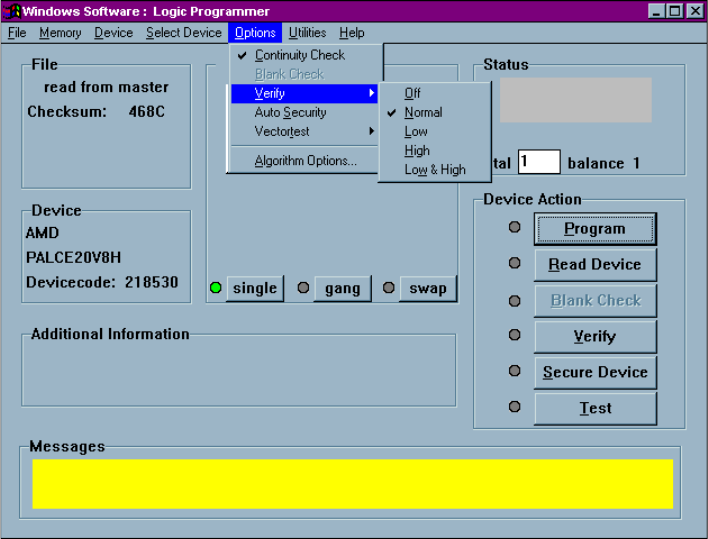
Options>Verify Options
This selection is used to set the methods of device data verification after
programming:
Verification options in the Options menu
The following device verification options are available:
q Verify Off provides no verification of the device after programming
q Verify Normal provides a single-pass verify at nominal V
CC
for the device after
programming
q Verify Low provides a single-pass verify at device-rated low V
CC
q Verify High provides a single-pass verify at device-rated high V
CC
q Verify Low and High provides a two-pass verify; once at device-rated low V
CC
,
and a second at device-rated high V
CC