OptimaUserManual.pdf - 第62页
OPTIMA PROM SOF TW AR E Opti ma User M anual 56 Start address in fi le: If a hexadecimal number is placed in the Start address in file box prior to a file load operation, the load softw are waits until that address is re…
OPTIMA PROM SOFTWARE
Optima User Manual
55
If your data file does not use any of the predefined file
extensions, you can wild card the file name by using (*.*) in
the file name box and choosing the appropriate file type.
Navigate the computer or network for the required data file, and select the <OK>
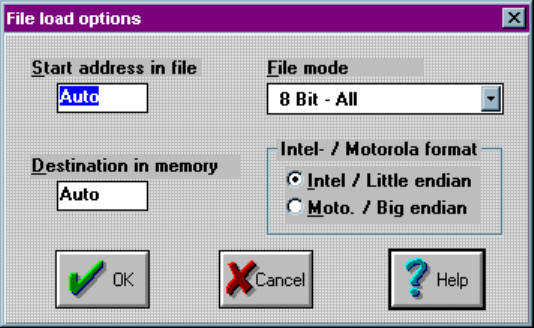
button. Once the file is selected, the File load options screen will appear:
File load options screen
This dialogue provides options for file starting address, device memory destination,
file mode, and data format.
File Load Options
For most file load operations you will accept the default values when the File load
options dialog box appears by clicking on <OK>. However, the File load options
dialog box has four option menus that allow you to customize the file load operation:
x Start address in file
x Destination in memory
x File mode
x Intel/Motorola format
OPTIMA PROM SOFTWARE
Optima User Manual
56
Start address in file:
If a hexadecimal number is placed in the Start address in file box prior to a file load
operation, the load software waits until that address is reached before placing data into
the Optima Ram Buffer.
In Example 1 below, the Start address in file has been set to 300 hex, and therefore
the load software waits until address 300 hex has been reached before placing data
into the Optima Ram Buffer starting at location zero.
Start address in file works for all formats.
Example 1: Start address in file
File Data (ASCII Hex Space) Optima Ram Buffer
$A000, Address Data
00 01 02 03 04 05 06 07 0000 88
0001 99
$A100, 0002 AA
08 09 0A 0B 0C 0D 0E 0F 0003 BB
0004 CC
$A200, 0005 DD
00 11 22 33 44 55 66 77 0006 EE
0007 FF
$A300, 0008 xx
88 99 AA BB CC DD EE FF 0009 xx
000A xx
000B xx
000C xx
Start address in file = 300 Hex 000D xx
xx = Don’t Care 000E xx
000F xx
OPTIMA PROM SOFTWARE
Optima User Manual
57
Destination in memory:
The hex value placed in the Destination in memory determines the starting point in the
Optima Ram Buffer where data will be stored.
Destination in memory works for all file formats.
In Example 2 below the Destination in memory value is set to 800 hex; this causes the
start of the data file to be placed at 800 hex in the Optima Ram Buffer.
Example 2: Destination in memory
File Data (ASCII Hex Space) Optima Ram Buffer
$A000, Address Data
00 01 02 03 04 05 06 07 0000 xx
0100 xx
$A008, 0200 xx
08 09 0A 0B 0C 0D 0E 0F 0300 xx
0400 xx
$A010, 0500 xx
00 11 22 33 44 55 66 77 0600 xx
0700 xx
$A018, 0800 00
88 99 AA BB CC DD EE FF 0801 01
0802 02
0803 03
0804 04
Destination in memory = 800 Hex 0805 05
xx = Don’t Care 0806 06
0807 07