OptimaUserManual.pdf - 第113页
OPT IMA PAL SO FTW ARE Opti ma User M anual 107 T he Mem ory Men u The second menu on t he M ain Pr ogramming scree n is the Me mor y m enu. The Memo ry menu provides y ou with a method to v iew and/or edit the content s…
OPTIMA PAL SOFTWARE
Optima User Manual
106
File>Save As
There is also an option for saving the data in RAM as a data file. This can be helpful
when you have a master device but no data file, and you would like to create one. The
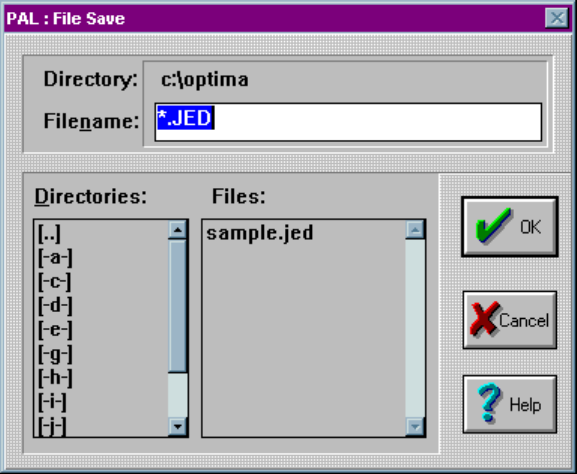
Save As dialogue allows the generation of data files as shown below:
The Save-As dialogue
You may save data files in standard JEDEC (*.jed) format only. Select a path and
filename for your file, then select <OK> to save it to the designated location.
OPTIMA PAL SOFTWARE
Optima User Manual
107
The Memory Menu
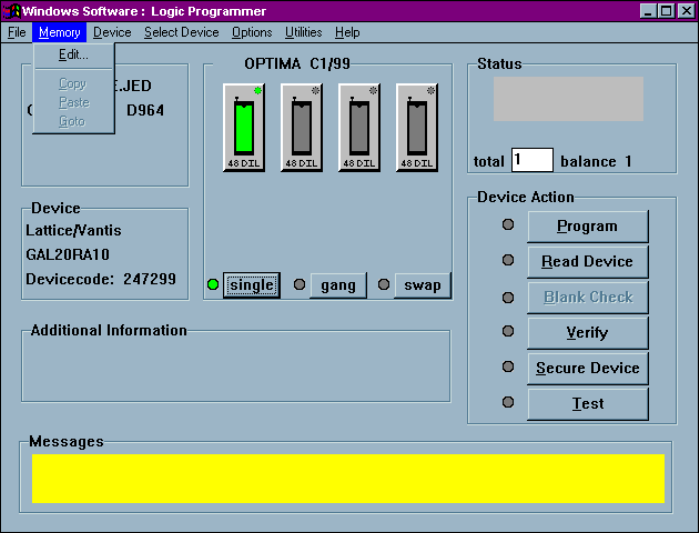
The second menu on the Main Programming screen is the Memory menu. The
Memory menu provides you with a method to view and/or edit the contents of
memory at any time before or after the programming operation:
The Memory menu
OPTIMA PAL SOFTWARE
Optima User Manual
108
Memory>Edit
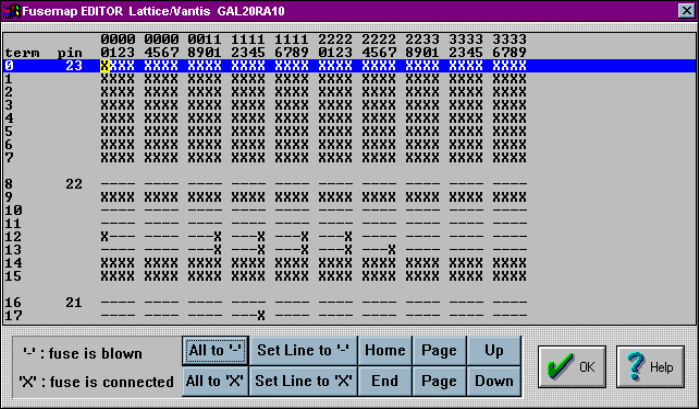
Selecting Memory>Edit from the Memory menu will produce the following screen:
The Edit menu
The editor screen allows you to view the fusemap of the logic device under test, and
also allows you to edit the fusemap manually if necessary. As can be seen in the
figure above, a portion of the addressable fuse locations is displayed. If there is a “–”
symbol in any location, that fuse has been blown, while the “X” symbol indicates that
the fuse is still intact. Some of the additional controls on the screen include:
x All to ‘–’—Blows all fuses in the device
x All to ‘X’—Connects all fuses in the device
x Set Line to ‘–’—Blows all fuses in the line that has been selected by the mouse
cursor; indicated by the highlighted line
x Set Line to ‘X’—Connects all fuses in the line that has been selected by the
mouse cursor; indicated by the highlighted line
x Home—Sends the cursor back to the beginning fuse location of the device
x End—Sends the cursor to the last fuse location of the device