OptimaUserManual.pdf - 第120页
OPT IMA PAL SO FTW ARE Opti ma User M anual 114 If you select < YES >, then the follow ing screen appears: Device error ma p follow ing a verify failure On the screen abov e, there are indications of the dev ice lo…

OPTIMA PAL SOFTWARE
Optima User Manual
113
the data on the device cannot be read by unauthorized
personnel.
Device>Blank Check
This selection verifies that the non-electrically erasable device in the socket is in the
erased condition. The device in the socket is read and the contents compared to the
expected “erased” condition. The device type selected must match the physical
device inserted in the socket.
Electrically-erasable devices do not require a blank check operation. These devices
are automatically erased as part of the programming cycle.
Note: Blank Check operation is automatically performed during the
Program operation.
Device>Verify
This selection verifies the fusemap against the data file to ensure they match; any
verify failures will produce the following error:
Verify failure will prompt you to display a detailed report
OPTIMA PAL SOFTWARE
Optima User Manual
114
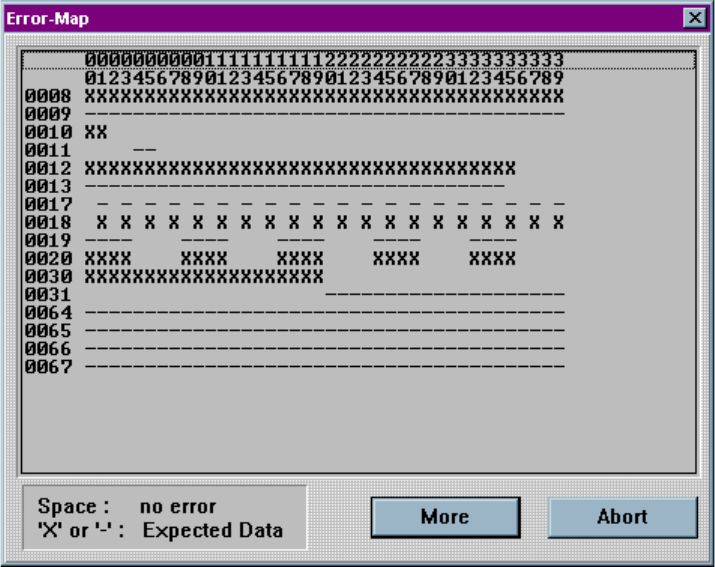
If you select <YES>, then the following screen appears:
Device error map following a verify failure
On the screen above, there are indications of the device locations and the failures
encountered. Blank spaces indicate locations where the data matched. Any space
with either a “–” symbol or an “X” symbol is an error, where the symbols indicate the
data that was expected in that location (“–” = blown fuse, “X” = connected fuse). The
<More> button provides more failure data if it exceeds the capacity of the window. If
a device has been secured, the Verify operation will not function correctly.
Device>Secure
This selection manually sets the security feature of the device inserted in the socket.
Many logic devices have optional security fuses that can be programmed after all
other fuses have been programmed. These final fuses prohibit reading (and
OPTIMA PAL SOFTWARE
Optima User Manual
115
verification) of the device. This means that the pattern set into the fuses of the device
is no longer readable by personnel who are not authorized to view the data pattern.
To manually secure the device, select Device>Secure. This must be the last step in
any programming sequence since the programmer expects to able to verify (read) a
device after programming.
In automatic mode (set with the Auto Security selection in the Options menu), the
security fuse(s) will be set during each programming cycle, after verifying and before
vector testing. If the JEDEC file contains the security fuse command (G1*), the Auto
Security mode is automatically enabled, and the Auto Security feature will be
checked in the Options menu.
The PAL software first programs the security fuse, then reads the array to verify that
the data no longer matches the array. The PASS message will only be displayed if the
array data is no longer readable.
Some devices disable preload if the security fuse is set. For these devices, Optima
PAL will run the test vector program before setting the security fuse during the
programming routine.
Some devices have a mode to read out the security fuse bit. Optima PAL can read this
bit and will indicate that the security bit is set. However, it will then perform a
double-check of the array contents to assure protection.
Device>Test
This selection performs vector testing of the device after programming. If a JEDEC
file with test vectors has been read into memory, then the device in the socket can be
tested for conformance with these test sequences with this command. This test will
also be invoked after the Verify operation in a programming cycle if test vectors are in
memory.
Note: If no test vectors are appended to the JEDEC file, this option
is not enabled.
The Test operation has three passes for each vector. Pass 1 sets up all input pins.
Any 0, 1, or X levels are presented to the device. All device outputs are set to read
mode. Optima PAL has a special method for handling the “X” (don’t care) level,
which is incompletely defined in the JEDEC specification and is often a cause of
vector test failures in other systems.