OptimaUserManual.pdf - 第126页
OPT IMA PAL SO FTW ARE Opti ma User M anual 120 Options>C ontinuity Che ck If enabled, this sel ection check s for proper devi ce alig nment in the sock et before a programming operat ion. A lignment err ors will pres…
OPTIMA PAL SOFTWARE
Optima User Manual
119
The Options Menu
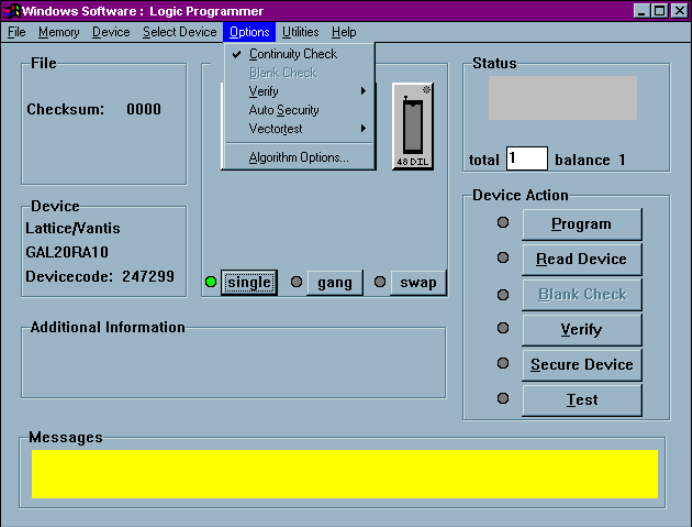
The fifth menu on the Main Programming screen is the Options menu.
The Options menu
Many programming operations are adjustable through the Options menu. Among
these are Continuity Check, Blank Check, verification parameters, Automatic
Security, Vectortest, and specific algorithm parameters.
Many of the options displayed in the Options menu are device-specific and may not
be available for all programming operations. For example, a UV erasable device may
not have the Blank Check menu item available to the user.
OPTIMA PAL SOFTWARE
Optima User Manual
120
Options>Continuity Check
If enabled, this selection checks for proper device alignment in the socket before a
programming operation. Alignment errors will present the standard continuity
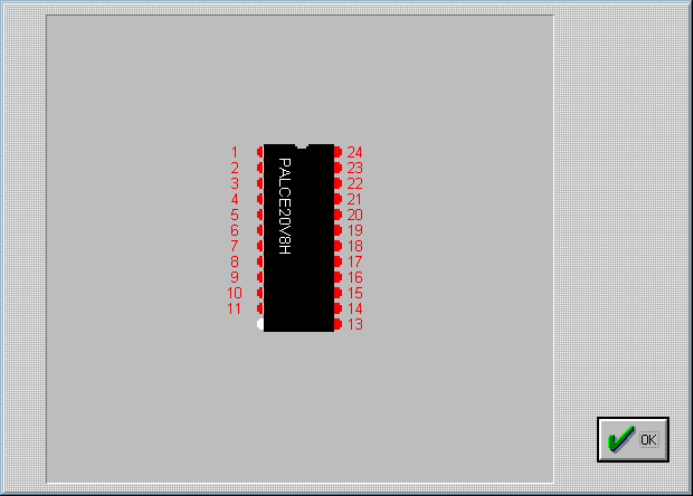
warning message and allow you to <Display> the pins in question:
Displaying the device pin map following a continuity failure
Note: The Continuity Check option should always be enabled unless
there is a known reason to turn it off.
Options>Blank Check
This selection adds a Blank Check operation to the programming operation if the
device requires blank check. If a device is not blank during the programming
operation, a message will appear notifying you that the device in use is not blank. If
you choose to continue, the device will be over-programmed.
OPTIMA PAL SOFTWARE
Optima User Manual
121
This option is not available with electrically-erasable devices.