OptimaUserManual.pdf - 第92页
OPTIMA PROM SOF TW AR E Opti ma User M anual 86 Device>Verify Dev ices may also be verified w ith know n good data by selecti ng Device>V erify To use this function, you m ust first read the device’s data i nto the…
OPTIMA PROM SOFTWARE
Optima User Manual
85
Device>Blank Check
The Blank Check feature may be enabled or disabled depending on the device
selected. If the feature is enabled, selecting Device>Blank Check lets you determine
if the device under test is truly empty. If the blank check passes, the device is truly
empty. Otherwise, some of the device locations may have data in them.
UV erasable devices must be erased under ultraviolet light in accordance with the
manufacturer’s instructions before programming.
Note: Not all UV erasable devices are guaranteed to arrive blank
from the manufacturer. If they are not blank, simply erase
them according to the manufacturer’s guidelines for the
device under test.
The Blank Check function is performed prior to all programming functions. You may
also initiate the Blank Check operation from the <Blank Check> button in the Device
Action section of the screen.
OPTIMA PROM SOFTWARE
Optima User Manual
86
Device>Verify
Devices may also be verified with known good data by selecting Device>Verify To
use this function, you must first read the device’s data into the programmer/software
RAM. The data can be read two different ways:
x Select Device>Read to read a master device into programmer/software RAM.
x Select File>Load to load a data file into programmer/software RAM.
Once the data to be verified has been successfully loaded into programmer/software
RAM, insert the device into the programmer socket. Select Device>Verify, or click
the <Verify> button in the Device Action section of the screen to initiate the Verify
action. During the Verify action, a byte-by-byte comparison is performed between the
data in RAM and the device in the socket. When the Verify action is complete,
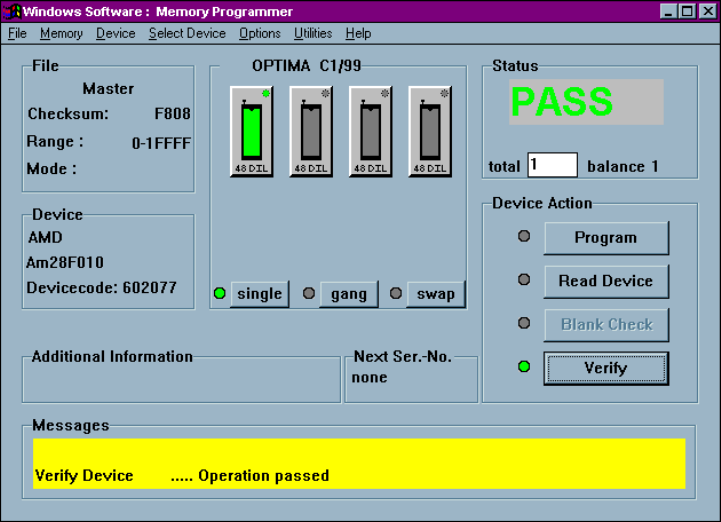
PASS/FAIL results will be displayed in the Status section of the screen, as well as in
the Messages section
Device Verify Pass message
OPTIMA PROM SOFTWARE
Optima User Manual
87
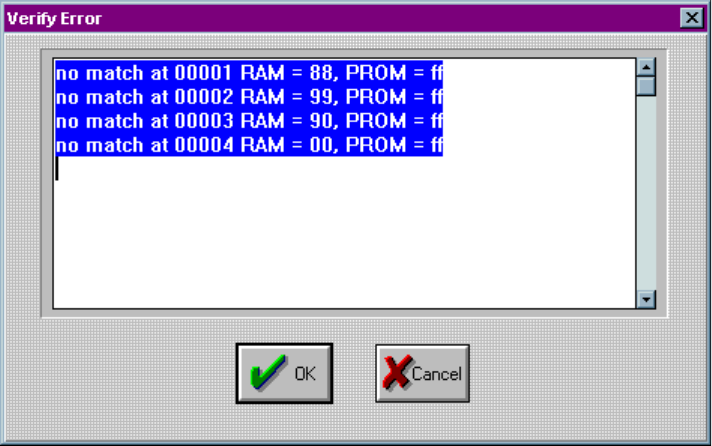
If you get an error message, the following screen will identify the address from RAM
and PROM and data information where errors occurred:
Device verification errors are displayed with location information