OptimaUserManual.pdf - 第54页
QUICK ST ART Opti ma User M anual 48 4. Click OK . You’l l be ask ed Ready to load? Click YES 5. A fter t he data has been loaded, y ou’ll see a screen that repor ts the stat us of the load ing:
QUICK START
Optima User Manual
47
L
OAD A
D
ATA FILE
:
After you have selected the device, you are ready to load a data file into RAM. To
load a data file, follow these steps:
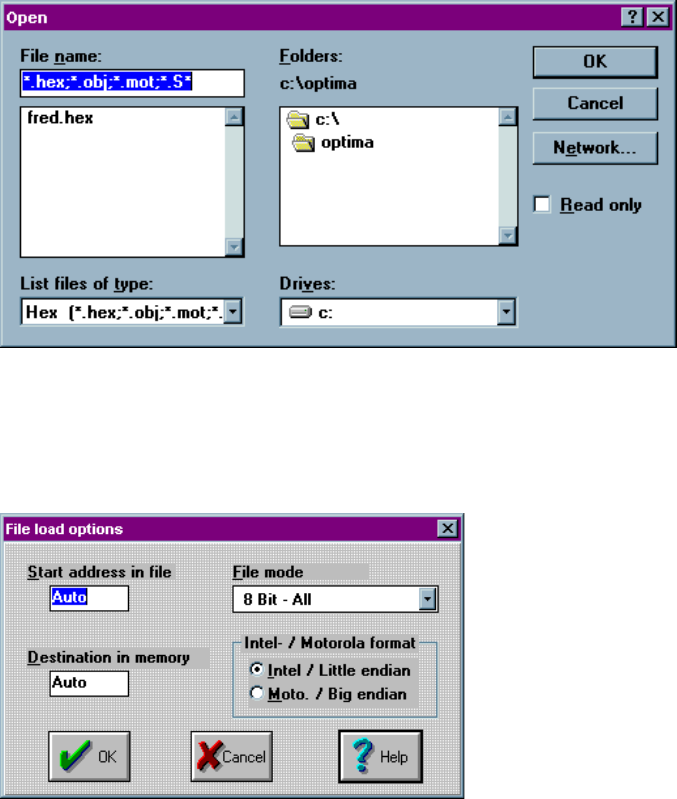
1. Select File > Load from the main menu bar. The Open dialog box is displayed:
2. Browse through the “List files of type” box and select the appropriate program
data file name from the list on the screen.
3. Click OK. The File load options dialog box is then displayed:
QUICK START
Optima User Manual
48
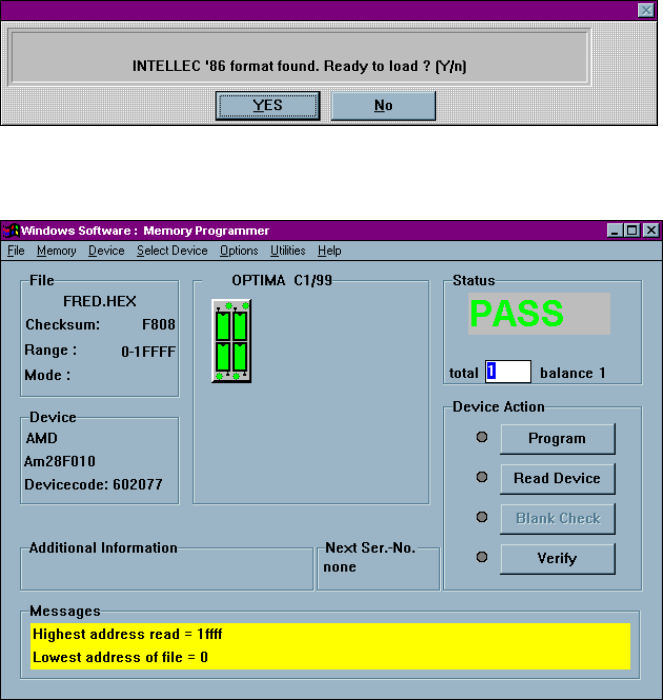
4. Click OK. You’ll be asked Ready to load? Click YES
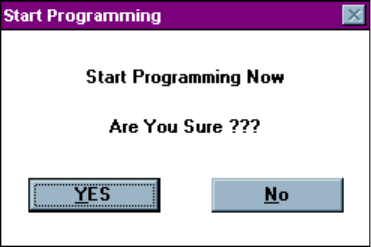
5. After the data has been loaded, you’ll see a screen that reports the status of the
loading:
QUICK START
Optima User Manual
49
P
ROGRAM THE
D
EVICE
Now that you have loaded valid data into the programmer’s RAM by loading a data
file, you’re ready to program the device. To program the device, follow these steps:
1. Insert the devices you wish to program into the four sockets of the TOP432.
2. Click Program. You will be asked if you wish to Start Programming Now.