ALFeeder_E.pdf - 第3页
General Contents EUKLU-213-0140 General Contents Introduction 1. About this manual S-1 1.1 Contens of each chapter S-1 2. Safety S-2 2.1 Common precautions S-2 2.2 Safety message S-3 2.3 Keeping body and objects away fro…
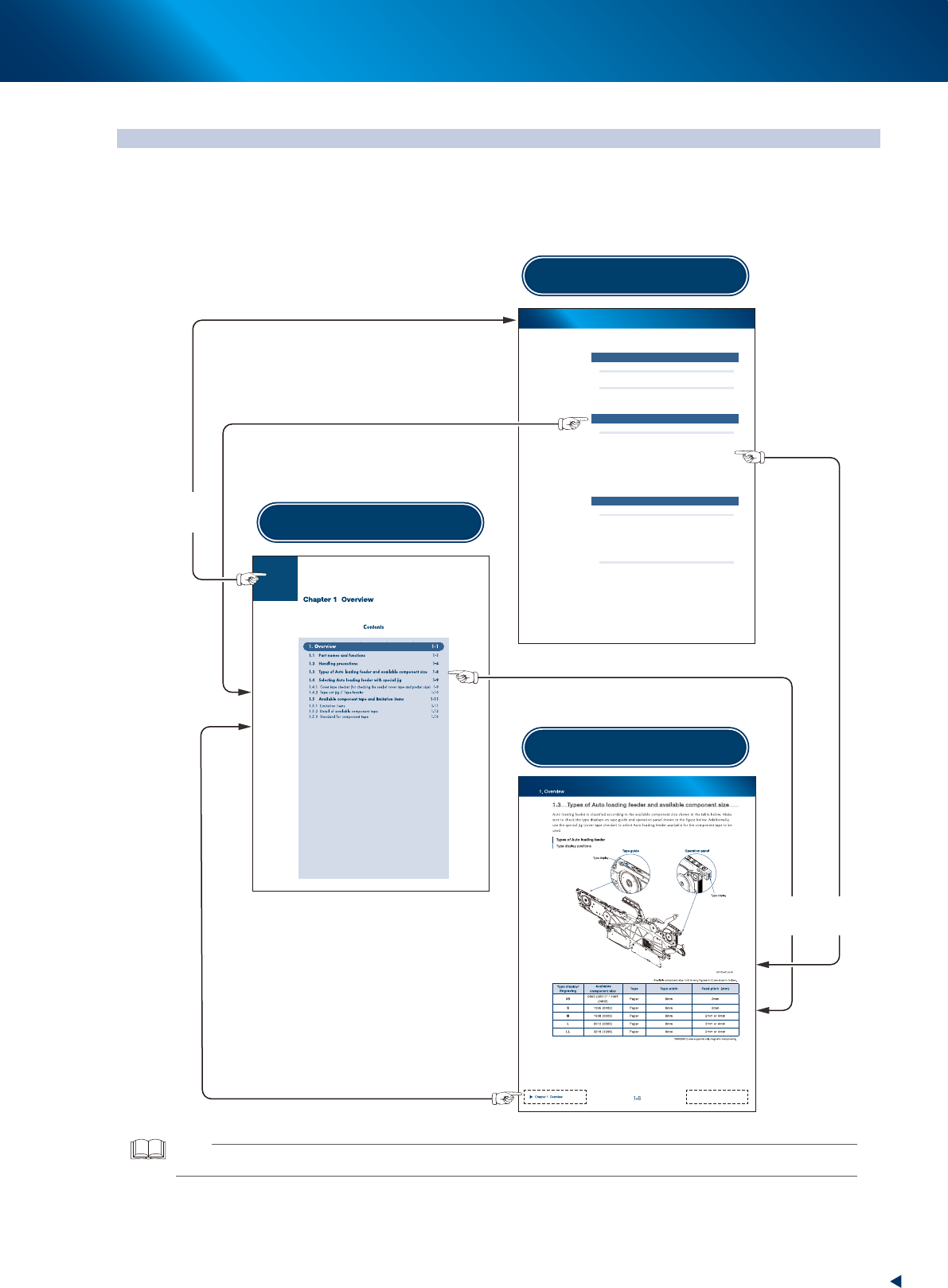
Page links in this manual
Page links in this manual
Page links in this manual
This PDF manual provides the following page links; jump from current page to “Chapter Contents” and
jump from “Chapter Contents” to “General Contents”, other than that from contents to selected page.
The figure below describes the detail.
General Contents
EUKLU-213-0140
General Contents
Introduction
1. About this manual S-1
1.1 Contens of each chapter S-1
2. Safety S-2
2.1 Common precautions S-2
2.2 Safety message S-3
2.3 Keeping body and objects away from moving parts S-4
Chapter 1 Overview
1. Overview 1-1
1.1 Part names and functions 1-1
1.2 Handling precautions 1-4
1.3 Types of Auto loading feeder and available component size 1-8
1.4 Selecting Auto loading feeder with special jig 1-9
1.4.1 Cover tape checker (for checking the seal of cover tape and pocket size) 1-9
1.4.2 Tape cut jig / Tape leveler 1-10
1.5 Available component tape and limitation items 1-11
1.5.1 Limitation items 1-11
1.5.2 Detail of available component tape 1-13
1.5.3 Standard for component tape 1-16
Chapter 2 Handling component tape
1. Preparation for loading component tape 2-1
1.1 Cutting component tape 2-1
1.1.1 New component tape 2-1
1.1.2 Component tape to be reloaded 2-2
1.1.3 Precautions about cutting position of component tape 2-3
1.1.4 Cutting component tape 2-4
1.2 Folding top of component tape 2-6
1.2.1 Folding top of component tape 2-6
2. Loading/Unloading component tape 2-7
2.1 Loading component tape 2-7
2.1.1 Standard type 2-7
2.1.2 IT Option type 2-10
2.2 Unloading component tape 2-13
Click chapter title.
Click
desired content.
Jump to
chapter contents
Jump to top of general contents
Click lower left/right chapter title.
General Contents
Chapter Contents
Desired page
Jump to
desired page
Click upper
left square.
Click desired content.
TIP
See the instruction manual supplied from software distributor for how to use application for browsing digital contents.

General Contents
EUKLU-213-0140
General Contents
Introduction
1. About this manual S-1
1.1 Contens of each chapter S-1
2. Safety S-2
2.1 Common precautions S-2
2.2 Safety message S-3
2.3 Keeping body and objects away from moving parts S-4
Chapter 1 Overview
1. Overview 1-1
1.1 Part names and functions 1-1
1.2 Handling precautions 1-4
1.3 Types of Auto loading feeder and available component size 1-8
1.4 Selecting Auto loading feeder with special jig 1-9
1.4.1
Cover tape checker (for checking the seal of cover tape and pocket size) 1-9
1.4.2 Tape cut jig / Tape leveler 1-10
1.5 Available component tape and limitation items 1-11
1.5.1 Limitation items 1-11
1.5.2 Detail of available component tape 1-13
1.5.3 Standard for component tape 1-16
Chapter 2 Handling component tape
1. Preparation for loading component tape 2-1
1.1 Cutting component tape 2-1
1.1.1 New component tape 2-1
1.1.2 Component tape to be reloaded 2-2
1.1.3 Precautions about cutting position of component tape 2-3
1.1.4 Cutting component tape 2-4
1.2 Folding top of component tape 2-6
1.2.1 Folding top of component tape 2-6
2. Loading/Unloading component tape 2-7
2.1 Loading component tape 2-7
2.1.1 Standard type 2-7
2.1.2 With IT Option 2-10
2.2 Unloading component tape 2-13

General Contents
Chapter 3 Setting up
1. Preparation before operation 3-1
1.1 Using Auto loading feeder 3-1
1.2 Specifying available components/guide types 3-3
1.2.1 Creating Auto Loading Feeder Capability list 3-3
1.2.2 Updating Auto Loading Feeder Capability list on board editor 3-6
1.3 Auto loading feeder Optimizer 3-8
1.4 Checking setup/Setup Assignment 3-10
1.4.1 Checking Auto loading feeder information on feeder viewer 3-10
1.4.2 Checking Auto loading feeder information on Setup Assignment 3-11
1.5 Activating Auto loading feeder per line 3-12
2. Preaparation for operation 3-13
2.1 Preset holder and attaching procedure 3-13
2.1.1 Preset holder 3-13
2.1.2 Feeder exchange carriage and reel holder for feeder bank 3-16
2.2 Setting up component tape 3-18
2.2.1 Setting up component tape without IT Option 3-18
2.2.2 Setting up component tape with IT Option 3-23
2.3 Other functions 3-28
3. Operation panel 3-29
3.1 Buttons on operation panel and LEDs 3-29
3.1.1 LED lighting patterns/Status 3-29
3.1.2 Buttons on operation panel 3-30
3.1.3 Sensors inside of the feeder body 3-30
3.2 Single operation 3-31
3.2.1 Loading component tape 3-31
3.2.2 Unloading component tape 3-32
4. Troubleshooting 3-33
4.1 The cover tape does not open correctly. 3-33
4.2 The cover tape cannot be cut correctly. 3-34
4.2.1 Element caused by tape 3-34
4.2.2 Element caused by feeder 3-35
4.3 Components cannot be supplied correctly from reel. 3-36
4.4 Feed pitch offset 3-37
4.5 Component tape cannot be loaded/unloaded. 3-38
4.5.1 Checking sensor status 3-40
4.6 Feeder Guide type is incorrect. 3-41