ALFeeder_E.pdf - 第49页
1. Preparation before operation 3-3 Chapter 3 Setting up 1.2 Specifying available components/guide types Although the a vailable components for Auto loading feeder are limited, they can be specified. n NOTE The optional …
1. Preparation before operation
3-2
Chapter 3 Setting up
█
Machine softwares standard setting
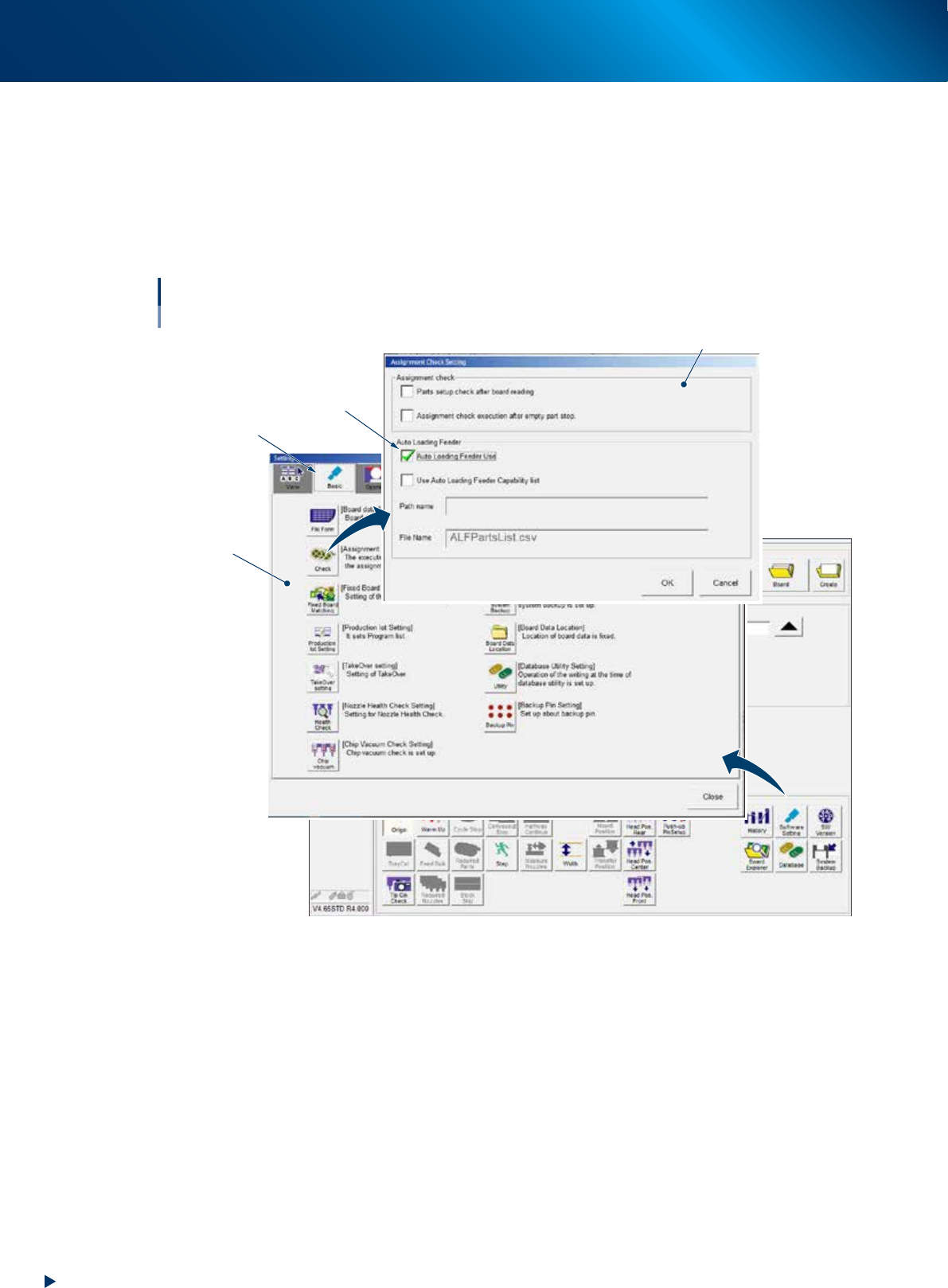
The following settings are required to use the auto loading feeder in the machine software.
1. Press the [Software settings] button on [Setup] - [Utility] screen and open the [Setting] screen.
2. Select the [Basic] tab and press the [Check] button.
3. Tick the checkbox of "Auto loading feeder Use".
4. Press the [OK] button to close the [Setting] screen.
Select this tab
Setting screen
Standard setting
with Auto loading feeder
Assignment Check Setting Screen
Tick here
64303-KLU-20
1. Preparation before operation
3-3
Chapter 3 Setting up
1.2 Specifying available components/guide types
Although the available components for Auto loading feeder are limited, they can be specified.
n
NOTE
The optional software "P-Tool" or "YSUP-PM" is required to use this function.
1.2.1 Creating Auto Loading Feeder Capability list
When performing items below, it is required to register the permission to use Auto loading feeder per
component on Auto Loading Feeder Capability list.
• Optimization considering Auto loading feeder placement
• Checking Auto loading feeder information on feeder viewer
• Checking Auto loading feeder information on Setup Assignment
• Specifying tape guide type (if necessary)
►
Procedure for Creating Auto Loading Feeder Capability list
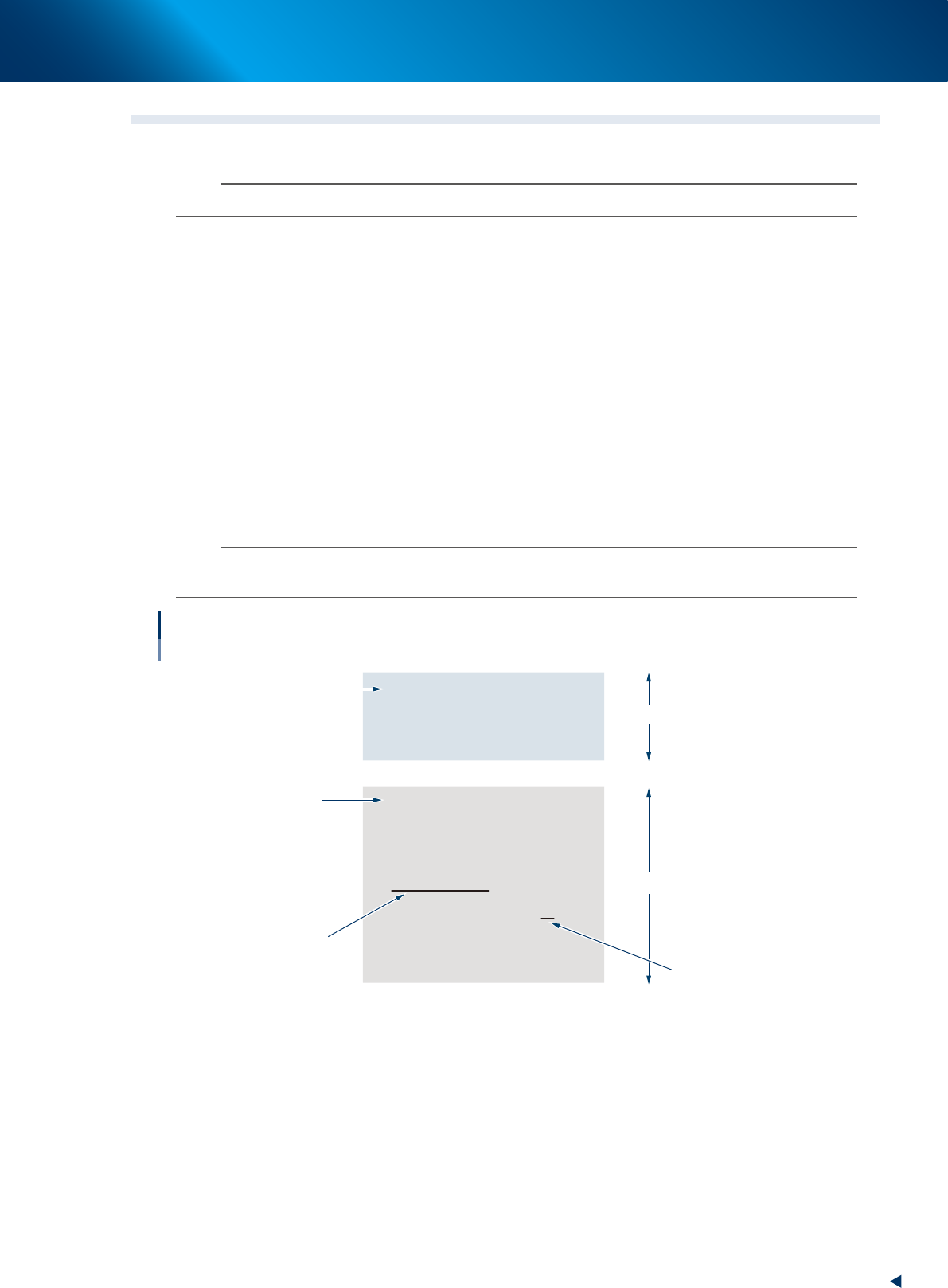
The CSV file "ALFPartsList.csv" is installed in the following folders upon installing the Optional software;
• Installing YFacT : [YFacT folder]\Common\Opt folder.
• Installing YSUP : [YSUP folder]\Common\Opt folder.
Enter the required information above on CSV file as shown in the text below.
n
NOTE
Auto Loading Feeder Capability list is composed of "Auto loading feeder information by feeder type" and "Auto loading
feeder information by component".
ALF Parts List Version,1,
Feeder Type,ALF,
8mm,FALSE,
,,
Parts Name,ALF,GuideSize
AB541-51531,TRUE,
AB542-11041,TRUE,
AB542-24731,TRUE,
AB542-51021,TRUE,M
AB542-51031,TRUE,
AB542-51042,TRUE,
Auto loading feeder Capability List
CSV format text delimited by comma
Auto loading feeder information
by feeder type
Auto loading feeder information
by component type
Header
Header
Component name
feeder type
component type
Guide type (for specifying)
64313-KLU-30

1. Preparation before operation
3-4
Chapter 3 Setting up
█
Auto loading feeder information by feeder type
The "Auto loading feeder information by feeder type" is applied for the component that is not registered
on the "Auto loading feeder information by component".
►
1st row
The version of Auto Loading Feeder Capability list is indicated on the header.
►
2nd row
The "Feeder type" is indicated on the 1st column. The "Auto loading feeder" is indicated on the 2nd
column.
►
3rd row and later
Register Auto Loading Feeder Capability list per feeder type.
Enter the feeder type on the 1st column.
Enter Auto loading feeder capability information on the 2nd column.
Enter "TRUE" when permitting to use Auto loading feeder and enter "FALSE" when not permitting to
use Auto loading feeder for Auto loading feeder capability information.
█
Auto loading feeder information by component
►
1st row
The "Parts Name" on the 1st column, "Auto loading feeder" on the 2nd column, and "Guide Size"
on the 3rd column are indicated on the header.
►
2nd row and later]
Register Auto loading feeder capability information per component.
Enter the component name on the 1st column. Enter Auto loading feeder capability information on
the 2nd column.
n
NOTE
When specifying the tape guide type (2S/S/M/L/LL), enter it on the 3rd column.
When not specifying the tape guide type, the appropriate tape guide type by component dimension is indicated on the
feeder viewer or Setup Assignment.