ALFeeder_E.pdf - 第44页
2. Loading/Unloading component tape 2-14 Chapter 2 Handling component tape 3 Unload th e compon ent tape by pre ssing the op er ation panel butt ons. 1. The component tape is unloaded to the direction of arrows in the fi…
2. Loading/Unloading component tape
2-13
Chapter 2 Handling component tape
2.2 Unloading component tape
The following describes the procedure for unloading the component tape from Auto loading feeder.
The unloading procedure is common regardless to Optional software.
1
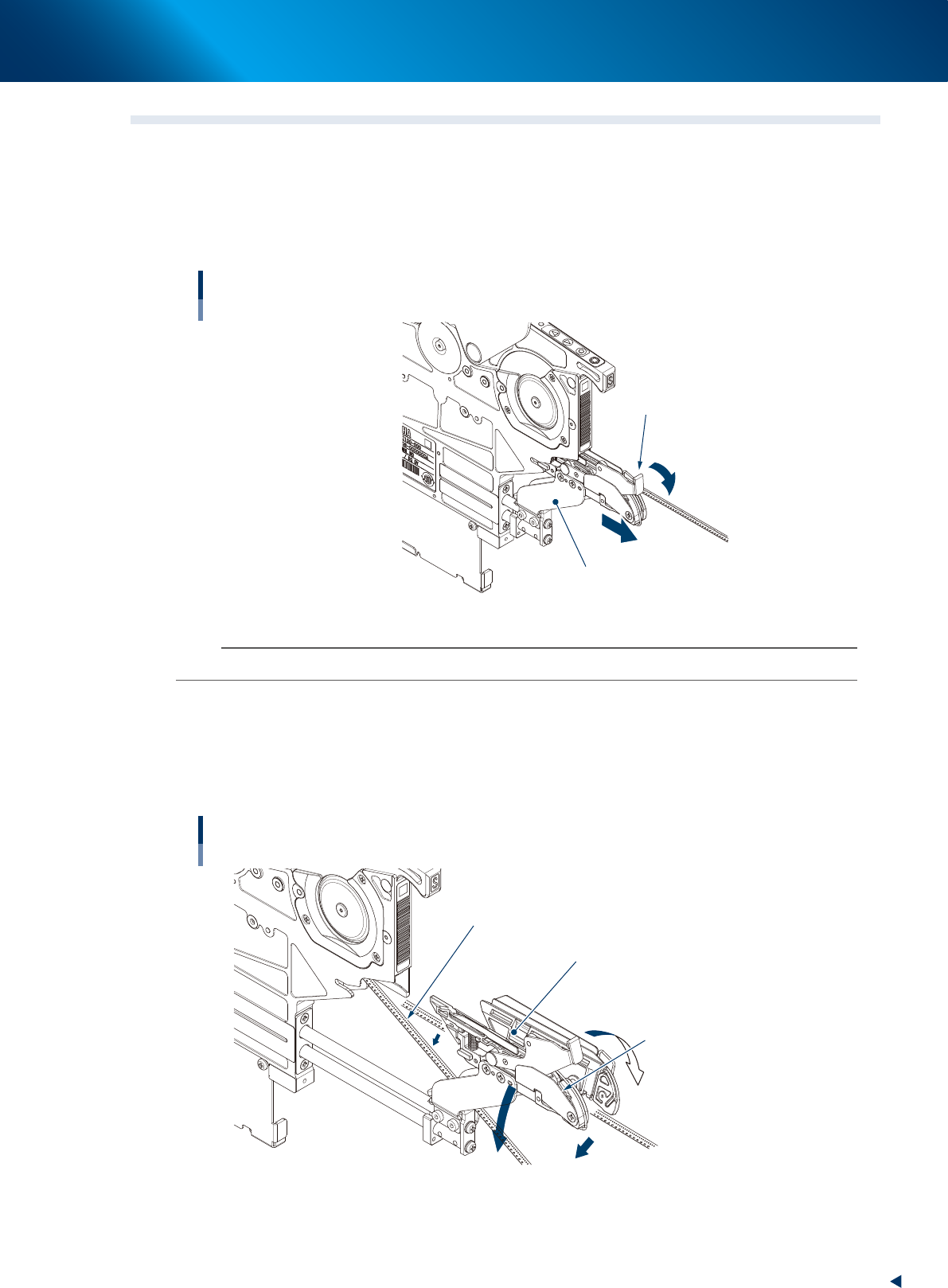
Pull the loading unit forward.
While pressing the tape clamp lever, pull the loading unit forward.
Pulling loading unit forward
Tape clamp lever
Loading unit
63225-KLU-40
n
NOTE
The loading unit does not open unless pulling it to the end completely.
2
Open the loading unit and move down the component tape.
1. The loading unit opens by releasing finger from the tape clamp lever.
2. Move down the component tape.
3. Keep pressing down the tape clamp lever and insert the loading unit into the feeder.
Moving down component tape to be unloaded
Loading unit
Component tape to be unloaded
The clamp unit opens to right and left
by releasing fingers from tape
clamp lever
Move down.
63226-KLU-40
2. Loading/Unloading component tape
2-14
Chapter 2 Handling component tape
3
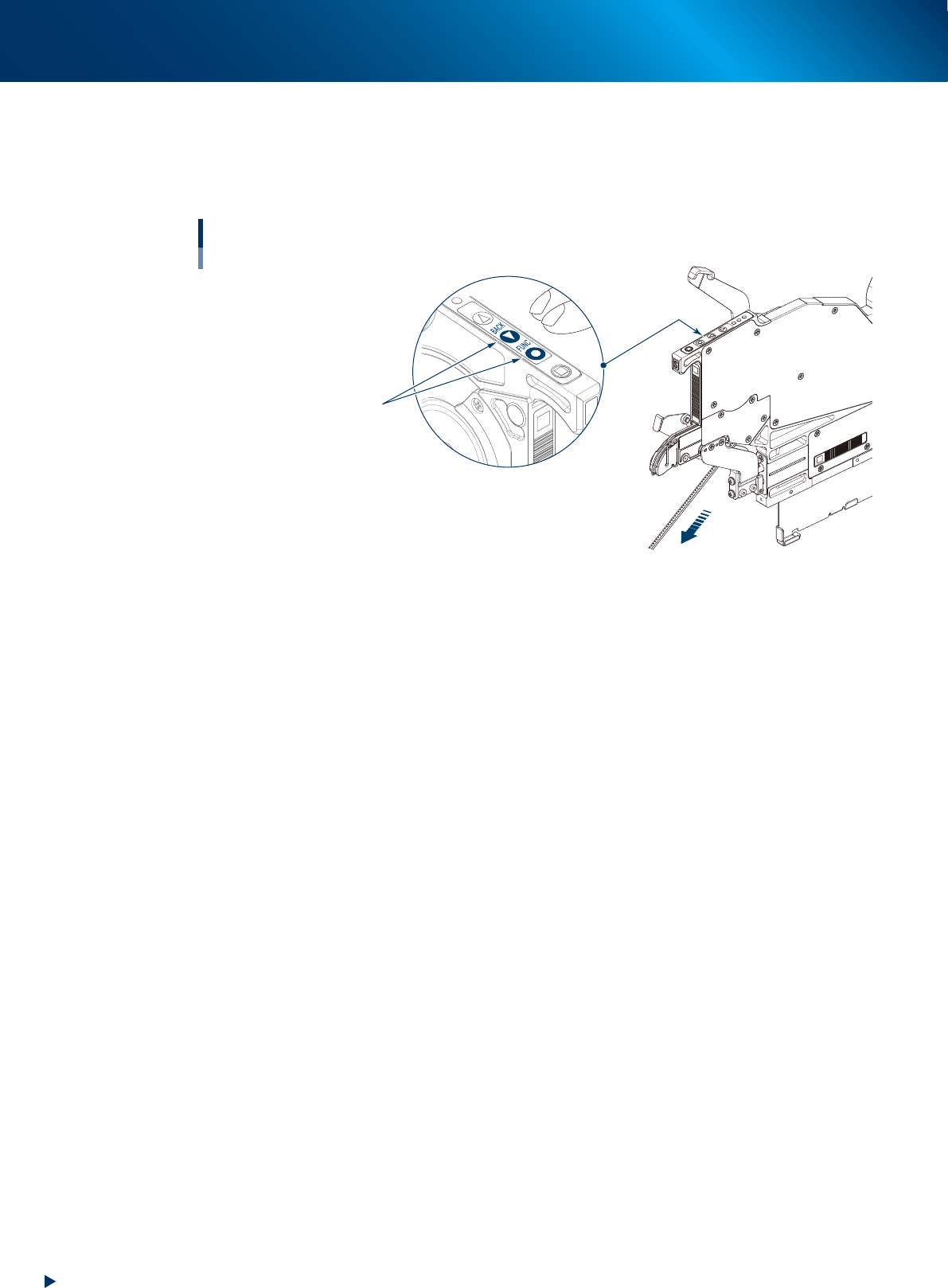
Unload the component tape by pressing the operation panel buttons.
1. The component tape is unloaded to the direction of arrows in the figure below by pressing
[BACK] and [FUNC] buttons simultaneously.
2. After unloading the component tape, pull it out manually.
Unloading component tape
Press [BACK] and [FUNC] buttons
simultaneously.
63227-KLU-40

Chapter 3 Setting up
Contents
1. Preparation before operation 3-1
1.1 Using Auto loading feeder 3-1
1.2 Specifying available components/guide types 3-3
1.2.1 Creating Auto Loading Feeder Capability list 3-3
1.2.2 Updating Auto Loading Feeder Capability list on board editor 3-6
1.3 Auto loading feeder Optimizer 3-8
1.4 Checking setup/Setup Assignment 3-10
1.4.1 Checking Auto loading feeder information on feeder viewer 3-10
1.4.2 Checking Auto loading feeder information on Setup Assignment 3-11
1.5 Activating Auto loading feeder per line 3-12
2. Preaparation for operation 3-13
2.1 Preset holder and attaching procedure 3-13
2.1.1 Preset holder 3-13
2.1.2 Feeder exchange carriage and reel holder for feeder bank 3-16
2.2 Setting up component tape 3-18
2.2.1 Setting up component tape without IT Option 3-18
2.2.2 Setting up component tape with IT Option 3-23
2.3 Other functions 3-28
3. Operation panel 3-29
3.1 Buttons on operation panel and LEDs 3-29
3.1.1 LED lighting patterns/Status 3-29
3.1.2 Buttons on operation panel 3-30
3.1.3 Sensors inside of the feeder body 3-30
3.2 Single operation 3-31
3.2.1 Loading component tape 3-31
3.2.2 Unloading component tape 3-32
4. Troubleshooting 3-33
4.1 The cover tape does not open correctly. 3-33
4.2 The cover tape cannot be cut correctly. 3-34
4.2.1 Element caused by tape 3-34
4.2.2 Element caused by feeder 3-35
4.3 Components cannot be supplied correctly from reel. 3-36