ALFeeder_E.pdf - 第59页
2. Preaparation for operation 3-13 Chapter 3 Setting up 2. Preaparation for operation 2.1 Pr eset holder and attaching procedur e 2.1.1 Preset holder T he preset holder is attached to reel holder on feeder exc hange carr…
1. Preparation before operation
3-12
Chapter 3 Setting up
1.5 Activating Auto loading feeder per line
n
NOTE
The optional software "P-Tool" or "YSUP-PM" is required to use this function.
The functions related to Auto loading feeder can be activated/inactivated per line that the application is
started. The following capabilities of function are switched.
• Updating Auto loading feeder Capability List on editor
• Auto loading feeder Optimizer
• Checking setup and Setup Assignment
►
Setting conditions
• The option setting "Use Auto loading feeder Capability list" is activated.
If not, functions related to Auto loading feeder are unavailable for all lines.
• A machine compatible with Auto loading feeder is installed on a line.
If not, functions related to Auto loading feeder are unavailable for all lines.
►
Setting procedure
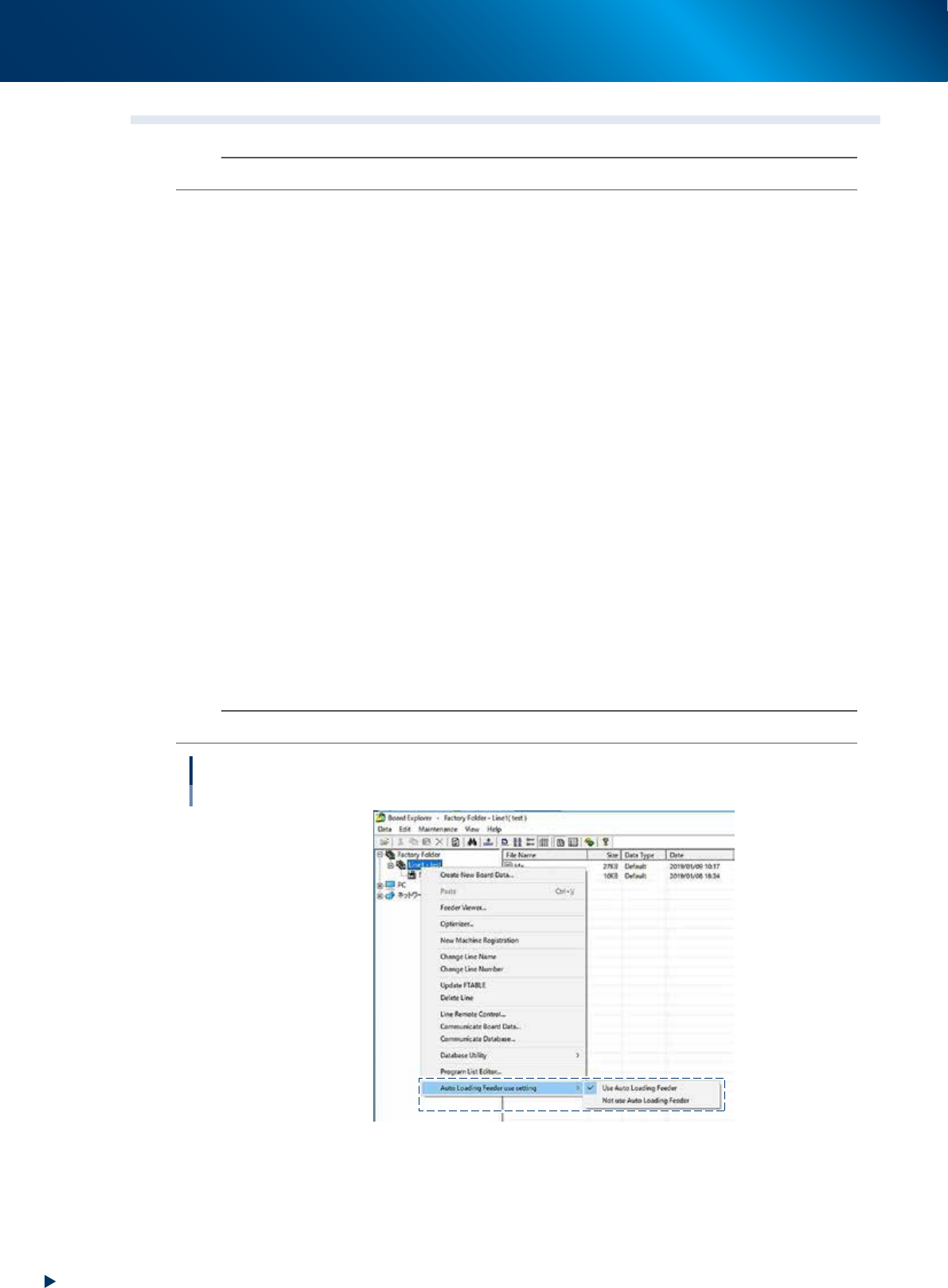
1
Open the "Board Explorer".
2
Select a line.
Select the folder of a line that the setting is changed and right-click it.
3
Select "Auto Loading Feeder use setting".
Select "Use Auto Loading Feeder" if the line uses Auto loading feeder. Select "Not use Auto Loading
Feeder" if the line does not use Auto loading feeder.
n
NOTE
"Use Auto Loading Feeder" is a default setting for "Auto Loading Feeder use setting".
Activating Auto loading feeder per line
64321-KLU-30
2. Preaparation for operation
3-13
Chapter 3 Setting up
2. Preaparation for operation
2.1 Preset holder and attaching procedure
2.1.1 Preset holder
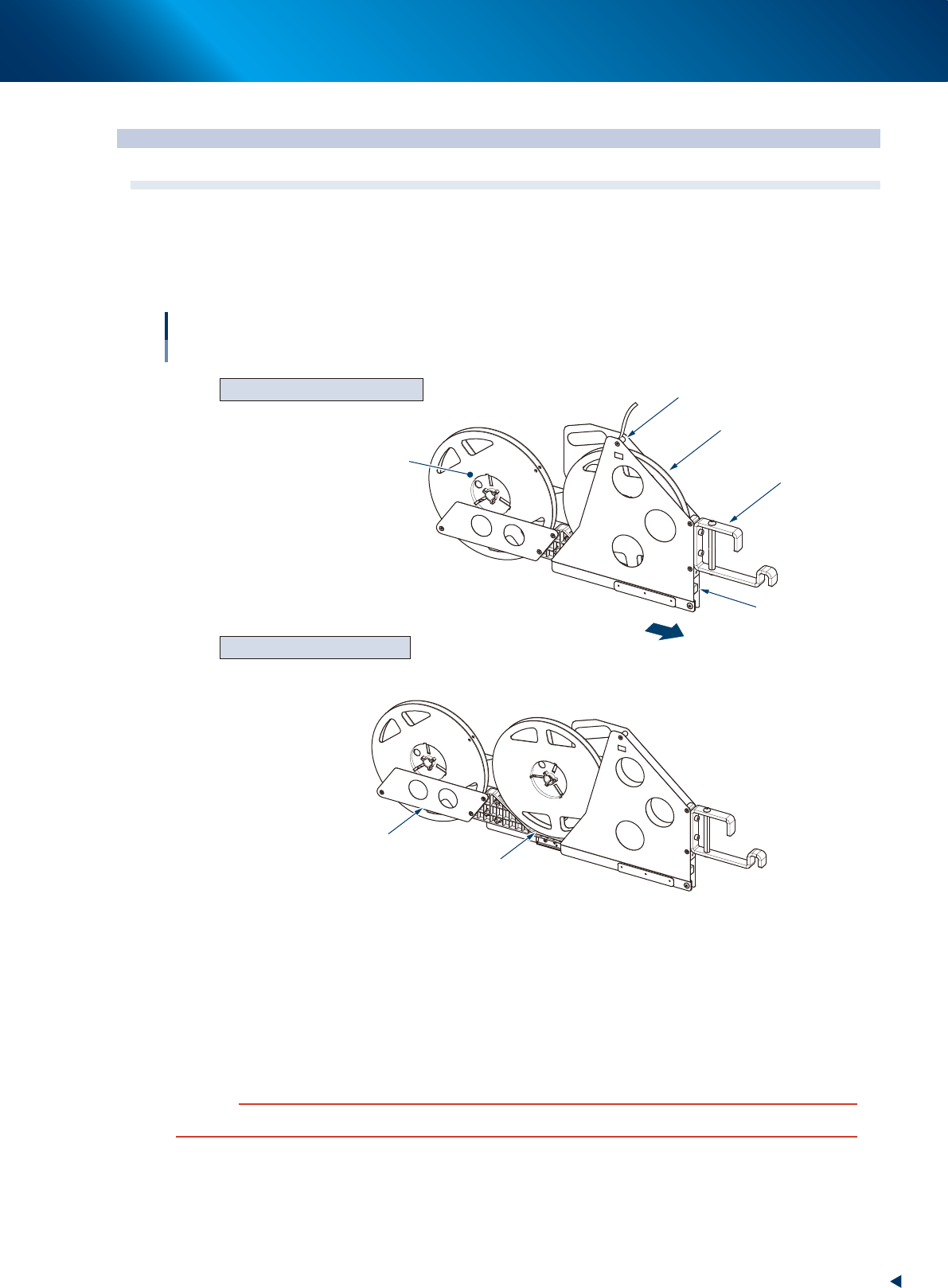
The preset holder is attached to reel holder on feeder exchange carriage or reel holder for feeder bank.
2 reel storages are provided. Slide and place the 1st reel on the front and the 2nd reel on the rear.
CLOSED (When supplying components)
OPEN (When setting up components)
Preset holder
Overview
1st reel
1st reel tape path
Sliding stopper
2nd reel
Storage for 2nd reel
Storage for 1st reel
Front
Preset holder hooks
63322-KLU-40
►
Sliding stopper
< Changing from CLOSE to OPEN >
The lock for the sliding stopper is released by pressing the storage for 2nd reel once.
< Changing from OPEN to CLOSE >
Press the storage for 2nd reel to the front side. It is locked if it is not detached by slightly pulling the
storage for 2nd reel.
c
CAUTION
The sliding stopper may be damaged if pulling the storage for 2nd reel forcibly when the preset holder is locked.
2. Preaparation for operation
3-14
Chapter 3 Setting up
►
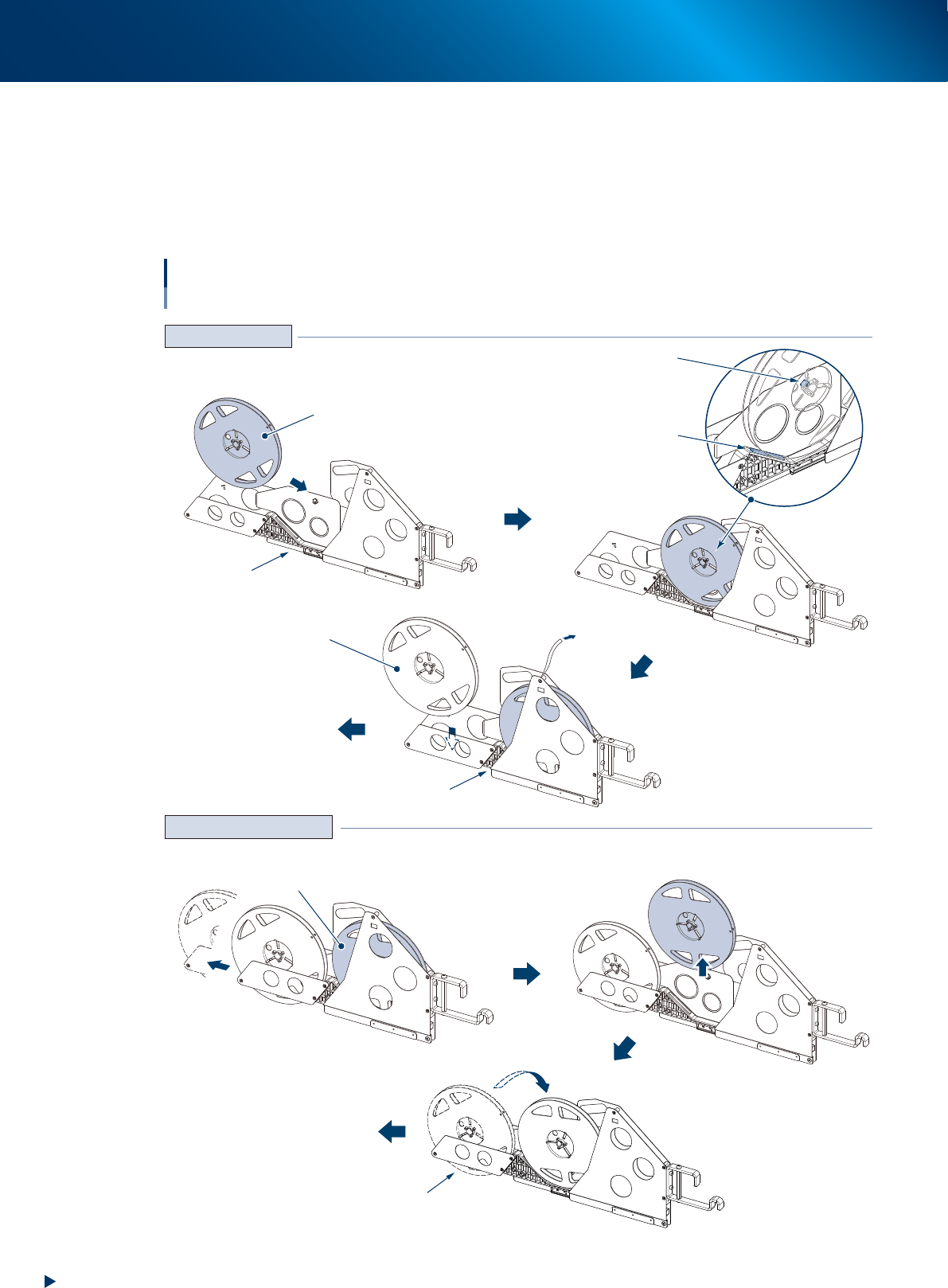
Attaching/Replacing tape reel
Tape reel can be attached to a preset holder both when preset holder is attached/detached to feeder
exchange carriage/reel holder for feeder bank.
When the 1st reel becomes empty and the 2nd reel starts supplying components, detach the empty reel
at 1st reel position, move the 2nd reel to the storage for 1st reel, then preset a new reel to the storage
for 2nd reel.
Preset holder
Handling procedure
1st reel
OPEN
CLOSE
Unlock preset holder
Detach empty reel
Move to storage for 1st reel
Empty reel
2nd reel in operation
Set a tape reel to loading unit and
load to pickup position
Set a reel by putting through the rotating axis
and the step of plate of preset holder
2nd reel
Preset the 2nd reel
to loading unit
Setting reel newly
Replacing reel in operation
Rotating axis
Step of plate
Preset the 2nd reel
to loading unit
63323-KLU-30