ALFeeder_E.pdf - 第54页
1. Preparation before operation 3-8 Chapter 3 Setting up 1.3 Auto loading feeder Optimizer When using Auto loading feeder with SS/ZS feeders, the button oper ation of SS/ZS feeder may be disturbed depending on the feeder…
1. Preparation before operation
3-7
Chapter 3 Setting up
█
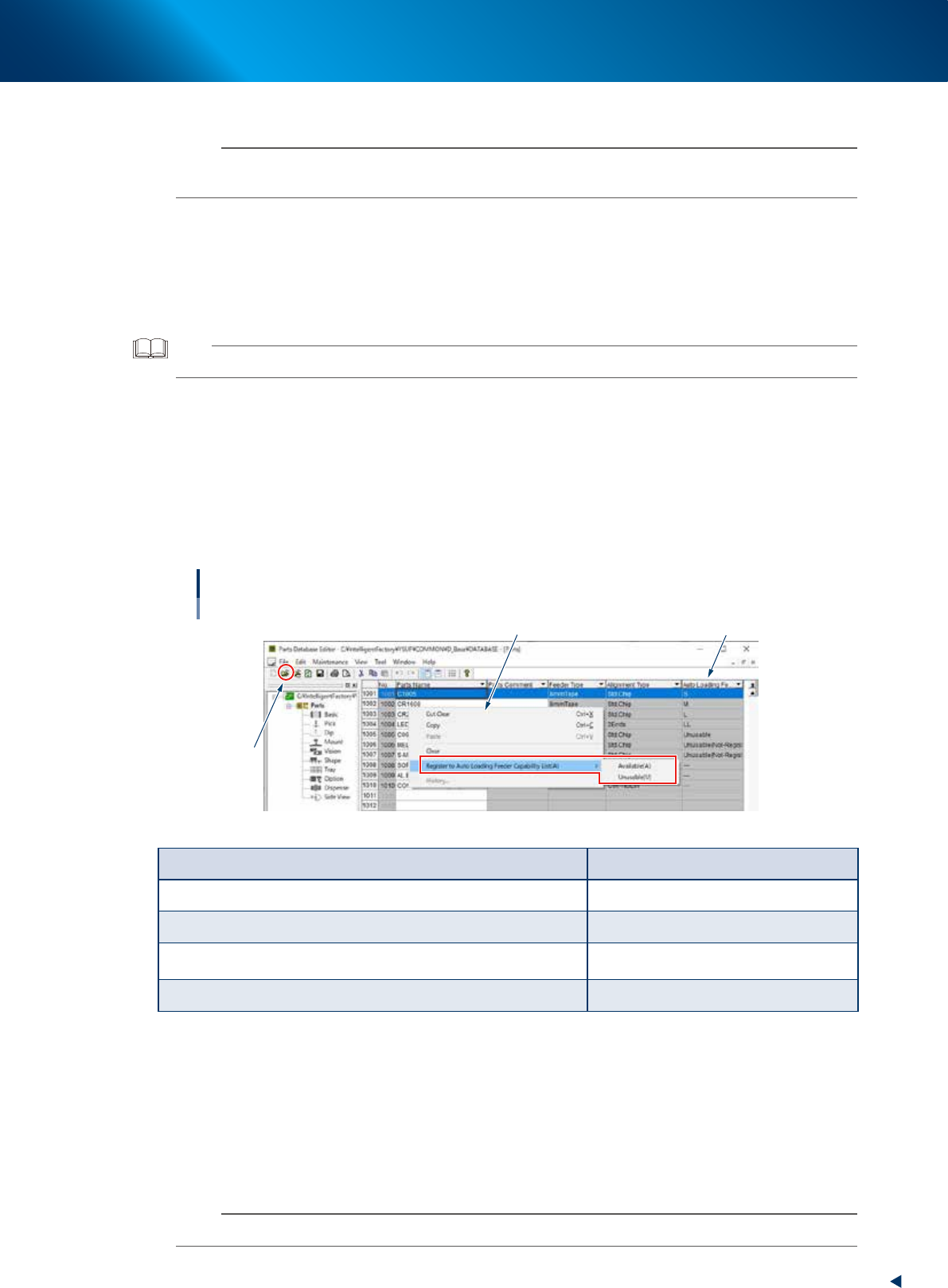
Updating on component screen of parts database editor
n
NOTE
The following setting is available when editing customer data base only. Therefore, the setting is not available when started
from YAMAHA database. The all components including No. 1001 or later apply to this condition.
1
Display the component list.
1. Open "Parts Database Editor" screen by selecting the [Parts Database Editor] - [Customer
Database] from the [File] menu on the [Board Editor] screen.
2. Click the "Open folder" icon on the tool bar and select [DATABASE] file, then press the [Select]
button. The component list of component database appears.
TIP
The [Parts Database Editor] screen can be opened from the [Data] menu on [Board Exproler] screen.
2
Display the context menu.
1. Select the row(s) of component(s) to be set.
2. Right-click the mouse to display the context menu.
3
Set "Register to Auto Loading Feeder Capability List (A)".
Select "Available (A)" or "Unusable (U)" from the sub menu of "Register to Auto Loading Feeder
Capability List (A)".
Updating Auto Loading Feeder Capability List
Parts database editor
Context menu Auto Loading Feeder column
1
64319-KLU-40
Condition Display on Auto Loading Feeder
Available component for Auto Loading Feeder 2S, S, M, L, or LL
Feeder type not compatible with Auto Loading Feeder ---
Component that "False" is displayed on Auto Loading Feeder column and
not registered
Unusable (Not-Registered)
Component registered as "FALSE" on Auto Loading Feeder column Unusable
█
Option setting
The followings are conditions to display "Register to Auto Loading Feeder Capability List (A)" on the
context menu previously described.
• The checkbox for "Use Auto Loading Feeder Capability List" on [Option Setting] - [Function] is
ticked.
• The board editor is edited offline.
• The customer database is edited when editing the parts database editor.
n
NOTE
When editing editor on mounter, the option setting is always hidden as the setting is not provided.
1. Preparation before operation
3-8
Chapter 3 Setting up
1.3 Auto loading feeder Optimizer
When using Auto loading feeder with SS/ZS feeders, the button operation of SS/ZS feeder may be disturbed
depending on the feeder shape.
Arrange the feeders to the position where they facilitate button operation by optimizing the component
placement using the "Auto loading feeder Optimizer" function of P-Tool (YFacT).
n
NOTE
The optional software "P-Tool" or "YSUP-PM" is required to use this function. Moreover, the option setting "Use Auto
Loading Feeder Capability list" must be activated.
►
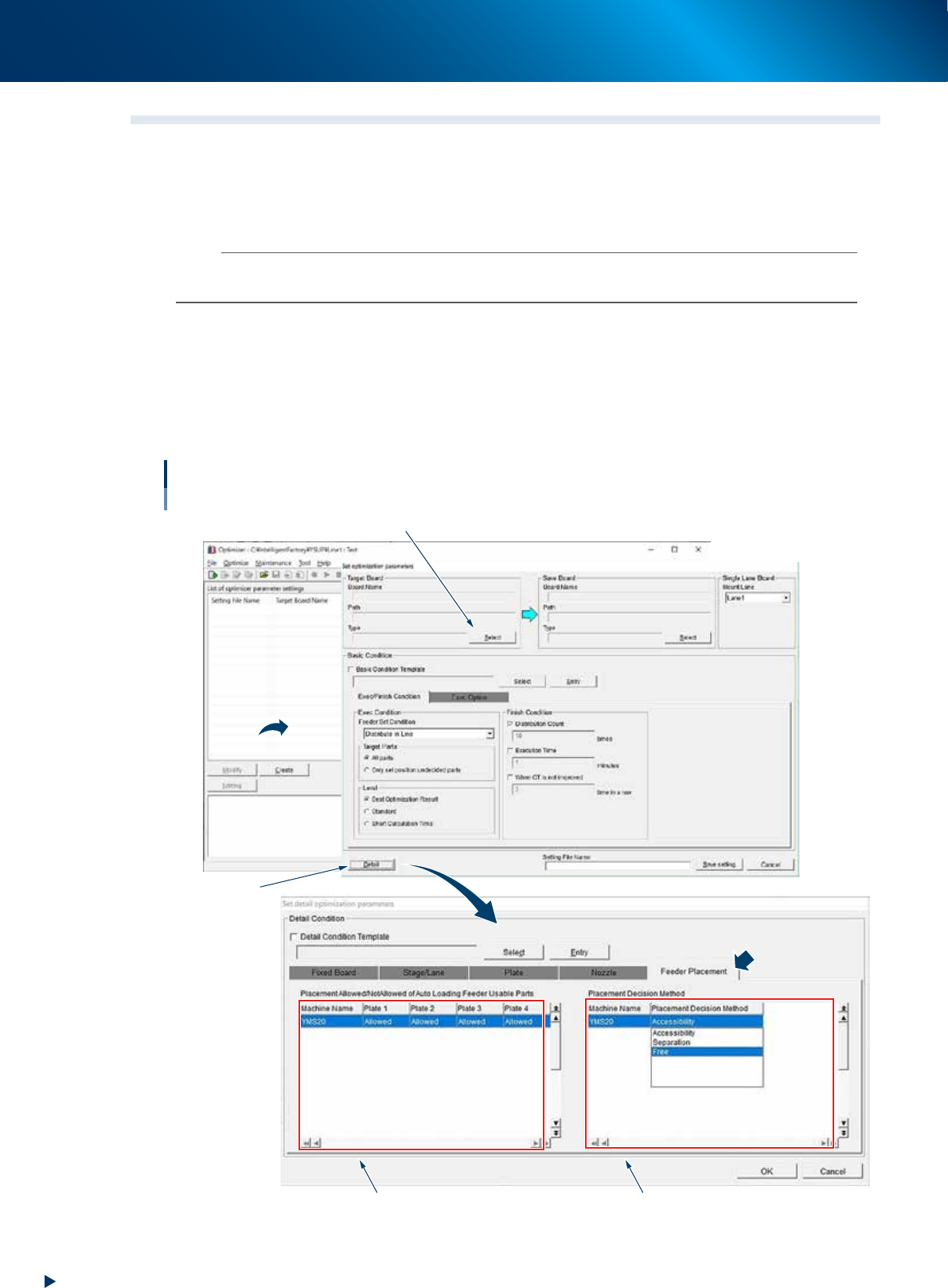
Changing current settings
1. Select a board to change the setting from "List of optimizer parameter settings".
2. Select the [Optimization Details] - [Feeder Placement] tab by pressing the [Modify] - [Detail] button.
►
Create new settings
Select the [Optimization Details] - [Feeder Placement] tab by pressing the [Modify] - [Detail] button.
Auto loading feeder Optimizer
Create new settings
Select a board
[Detail] button
Placement Allowance/Not Allowed Placement Decision Method
64315-KLU-40
1. Preparation before operation
3-9
Chapter 3 Setting up
█
Placement Allowed/Not Allowed
Set "Placement Allowed/Not Allowed" per plate.
Placement Allowed/Not
Allowed
Description
Not Allowed Auto loading feeder cannot be placed on relevant plate. SS/ZS feeders only are placed.
Only Auto loading feeder only is placed on relevant plate.
Allowed Both Auto loading feeder and SS/ZS feeders are placed on relevant plate.
█
Placement decision method
Set the method to decide the placement of Auto loading feeders and SS/ZS feeders per machine. The
machine with plate selected "Allowed" from "Placement Allowed/Not Allowed" only can be edited.
TIP
The setup includes "Attaching/Detaching feeder", "Cutting component tape", and " Feeder ID bar code reading (Setup
verify)".
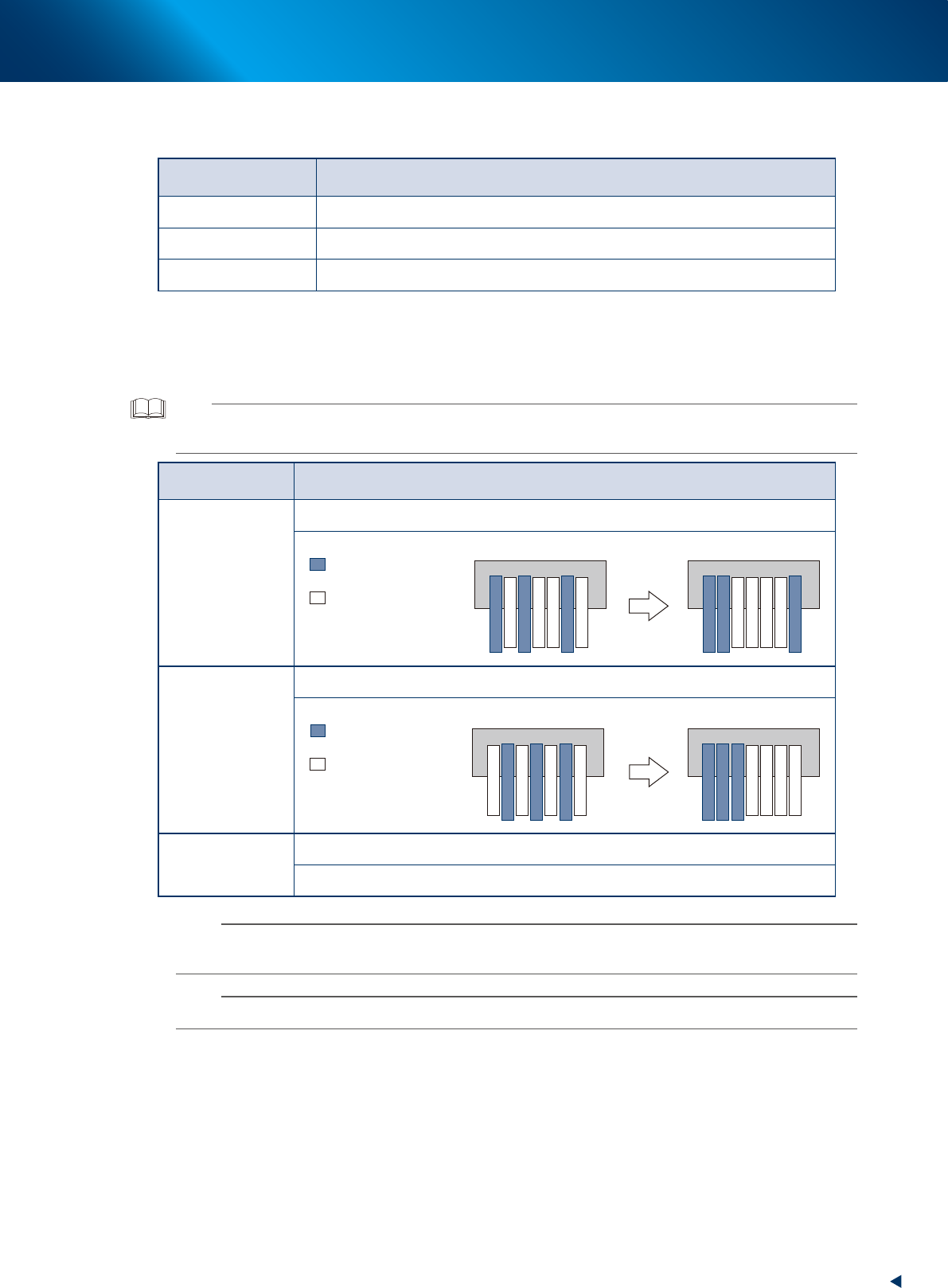
Placement decision
method
Description/Image
Accessibility
Placement is decided to be able to setup feeder.
: Auto loading feeder
Before the placement After the placement
: ZS/SS
Separation
Placement areas of Auto loading feeder and SS/ZS feeder are separated on the plate.
: Auto loading feeder
Before the placement After the placement
: ZS/SS
Free
Placement is decided regardless of feeder type (Auto loading feeder/SS/ZS).
Same as previous optimization.
n
NOTE
Although the feeder can be optimized usually from the mounter side, the optimization of auto loading feeder cannot be
performed as there is no optional settings.
n
NOTE
Although depending on data, the cycle time decreases by 0.6 to 1.9% if performing Auto loading feeder optimizer.