MR8740T_Quick guide_eng_20191016H.pdf - 第105页
99 Specications of Model MR8740T W aveform search Search method T rigger Level, window-in, window-out Logic trigger points can be searched for when the target channel is set to the logic channels. Peak Maximum, minimum,…
98
Specications of Model MR8740T
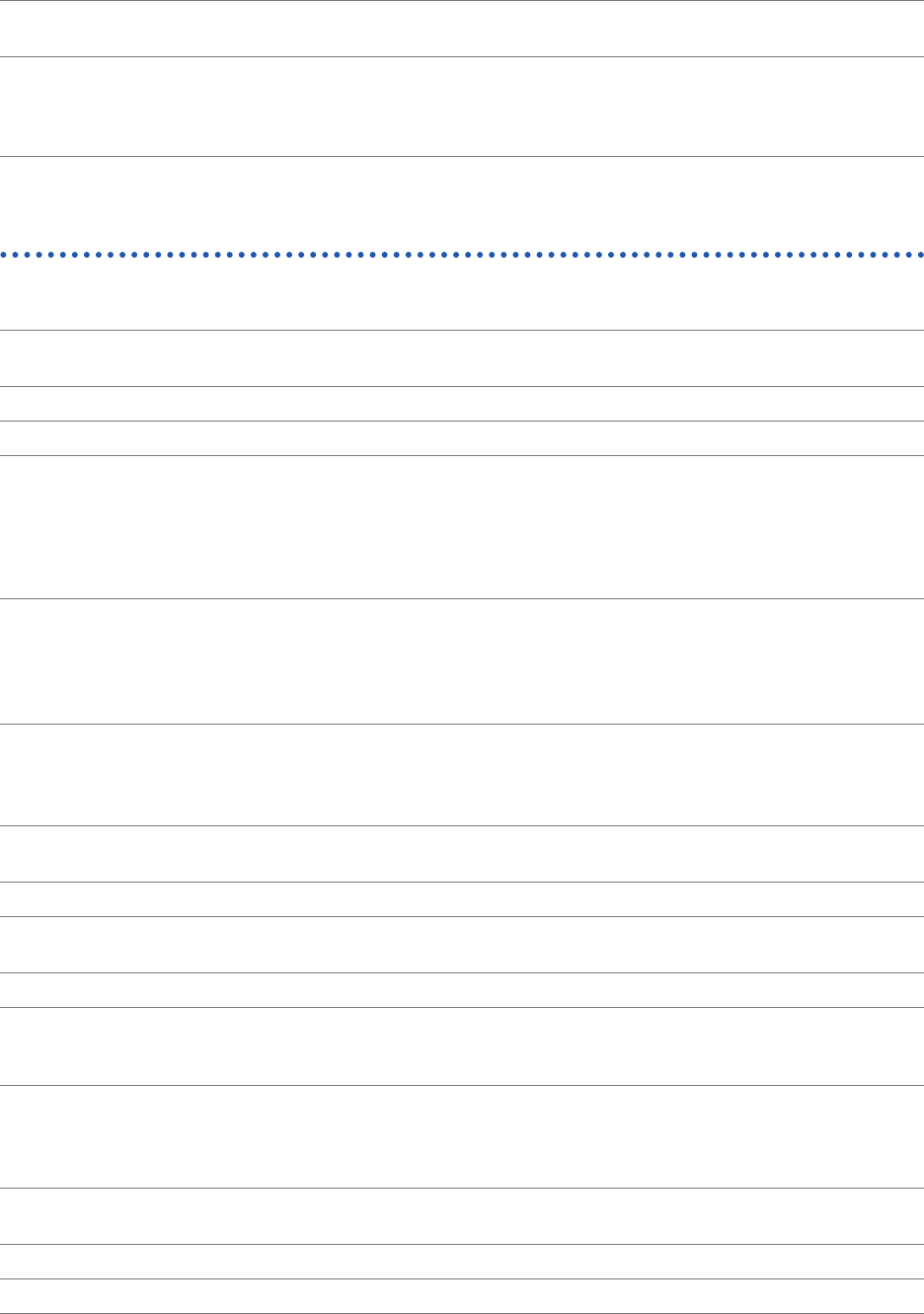
2. Data loading
Drive from which
data is loaded
SSD:
USB ash drive:
Built-in SSD (storage capacity: 480 GB)
Model Z4006 USB Drive (16 GB)
Loadable data
formats
Setting data (.SET)
Measured data: Binary format (.MEM)
Index: Division save (.IDX)
Startup: STARTUP.SET
Performing calculation
1. Numerical calculation
Maximum number of
calculations
(108 items) × (the number of measuring channels)
Calculation range All or a specied segment
Statistical functions Start, average, maximum, minimum
Calculation items P-P, maximum, minimum, high level, low level, average, RMS, standard deviation, rise
time*, fall time*, frequency*, period*, duty ratio*, pulse count, area, X-Y area, time lag*,
phase contrast*, time to maximum, time to minimum, time to level, level at time, pulse
width*, four arithmetic operations, intermediate, amplitude, accumulation, burst width*,
angle of XY waveform, overshoot, undershoot, +Width*, −Width*
*: Statistical functions (start, average, maximum, minimum) available
Numerical judgment
Target waveform: Analog, logic, and waveform calculation channels
Judge setting: On/Off
Stopping
condition:
PASS, FAIL, PASS & FAIL
2. Waveform calculation
Maximum number of
calculations
16 expressions
Calculation range All or a specied segment
Maximum recording
length
2,000,000 points
Standard operators +, −, ×, ÷
Calculation items Absolute value, square root, cubic root, logarithm, exponent, sine, arc sine, cosine, arc
cosine, tangent, arc tangent, derivative, 2nd-order derivative, integral, 2nd-order integral,
moving average, slide, PLCS
3. Memory division
Maximum division
number
1024 blocks
Block search The instrument can search data stored in divided memory blocks.
Representation Displays blocks specied.
99
Specications of Model MR8740T
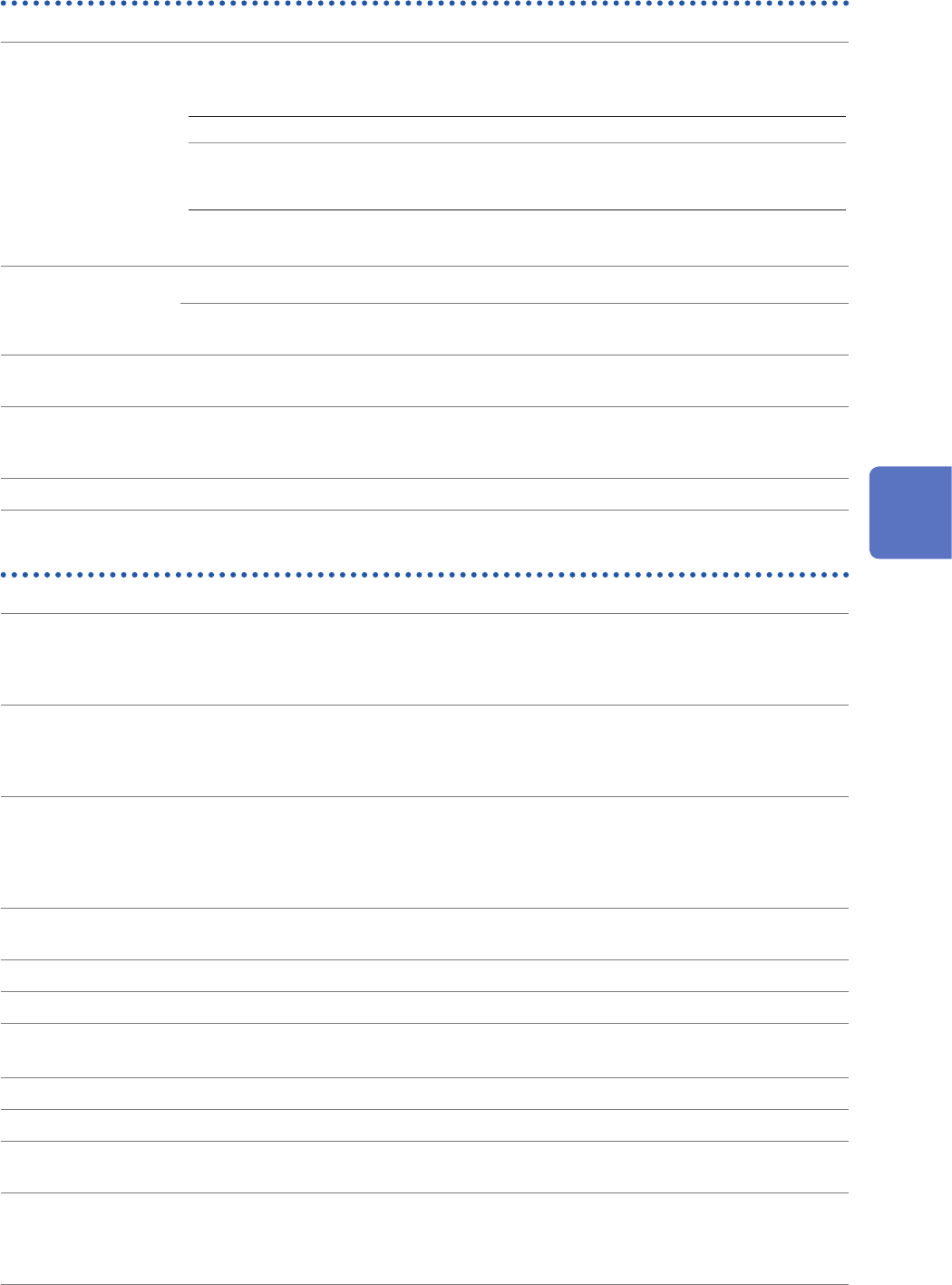
Waveform search
Search method
Trigger Level, window-in, window-out
Logic trigger points can be searched for when the target channel is set
to the logic channels.
Peak Maximum, minimum, maximal, minimal
Concierge Histogram or standard deviation (For each of them, a target for
comparison can be chosen between the fundamental waveform and
the previously observed waveform.)
Jump Event mark, cursor, time (specied by an absolute time, a relative time,
or the number of points), trigger point, search mark.
Search range All: Whole data stored in the internal memory
Section
designation:
Either one of the areas between cursors A and B and between cursors
C and D is chosen.
Number of points to
be searched for
Up to 10,000 points
Continuous search When the scope of search is found to include retrieved data points more than the specied
number after the search, the instrument can continuously search waveform data points
after the last retrieved data point.
Display method Displays the search result specied as a search position.
Others
Auto-range Available
The instrument automatically selects a sampling rate and measurement range appropriate
for an input waveforms.
(Not available when the external sampling is used.)
Beep sound Three levels are available:
• Off
• Alert
• Alert+Action
Email transmission Email transmission function using SMTP
Transmission timing: When data is automatically saved; when data is saved by clicking the
SAVE icon
Contents of email: The text entered in the Body box is included and a le in the format
specied in the Type box is attached.
Initialization Discarding the existing waveform data, restoring the settings to the initial values, initializing
the instrument
Self-check Memory check, LAN check, media check
Language English, Japanese
Error indication
Warning indication
The instrument displays details of an error or warning.
Time value display Time, time in sexagesimal, date, the number of data points
Zero position display On/Off
Waveform screen
background color
Black or white
Restart permission Permitted or prohibited
Permitted: When a setting is changed during a measurement, another measurement
starts.
Prohibited: Changing any settings are prohibited during measurement.
5
Specications

100
Specications of Model MR8740T
Time setting A date and time can be set.
Number of current
sensors to be
connected
Up to nine sensors can connect to Model 8971 Current Unit and Model U8977 3CH
Current Unit in total.
Limitation of the
number of modules
Model 8971 Current Unit
Model U8977 3CH Current Unit
Model 8973 Logic Unit
Up to four slots
Up to three slots
Up to three slots
Slots in which the module can be installed (slots 25, 26,
and 27)
POWER LED
indication
Green light Power-on state
Green blinking
light
During aging (30 minutes or less since powered on)
Orange light Stand-by state (the rear main-power switch is set to on)
Off The power is shut off (the rear main-power switch is set to off).
CMD ERR LED
indication
Red light A command received contains a syntax error. Send the
∗
CLS
command to
turn the LED off.
A warning is issued.
Off No error or warning is found.
DIAG LED indication
Red light An ambient temperature is too high. (> 35°C)
Purple light An ambient temperature is too low. (< 10°C)
Yellow light The CPU load rate stands at 80% or more (Updated every 0.5 seconds,
based on average load rates calculated over the period).
Blue light Waiting for a trigger.
Green light The recording is in progress.
Pink light The recording is complete.
Switches to the normal operation indication when a new command is
received.
White light During normal operation (under suspension)