MR8740T_Quick guide_eng_20191016H.pdf - 第151页
145 T roubleshooting 6.1 T roubleshooting If damage is suspected, read the “Before having the instrument repaired” section before contacting your authorized Hioki distributor or reseller . Before sending the instrument f…

144
Replaceable parts and operating lifetimes
The characteristics of some of the parts used in the instrument may deteriorate with extended use.
To ensure the instrument can be used over the long term, it is recommended to replace these parts
on a periodic basis. When replacing batteries, please contact your authorized Hioki distributor or
reseller.
The service life of parts varies with the operating environment and frequency of use. Parts are not
guaranteed to operate throughout the recommended replacement cycle.
Part name
Recommended
replacement cycle
Remarks/conditions
Fan motor About 5 years –
SSD About 1,400 hours
(When the instrument
writes data
continuously)
At an ambient temperature of 25°C
Total bytes written (TBW): About 300 TB
Data retention period: About 1 year (When the instrument is
turned off)
Data backup at regular intervals is recommended.
Electrolytic
capacitors
About 10 years Deteriorates in about 10 years when the instrument is used
in a severe environment (at an ambient temperature of
40°C).
Lithium battery About 10 years The instrument contains built-in backup lithium batteries,
which offer a service life of about 10 years.
If the date and time deviate substantially at power-on, it is
the time to replace that battery. Contact your authorized
Hioki distributor or reseller.
Built-in battery About 2 years The instrument contains a built-in battery. Regularly
replacing the batteries is required because a powerless
battery can prevent Windows
®
from shutting down and thus
correctly restarting. When recommended replacing period
has passed, contact your authorized Hioki distributor or
reseller.
The fuse is housed in the power unit of the instrument. If the instrument is not powered on, the fuse
may be blown. Customers cannot replace the fuse or repair the instrument. Please contact your
authorized Hioki distributor or reseller.
145
Troubleshooting
6.1 Troubleshooting
If damage is suspected, read the “Before having the instrument repaired” section before contacting
your authorized Hioki distributor or reseller.
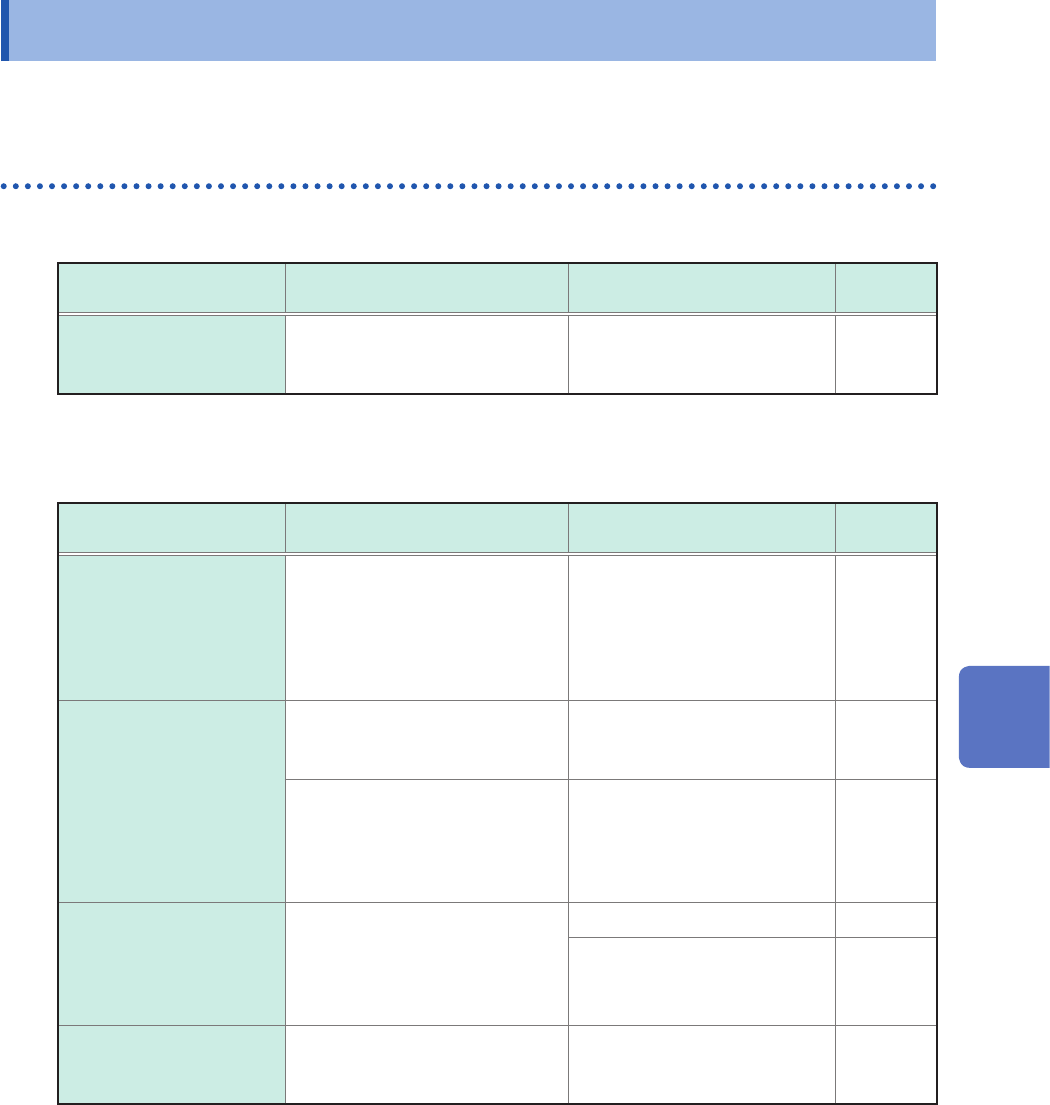
Before sending the instrument for repair
If the start button does not work correctly
Problem Check item or cause Remedy
Reference
page
Nothing appears on the
screen even if you press
the power key.
• Is the power cord connected?
• Is the power cord connected
correctly?
Check that the power cord is
properly connected.
p. 60
If the display or behavior shows an abnormality
Condition Check item or cause Remedy
Reference
page
No waveforms are
displayed even when the
start icon is clicked.
• Is the message “Waiting for
Pre-Trigger” displayed?
• Is the message “Waiting for
Trigger” displayed?
When the pre-trigger setting
is enabled, the instrument is
not triggered while it is writing
data in the pre-trigger memory.
Recording starts when the
instrument is triggered.
p. 73
The displayed waveforms
do not change.
• Are current sensors or
connection cords connected
correctly?
Check the current sensors
and connection cords for
disconnection.
p. 36
• Is the measurement range
suitable for the measuring
object?
• Is the low-pass lter setting
congured to be used?
Check the settings of the input
channels.
p. 70
During measurement,
the instrument displays
waveforms with much
lower frequencies than the
actual.
• Aliasing may be exhibited.
Use a faster sampling rate. p. 69
Use [Auto range] to
automatically set the
measurement range.
p. 78
The entire screen is lled
with blue.
• Are not two monitor output
cables connected?
(For example, VGA and HDMI)
Remove either one of them. –
6
Maintenance and Service
146
Troubleshooting
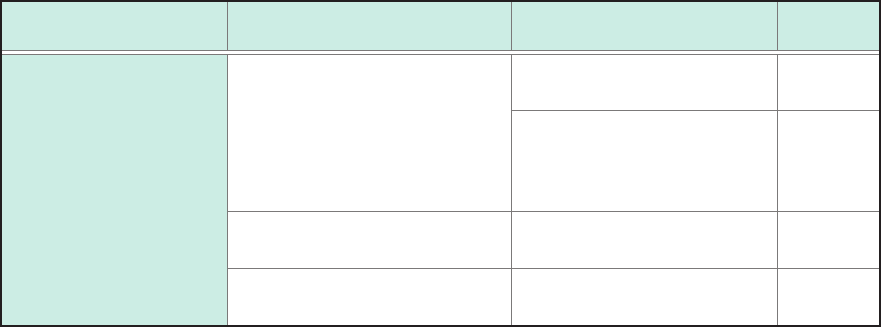
If the instrument cannot save any data
Condition Check item or cause Remedy
Reference
page
No data can be saved
on a storage device that
includes a USB ash
drive.
• Does the storage device have
sufcient free space?
• Has the number of les in the
folder reached 5000?
Format or replace the storage
device.
p. 59
Up to 5000 les can be saved
in a folder. If you would like to
create more les, adjust the
quantity.
∗
• Is the storage device properly
inserted?
Properly insert the storage
device.
–
• Formatting a storage device is
required before rst use.
Format the storage device. p. 59
*: “4.4 Managing Files” of Instruction Manual
If the cause cannot be revealed
Initialize the instrument. All settings are restored to the factory default.
Refer to “6.2 Initializing the Instrument” (p. 147).