MR8740T_Quick guide_eng_20191016H.pdf - 第45页
39 Attaching Connection Cords How to connect a cord Example: Model 8966 Analog Unit BNC connector slots Locking studs of module connector Locking studs 1 Lock 2 3 1 Align the slots in the BNC connector of a connection co…
38
Attaching Connection Cords
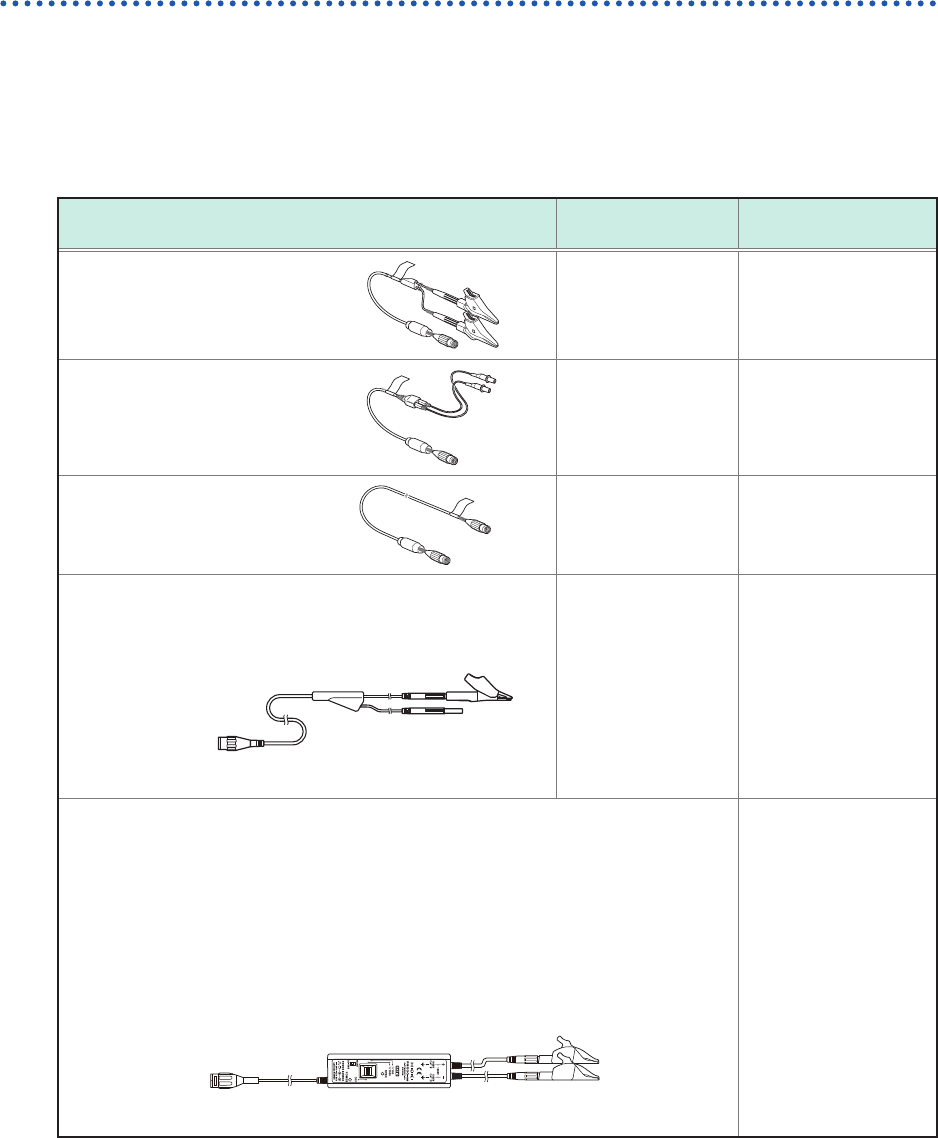
Connection cables (For measuring voltage, frequency, or rotation
speed, and obtaining accumulations)
Insert connection cords to modules. Choose an appropriate connection cord based on the
maximum input voltage and tips of cables.
The maximum input voltage of the instrument or connection cord, whichever is lower, is applicable.
Refer to “Before connecting cords” (p. 16).
Required items: Connection cords
Connection cord
Maximum input
voltage
Type
Model L9197
Connection Cord
600 V Large alligator clip
Model L9198
Connection Cord
300 V Small alligator clip
Model L9217
Connection Cord
300 V BNC output
Model L9790 Connection Cord
Example: with the alligator clip attached.
600 V Alligator clip
Grabber clip
Contact pin
When the voltage to be measured exceeds the maximum input rating of the module
being used
(excluding Model U8991 Digital Voltmeter Unit)
Model 9665 10:1 Probe*
1
Model 9666 100:1 Probe*
1
Model 9322 Differential Probe*
2
Model P9000-01 Differential Probe*
3
Model P9000-02 Differential Probe*
3
Example: Model P9000-02 Differential Probe
Alligator clip
*1: The maximum rated voltage to earth depends on a module to be used.
*2: An optional power cord or AC adapter is required.
*3: An optional AC adapter or a commercially available USB cable is required.
39
Attaching Connection Cords
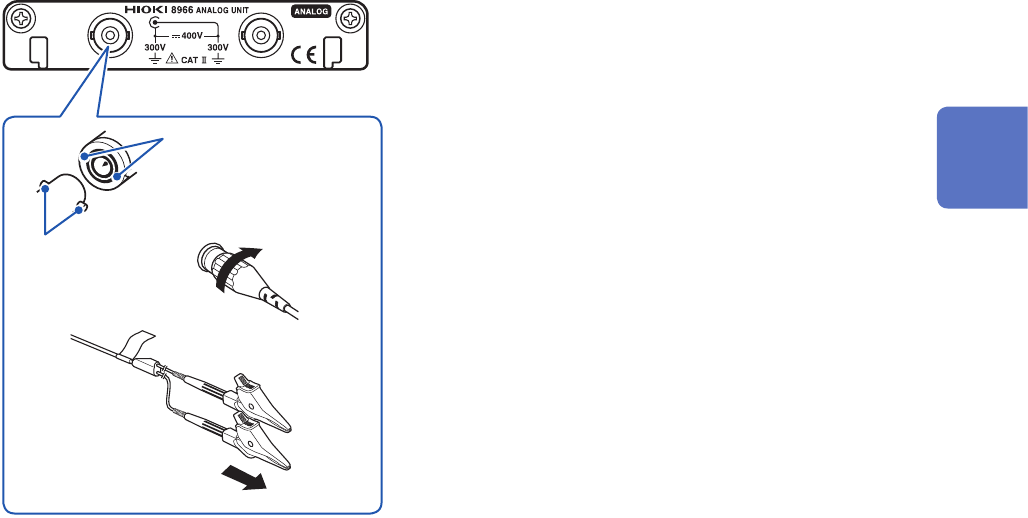
How to connect a cord
Example: Model 8966 Analog Unit
BNC connector slots
Locking studs of
module connector
Locking studs
1
Lock
2
3
1
Align the slots in the BNC connector of a
connection cord with the locking studs of a
BNC connector on the module, and insert the
connector.
2
Turn the BNC connector of the connection cord
clockwise until it locks.
3
Connect the connection cord clips to a
measuring object.
How to disconnect the cord
Turn the BNC male connector of the connection cable
counterclockwise, and then pull out the connector.
2
Preparing for Measurement
40
Attaching Connection Cords
Thermocouple (Temperature)
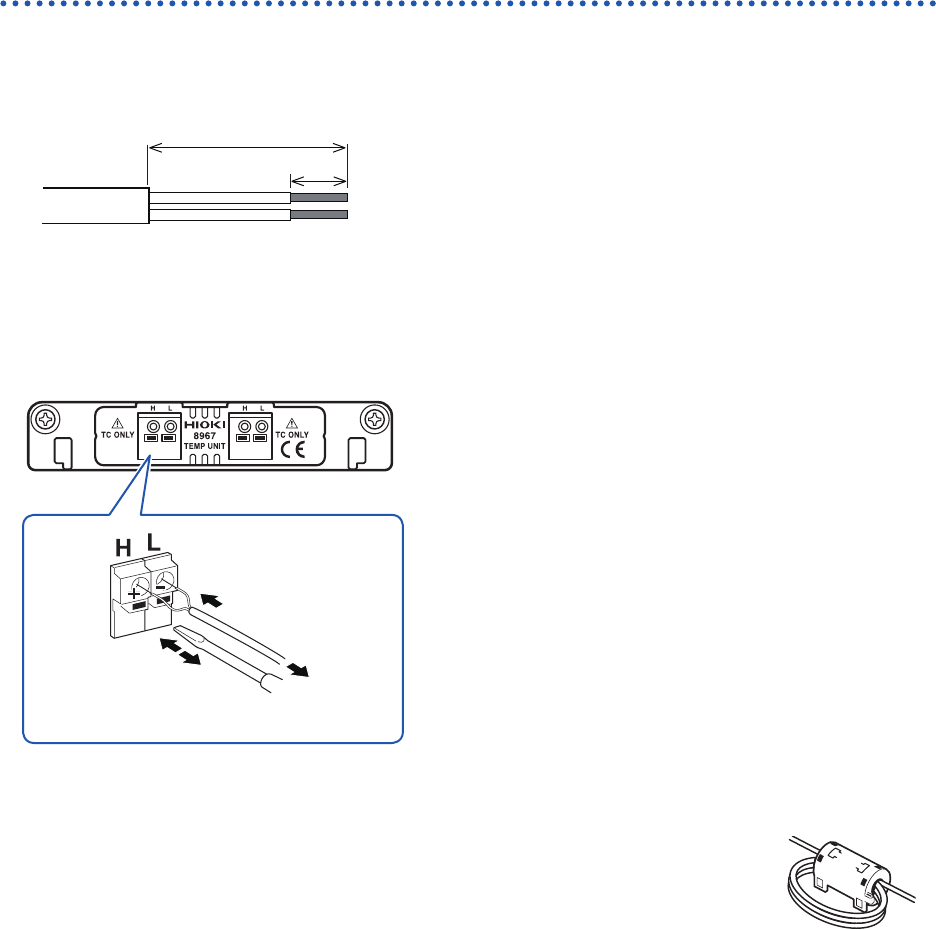
Connect thermocouples to Model 8967 Temp Unit.
Required items: Thermocouple and at-blade screwdriver (2.6-mm-width blade)
Outer
insulation
Inner insulation
10 mm
Thermocouple
element wires
25 mm
Recommended cable
Compatible wire: Thermocouple element wires with a diameter
of 0.4 mm to 1.2 mm
Standard insulation stripping length: About 10 mm
Strip the insulation of the thermocouple wires as shown on the
left.
How to connect the thermocouple
Model 8967 Temp Unit
Thermocouple
3
1
4
2
1
Depress a button on the terminal block on the
module with the at-blade screwdriver.
2
While depressing the button with the at-blade
screwdriver, insert each thermocouple wire into
the appropriate terminal hole
3
Release the button.
The thermocouple is connected.
4
Attach the thermocouple on a measuring
object.
How to disconnect the thermocouple
While depressing the button, pull the thermocouple wire.
• If noise inuences surrounding equipment, pass the thermocouple element
wires through the center hole of the ferrite clamp-on choke (comes with
Model 8967 Temp Unit) several times successively from the same end.
• If a thermocouple three meters long or longer is connected, the measurement
may be inuenced by the EMC environment that includes external noise.
• For K type and E type thermocouples, the physical phenomenon, short-range ordering can
probably cause incorrect temperature measurement in the range of 250°C to 600°C. Contact a
thermocouple manufacturer to choose proper thermocouples.