MR8740T_Quick guide_eng_20191016H.pdf - 第152页
146 T roubleshooting If the instrument cannot save any data Condition Check item or cause Remedy Reference page No data can be saved on a storage device that includes a USB ash drive. • Does the storage device have suf…
145
Troubleshooting
6.1 Troubleshooting
If damage is suspected, read the “Before having the instrument repaired” section before contacting
your authorized Hioki distributor or reseller.
Before sending the instrument for repair
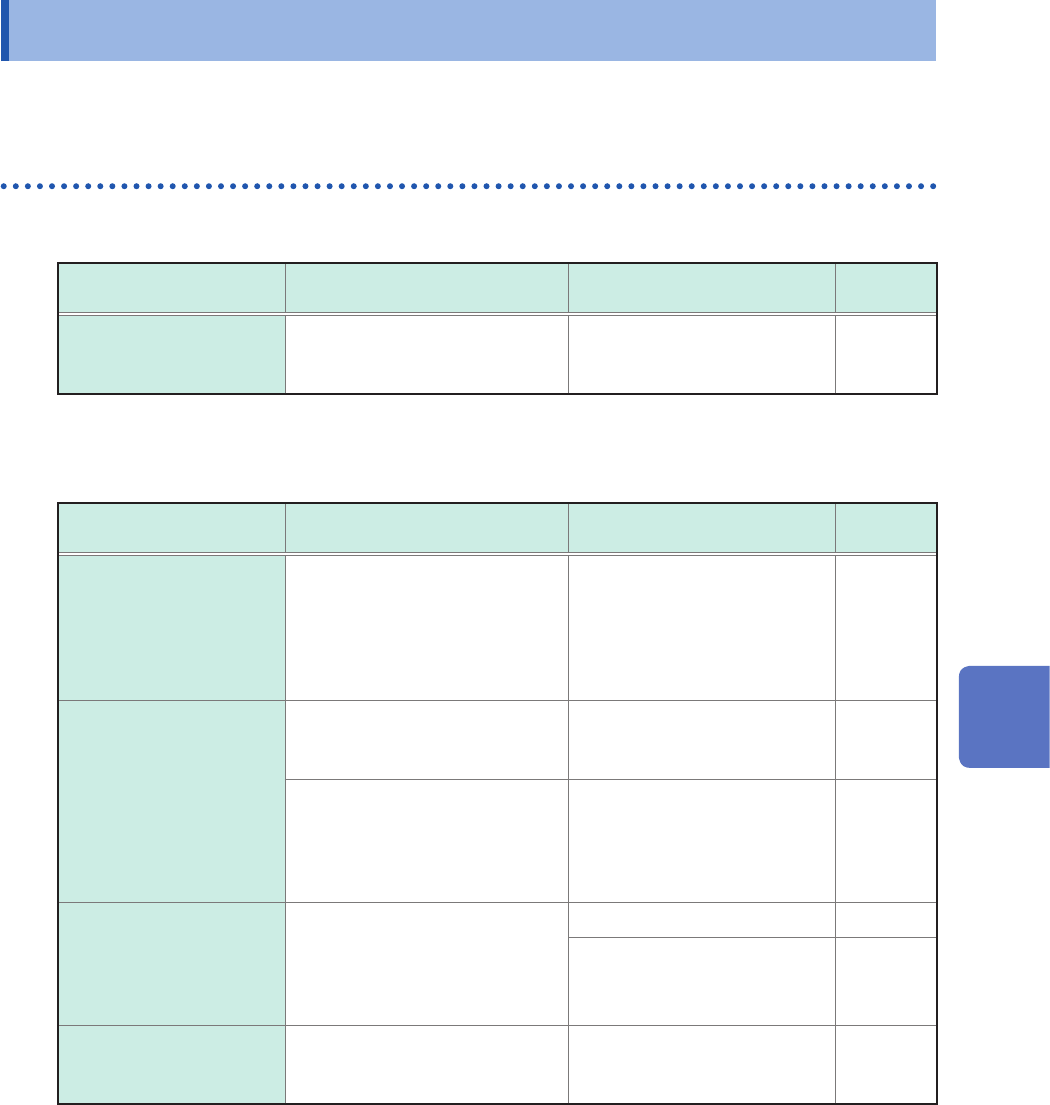
If the start button does not work correctly
Problem Check item or cause Remedy
Reference
page
Nothing appears on the
screen even if you press
the power key.
• Is the power cord connected?
• Is the power cord connected
correctly?
Check that the power cord is
properly connected.
p. 60
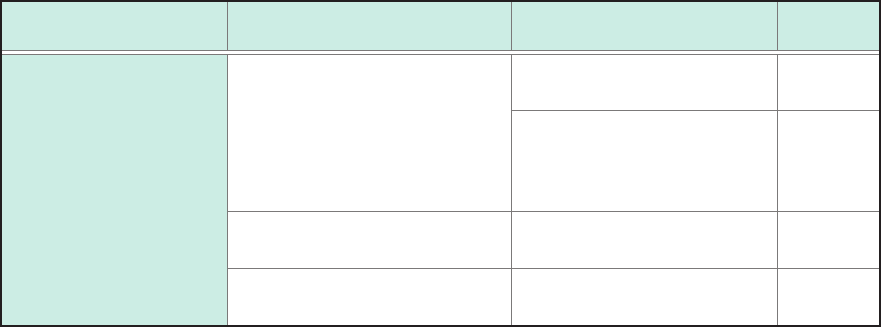
If the display or behavior shows an abnormality
Condition Check item or cause Remedy
Reference
page
No waveforms are
displayed even when the
start icon is clicked.
• Is the message “Waiting for
Pre-Trigger” displayed?
• Is the message “Waiting for
Trigger” displayed?
When the pre-trigger setting
is enabled, the instrument is
not triggered while it is writing
data in the pre-trigger memory.
Recording starts when the
instrument is triggered.
p. 73
The displayed waveforms
do not change.
• Are current sensors or
connection cords connected
correctly?
Check the current sensors
and connection cords for
disconnection.
p. 36
• Is the measurement range
suitable for the measuring
object?
• Is the low-pass lter setting
congured to be used?
Check the settings of the input
channels.
p. 70
During measurement,
the instrument displays
waveforms with much
lower frequencies than the
actual.
• Aliasing may be exhibited.
Use a faster sampling rate. p. 69
Use [Auto range] to
automatically set the
measurement range.
p. 78
The entire screen is lled
with blue.
• Are not two monitor output
cables connected?
(For example, VGA and HDMI)
Remove either one of them. –
6
Maintenance and Service
146
Troubleshooting
If the instrument cannot save any data
Condition Check item or cause Remedy
Reference
page
No data can be saved
on a storage device that
includes a USB ash
drive.
• Does the storage device have
sufcient free space?
• Has the number of les in the
folder reached 5000?
Format or replace the storage
device.
p. 59
Up to 5000 les can be saved
in a folder. If you would like to
create more les, adjust the
quantity.
∗
• Is the storage device properly
inserted?
Properly insert the storage
device.
–
• Formatting a storage device is
required before rst use.
Format the storage device. p. 59
*: “4.4 Managing Files” of Instruction Manual
If the cause cannot be revealed
Initialize the instrument. All settings are restored to the factory default.
Refer to “6.2 Initializing the Instrument” (p. 147).
147
Initializing the Instrument
6.2 Initializing the Instrument
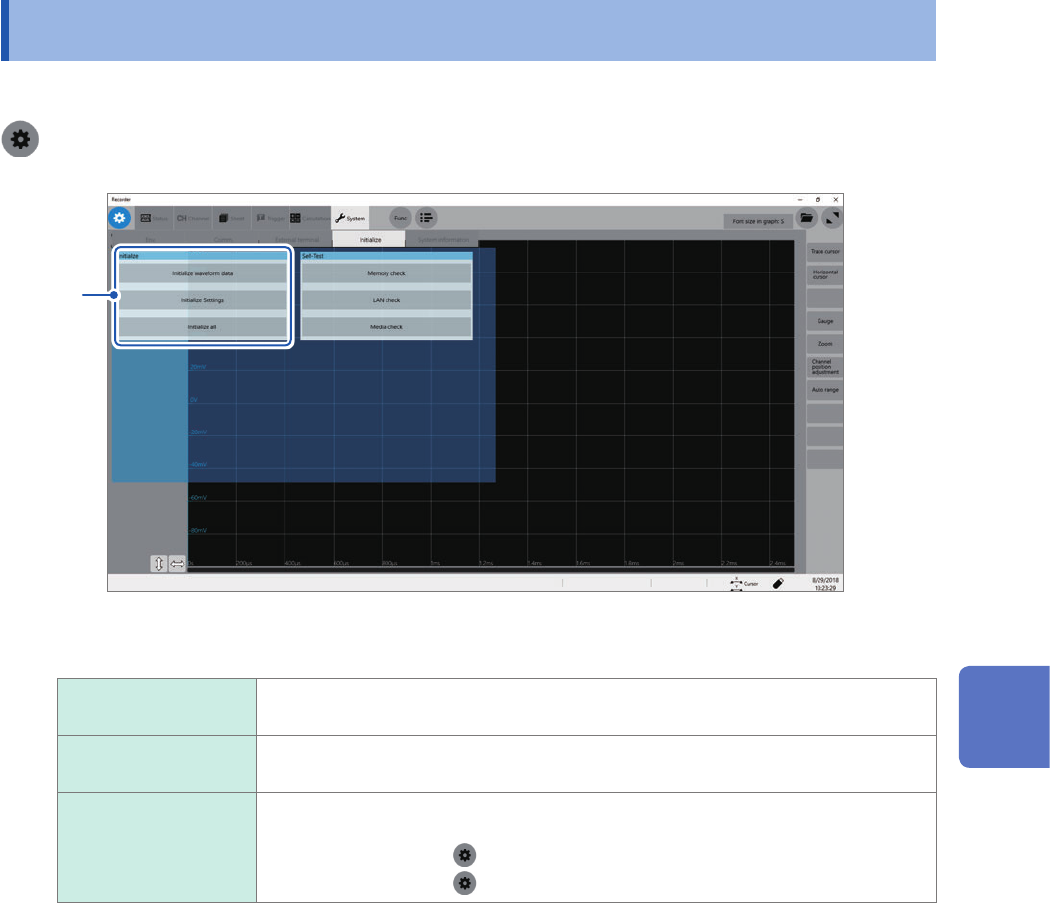
Choose settings congured on the instrument and restore them to the factory default.
> [System] > [Initialize]
1
1
Choose an item to be restored.
Initialize waveform
data
Discards the waveform data saved in the internal memory.
Initialize Settings Restores the settings for measurement, channels, sheets, triggers, and calculation
tabs.
Initialize all Restores all the settings to the factory default.
However, the following settings are not restored:
• Clock setting (
> [System] > [Date and time])
• Computer setting (
> [Comm.] > [Open PC settings])
2
Click [OK].
6
Maintenance and Service