MR8740T_Quick guide_eng_20191016H.pdf - 第159页
153 Message No. Message Solution Reference page 607 Current sensor removed. Check the connection of the current sensors. – 616 Search target channel has no data. Start another measurement or load a le. “4.3 Loading Data…

152
Message
No. Message Solution Reference page
219 E-mail recipient error.
The server has refused to
send the email message to the
recipient. Check addresses
in the “to” eld. Check the
recipient’s address.
“11 Connecting the Instrument
to Computers” of Instruction
Manual
221
The sent e-mail size exceeds
the limit.
The email size exceeds limits.
Reduce the recording length or
increase the size setting.
“11 Connecting the Instrument
to Computers” of Instruction
Manual
222
E-mail size exceeds server
limits.
The sent email size exceeds
the email server limit. Reduce
the recording length or change
the attachment contents.
“11 Connecting the Instrument
to Computers” of Instruction
Manual
223 FTP transfer failed.
Check the network environment.
The FTP server may have
rejected the le. Check the FTP
server setting. For example,
creating a directory (DIR) or le
is prohibited, or the server is
full.
“11 Connecting the Instrument
to Computers” of Instruction
Manual
224 E-mail transfer failed.
Check the network environment.
The email server may have
rejected the email message.
Check the transmission
condition of the email server.
For example, the size or the
number of emails reaches the
limit of the server.
“11 Connecting the Instrument
to Computers” of Instruction
Manual
225 Data send aborted.
The transmission is aborted.
Incomplete data may have been
transmitted via FTP or e-mail.
Check the transmitted data.
“11 Connecting the Instrument
to Computers” of Instruction
Manual
226 Network error.
A network error occurred during
communication. Check the
network environment.
“11 Connecting the Instrument
to Computers” of Instruction
Manual
232
File processing could not be
successfully completed.
An unexpected error occurred
while a le in the USB ash
drive is being processed.
Replace the storage device with
another or cycle the instrument.
“2.5 Preparing Storage Devices
(Recording Media)” (p. 57)
235
Real-time save could not be
completed within available time.
Check the upper limit value of
the sampling rate for real-time
save.
Some storage devices may
have a slow writing speed,
causing real-time writing to fail.
Use another USB ash drive.
Connect a drive to the USB 3.0
connector.
“1.2 Conguring Measurement
Conditions” of Instruction
Manual
241 File processing error.
An unexpected error occurred
while a le in the USB ash
drive is being processed.
Replace the storage device with
another or cycle the instrument.
“2.5 Preparing Storage Devices
(Recording Media)” (p. 57)
601 Zero-adjustment required. Execute zero-adjustment.
“2.8 Regulating the Zero
Position (Zero-Adjustment)”
(p. 63)
606 Current sensor recognized. – –
153
Message
No. Message Solution Reference page
607 Current sensor removed.
Check the connection of the
current sensors.
–
616
Search target channel has no
data.
Start another measurement or
load a le.
“4.3 Loading Data” of Instruction
Manual
640
Number of search results
exceeded 10,000. Search has
been canceled.
The instrument can display up
to 10,000 search results.
“6 Search Function” of
Instruction Manual
641
Insufcient data to perform
search.
Check the scope of search.
“6 Search Function” of
Instruction Manual
642
Unable to capture a stable
fundamental wave.
Check the setting for the
fundamental wave.
“6 Search Function” of
Instruction Manual
650
Cannot set numerical value.
Check the setting of upper and
lower limits.
– –
6
Maintenance and Service
154
Self-check
6.4 Self-check
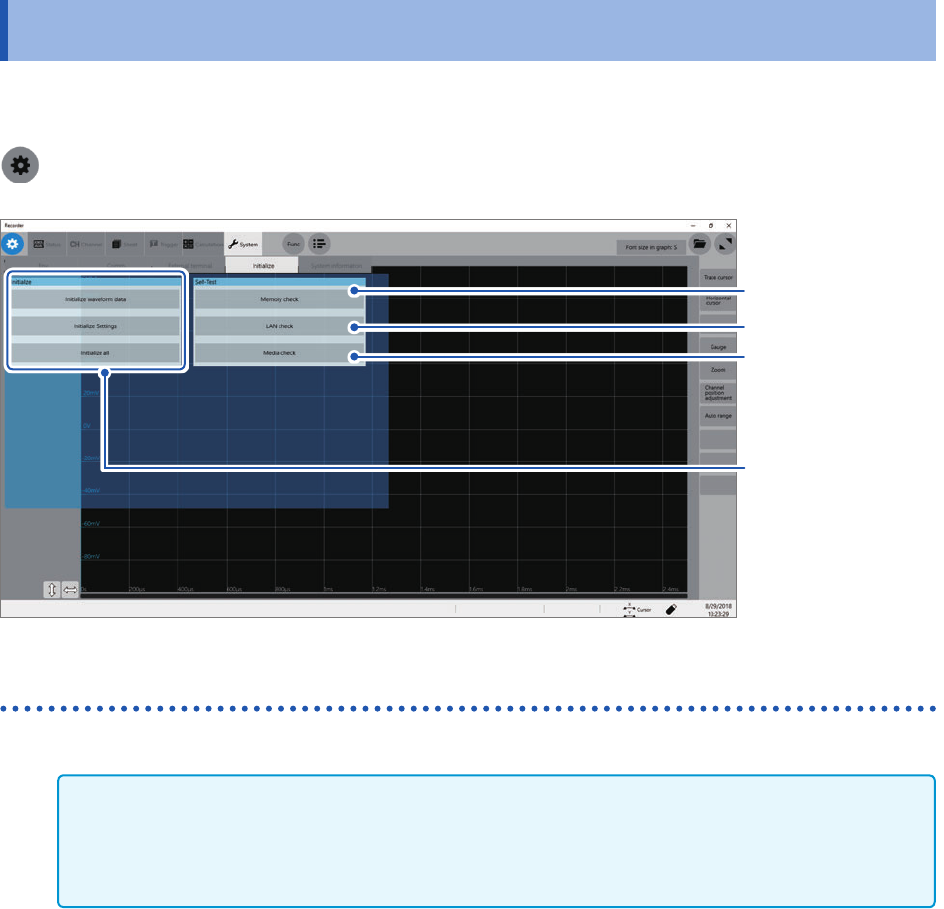
Executing the self-check function checks the instrument for malfunctions. The self-check consists
of the following checks:
> [System] > [Initialize]
(p. 155)
(p. 154)
(p. 157)
“Initializing the
Instrument”
(p. 147)
Memory check
Storage memory, backup memory (SRAM memory)
IMPORTANT
• Save measured data in a storage device before performing the memory check. Any measured
data will be deleted after the memory check.
• Do not turn off the instrument during the memory check.
1
Click [Memory check].
2
Click [Execute].
The memory check starts.
The memory check will nish in about 30 seconds.