MR8740T_Quick guide_eng_20191016H.pdf - 第62页
56 Connecting the Instrument with computers When connecting the instrument and the computer using Model 9642 LAN Cable and the accompanying crossover connector Model 9642 LAN Cable Crossover connector 1000BASE-T connecto…
55
Connecting the Instrument with computers
2.4 Connecting the Instrument with computers
Connecting the instruments with computers via a LAN cable allows computers to control and
monitor the instrument. Connect LAN cables to the 1000BASE-T connector of computers and
instrument. The procedures for connecting the cables (2 ways) are as follows.
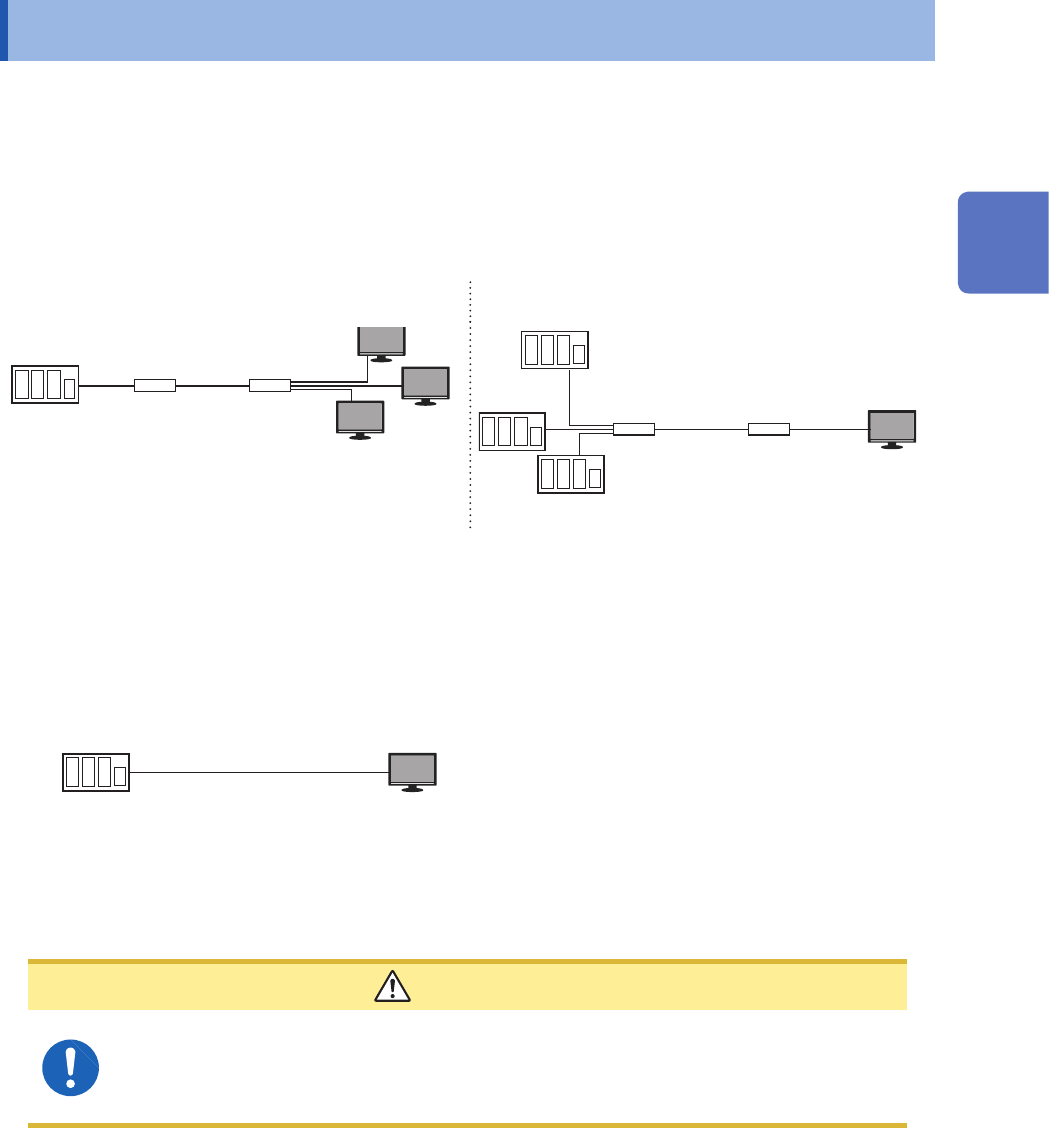
(1) Connecting the instrument to the existing network
Connecting the instruments with a hub via LAN cables allows computers to control and monitor the
instruments.
Connecting one instrument to multiple PCs Connecting multiple instruments to one computer
LAN cable* LAN cable*
Hub Hub
Model MR8740T
LAN
Computer
LAN
HubHub
Model MR8740T
LAN cable*
LAN cable*
Computer
*: Use one of the following cables:
• 1000BASE-T straight-through cable (maximum length: 100 m, commercially available)
• Model 9642 LAN Cable (optional)
(2) One-to-one connection of the instrument and a computer
Connecting the instruments with computers via a LAN cable allows computers to control and
monitor the instrument.
Model MR8740T
Computer
LAN cable*
*: Use one of the following cables:
• 1000BASE-T compatible crossover cable (maximum length: 100 m)
• 1000BASE-T straight-through cable and crossover connector (maximum length: 100 m)
• Model 9642 LAN Cable (optional, coming with crossover connector)
CAUTION
When connecting the instrument to your LAN using a LAN cable of more than 30 m or
with a cable laid outdoors, take appropriate countermeasures that include installing a
surge protector for LANs. Such signal wiring is susceptible to induced lighting, which
can cause damage to the instrument.
2
Preparing for Measurement
56
Connecting the Instrument with computers
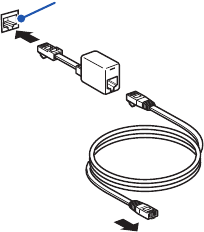
When connecting the instrument and the computer using Model 9642 LAN Cable and the
accompanying crossover connector
Model 9642 LAN Cable
Crossover connector
1000BASE-T connector of instrument
Connect it to your computer.
1
2
3
1
Connect Model 9642 LAN Cable to the
accompanying crossover connector.
2
Connect the crossover connector to the
1000BASE-T connector of the instrument.
3
Connect Model 9642 LAN Cable to the
1000BASE-T connector of your computer.
57
Preparing Storage Devices (Recording Media)
2.5 Preparing Storage Devices (Recording Media)
The storage device that can be used with the instrument are USB ash drives and a built-in drive.
Refer to “Handling storage devices” (p. 14).
USB ash drive
The instrument supports not all commercially available USB ash drives. You have to congure the
USB ash drive setting on the instrument to use USB ash drives.
Refer to “Formatting storage devices” (p. 59).
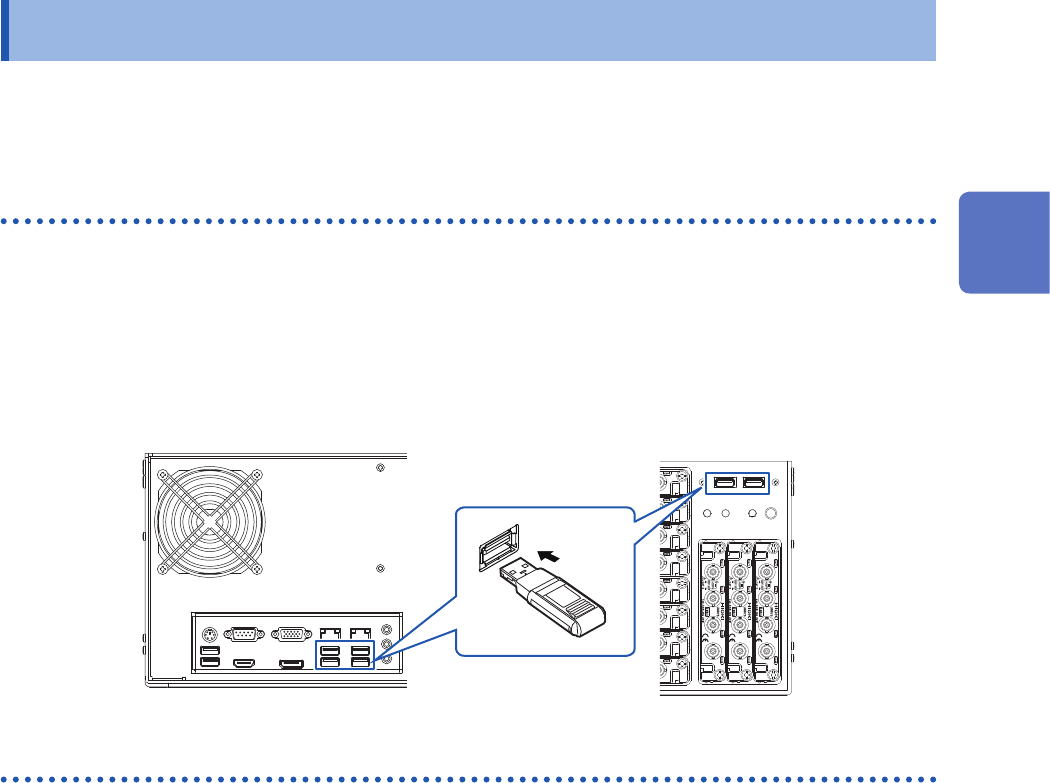
How to insert a USB ash drive
Align the USB ash drive with the connector, and fully insert it.
Rear side
Front side
Built-in drive
The built-in drive is factory-formatted.
Built-in SSD (capacity: 480 GB*)
*: Once the SSD has been formatted, the actually available capacity decreases.
You cannot remove the built-in drive.
2
Preparing for Measurement