MR8740T_Quick guide_eng_20191016H.pdf - 第50页
44 Attaching Connection Cords Connecting a current sensor with Model U8977 3CH Current Unit Y ou can directly connect a current sensor with the sub model-number “-05,” which has a metal connector (ME15W). Hold the metal …
43
Attaching Connection Cords
Current sensor
Familiarize yourself with “Operation Precautions” (p. 8) before connecting a current sensor.
Refer to the instruction manual that comes with each current sensor for details on specications
and directions for use.
CAUTION
Do not connect and remove a current sensor while the instrument remains on.
Doing so will cause damage to the current sensor.
Up to nine sensors can connect to Model 8971 Current Unit and Model U8977 3CH Current Unit all
together.
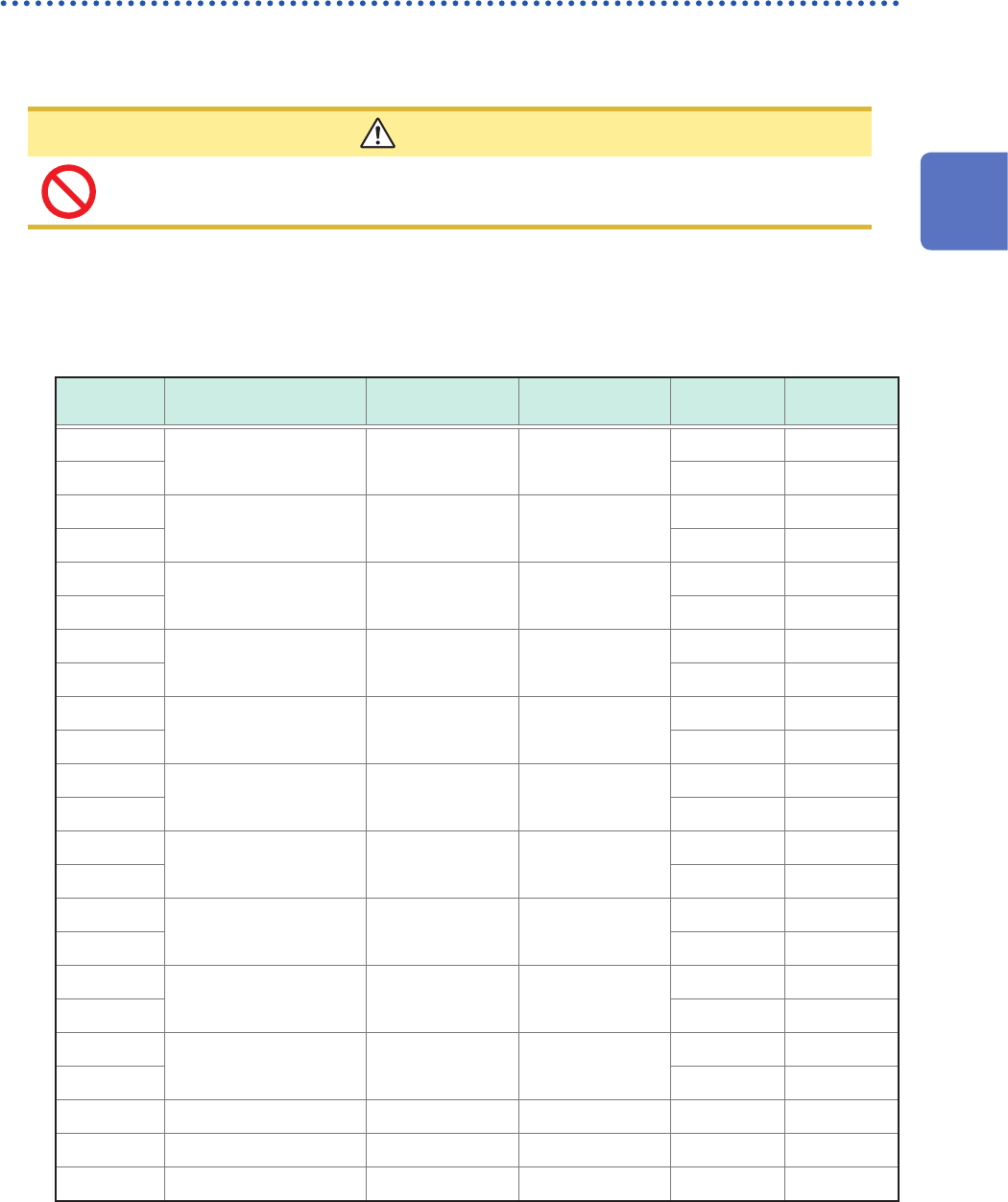
Connectable current sensors
: Connectable with Model U8977; –: Conversion cable required
Model
number
Model name
Maximum input
current
Frequency
Directly
connectable
Connector*
1
9709
AC/DC Current Sensor 500 A DC to 100 kHz
–*
2
Plastic
9709-05
Metal
9272-05
Clamp on Sensor 20 A / 200 A 1 Hz to 100 kHz
Metal
9272-10 –*
2
Plastic
CT6841
AC/DC Current Probe 20 A DC to 1 MHz
–*
2
Plastic
CT6841-05
Metal
CT6843
AC/DC Current Probe 200 A DC to 500 kHz
–*
2
Plastic
CT6843-05
Metal
CT6844
AC/DC Current Probe 500 A DC to 200 kHz
–*
2
Plastic
CT6844-05
Metal
CT6845
AC/DC Current Probe 500 A DC to 100 kHz
–*
2
Plastic
CT6845-05
Metal
CT6846
AC/DC Current Probe 1000 A DC to 20 kHz
–*
2
Plastic
CT6846-05
Metal
CT6862
AC/DC Current Sensor 50 A DC to 1 MHz
–*
2
Plastic
CT6862-05
Metal
CT6863
AC/DC Current Sensor 200 A DC to 500 kHz
–*
2
Plastic
CT6863-05
Metal
CT6865
AC/DC Current Sensor 1000 A DC to 20 kHz
–*
2
Plastic
CT6865-05
Metal
CT6875 AC/DC Current Sensor 500 A DC to 2 MHz
Metal
CT6876 AC/DC Current Sensor 1000 A DC to 1.5 MHz
Metal
CT6877 AC/DC Current Sensor 2000 A DC to 1 MHz
Metal
*1: Metal connector (ME15W)
Plastic connector (PL23)
*2: The probe/sensor requires Model CT9900 Conversion Cable to connect with Model U8977 3CH Current
Unit.
The probe/sensor requires Model 9318 Conversion Cable to connect with Model 8971 Current Unit.
2
Preparing for Measurement
44
Attaching Connection Cords
Connecting a current sensor with Model U8977 3CH Current Unit
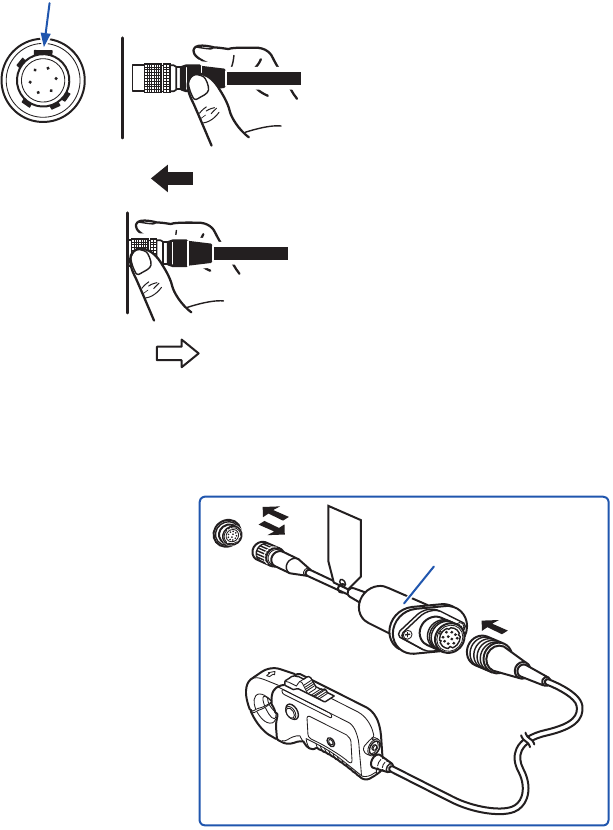
You can directly connect a current sensor with the sub model-number “-05,” which has a metal
connector (ME15W).
Hold the metal
sleeve.
Point the widest key upward.
1
Align the connector guides of the cable with
those of the module connector.
2
Straightly insert the connector until it locks.
Hold the part other than metal to insert the
connector.
The instrument automatically recognizes the
model of the current sensor.
How to disconnect the current sensor
1
Hold and pull the metal collar, which releases
the lock.
2
Pull the connector.
Using Model CT9900 Conversion Cable, you can connect a current sensor without the sub model-
number “-05,” which has a plastic connector (PL23), with Model U8977 3CH Current Unit.
Model CT9900
Conversion Cable
When Model CT9900 Conversion Cable is used, the instrument recognizes Model CT6846 or
CT6865 (1000 A rating) as a 500-A AC/DC sensor. Set the conversion ratio to 2.00.
45
Attaching Connection Cords
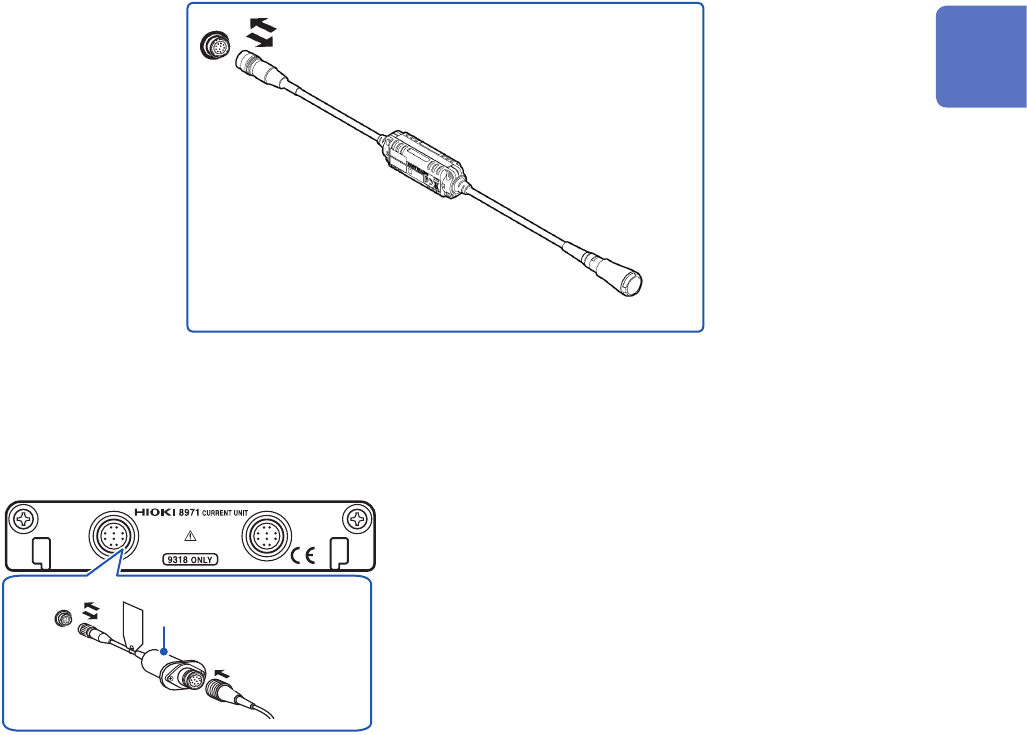
By using Model CT9920 Conversion Cable (optional), you can connect a current sensor of Model
CT7000 series with Model U8977 3CH Current Unit. The instrument cannot recognize any sensor
with Model CT9920 connected.
Select a mode in the setting screen.
Supported models Model CT7631, Model CT7636, Model CT7642, Model CT7731, Model CT7736,
Model CT7742, Model CT7044, Model CT7045,
Model CT7046
Model CT9920
Conversion Cable
For current sensor
Connecting a current sensor with Model 8971 Current Unit
By using Model 9318 Conversion Cable*, you can connect a current sensor without the sub model-
number “-05,” which has a plastic connector (PL23), with Model 8971 Current Unit..
*: Model 9318 Conversion Cable is an accessory of Model 8971 Current Unit.
Model 9318
Conversion Cable
1
2
Model 8971 Current Unit
1
Align the guides of the conversion cable with
those of the sensor connector on the module,
and straightly insert the plug until it locks.
2
Align the guides of the current sensor to
be used with those of the conversion cable
connector, and straightly insert the plug until it
locks.
The instrument automatically recognizes the
model of the current sensor.
3
Clamp the current sensor around a line of a
measuring object.
How to connect the cable and a sensor
1
Hold and pull the plastic collar of the
conversion cable, which releases the lock, and
the remove the connector.
2
Hold and pull the plastic collar of the current
sensor, which releases the lock, and the
remove the connector.
When measuring currents with a voltage module
Using Model 9018-50 Clamp on Probe, you can measure a current using a voltage measurement
module such as Model 8966 Analog Unit.
Conguring the scaling settings allows measured waveforms to be displayed as current values. For
the setup procedure, refer to “Converting Input Values (Scaling Function)” of the Instruction Manual.
2
Preparing for Measurement