MR8740T_Quick guide_eng_20191016H.pdf - 第164页
158 Self-check System conguration check Y ou can check the functions and devices installed in the instrument in a list. > [System] > [System information] 1 2 No. Item Description 1 System conguration Y ou can che…
157
Self-check
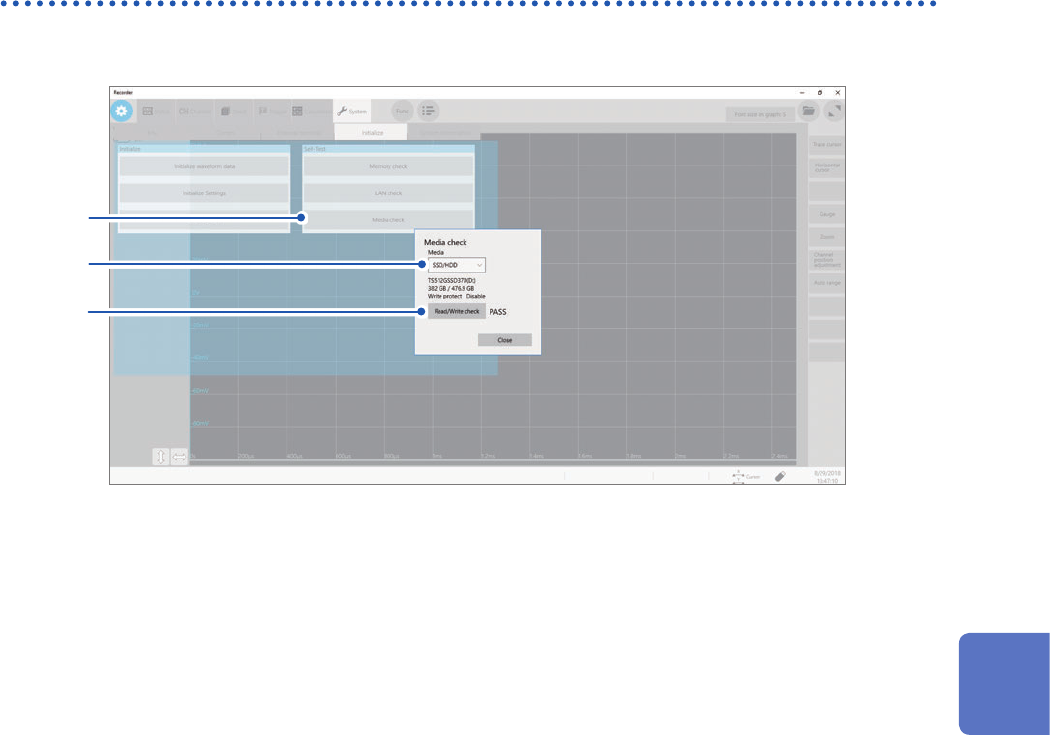
Media check
This check tests the storage devices for malfunction.
3
2
1
1
Click [Memory check].
2
Click the [Media] box and choose a storage device from the list.
The screen displays the information of the chosen storage device.
3
Click [Read/Write check].
The read/write check starts.
6
Maintenance and Service
158
Self-check
System conguration check
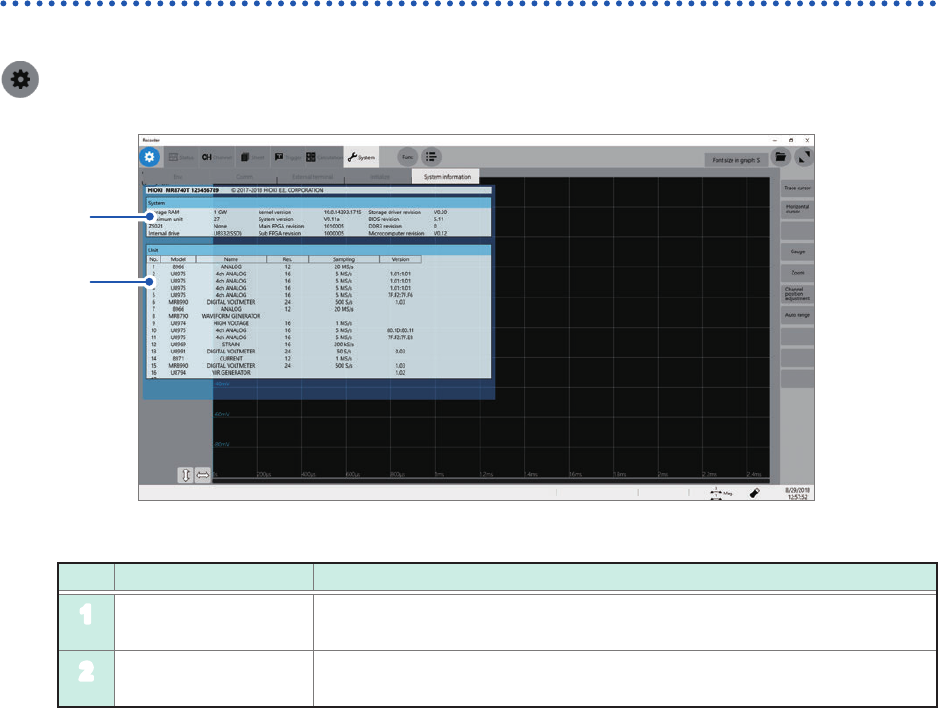
You can check the functions and devices installed in the instrument in a list.
> [System] > [System information]
1
2
No. Item Description
1
System
conguration
You can check the system conguration, software version numbers, and
board versions of the instrument.
2
Module
conguration
You can check the model number, name, resolution, sampling rate, and
rmware version number of each module (unit) installed in the instrument.
159
Cleaning the Instrument
6.5 Cleaning the Instrument
To clean the instrument and modules, wipe it gently with a soft cloth moistened with water or mild
detergent.
CAUTION
Clean the vents periodically to avoid blockage.
When the vents get clogged, the instrument’s internal cooling effect is hampered, and
this can lead to damage to the instrument.
6.6 Disposing of the Instrument (Removing the
lithium battery)
When disposing of this instrument, remove the battery and lithium battery and dispose of the
battery and instrument in accordance with local regulations.
WARNING
To avoid an electric shock, turn off the instrument and disconnect any connection
cords from the instrument before removing the battery and lithium battery.
Do not short-circuit, recharge, disassemble or dispose of them in re. The battery
may explode if mistreated.
Keep batteries away from children to prevent accidentally swallowing.
• The instrument contains a battery to shut down the OS correctly. The battery offers a service life of
about two years If the OS does not correctly shut down, it is the time to replace that battery.
The instrument contains built-in backup lithium batteries, which offer a service life of about 10
years.
If the date and time deviate substantially at power-on, it is the time to replace that battery.
Contact your authorized Hioki distributor or reseller.
•
The battery is subject to self-discharge. Be sure to charge the battery before initial use. If the OS
does not correctly shut down even after the battery is recharged, it is the time to replace that battery.
CALIFORNIA, USA ONLY
Perchlorate Material - special handling may apply.
See www.dtsc.ca.gov/hazardouswaste/perchlorate
6
Maintenance and Service