MR8740T_Quick guide_eng_20191016H.pdf - 第54页
48 Attaching Connection Cords Logic probe (Measuring logic signals) Connect logic probes to Model 8973 Logic Unit. Refer to “Before connecting a logic probe to a measuring object” (p. 17). Refer to an instruction manual …
47
Attaching Connection Cords
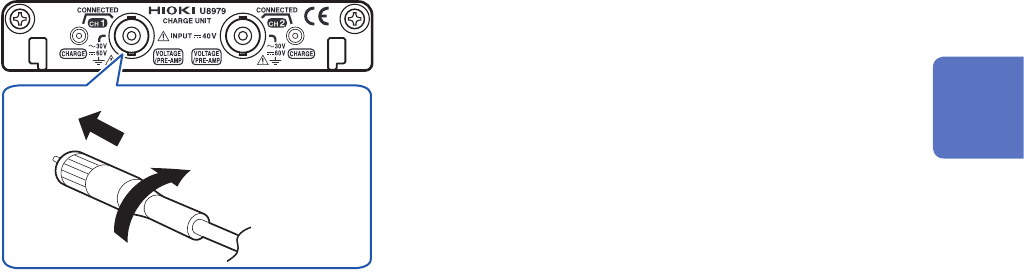
Connecting a charge-output acceleration sensor
Connecting a charge-output acceleration sensor equipped with the miniature connector
(#10-32)
Model U8979 Charge Unit
Tighten the
screw.
1
Align the screw of the miniature connector, and
turn the connector clockwise to tighten it.
2
Attach the charge-output acceleration sensor
to a measuring object.
How to disconnect the current sensor
Turn the miniature connector counterclockwise,
and then pull out the connector.
Connecting an charge-output acceleration sensor equipped with a connector other than a
miniature connector (#10-32)
Convert the output connector into the miniature connector (#10-32) using a commercially available
conversion connector or conversion cable to connect the sensor.
2
Preparing for Measurement
48
Attaching Connection Cords
Logic probe (Measuring logic signals)
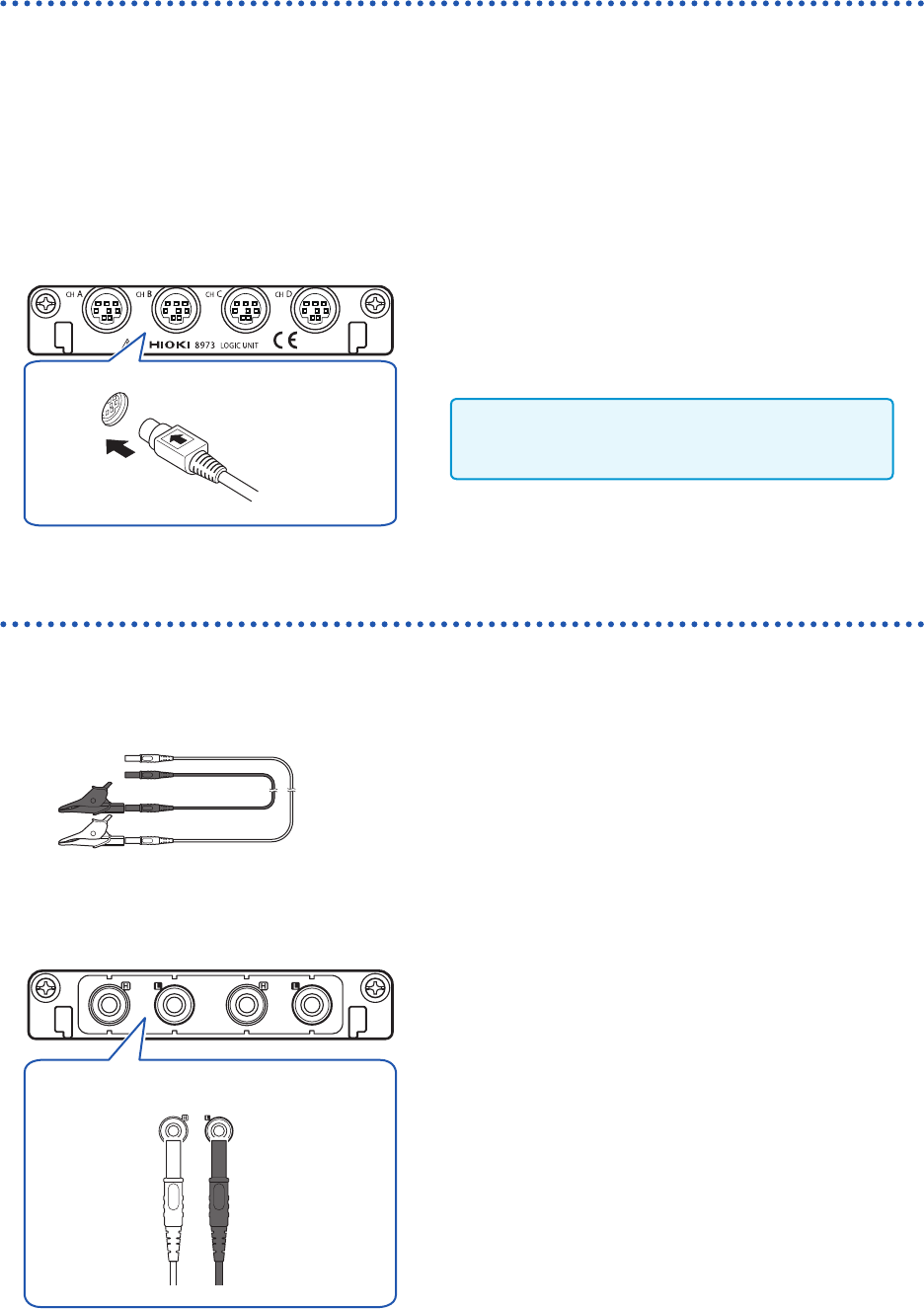
Connect logic probes to Model 8973 Logic Unit.
Refer to “Before connecting a logic probe to a measuring object” (p. 17).
Refer to an instruction manual of each logic probe.
Required item: Logic probe (Model 9320-01, Model MR9321-01, or Model 9327)
How to connect a logic probe
Example: Connecting Model 9327 Logic Probe
Model 8973 Logic Unit
1
Align the plug slots of the logic probe with a
logic terminal, and insert the logic-probe plug.
2
Connect the logic probe to a measuring object.
Only slots to which UNIT 25, UNIT 26, or UNIT
27 is assigned are available.
Connection cable (For precisely measuring voltage)
Connect Model L2200 Test Lead to a module.
Required item: Model L2200 Test Lead (maximum input voltage: 1000 V)
How to connect a logic probe
Model MR8990 Digital Voltmeter Unit
H L
Red Black
1
Connect the test leads to the banana jacks on
the module.
Connect the black lead to the L jack; and the red lead to
the H jack. Make sure the test leads are fully inserted into
the jacks.
2
Connect the test leads to a measuring object.
49
Attaching Connection Cords
Outputting waveforms
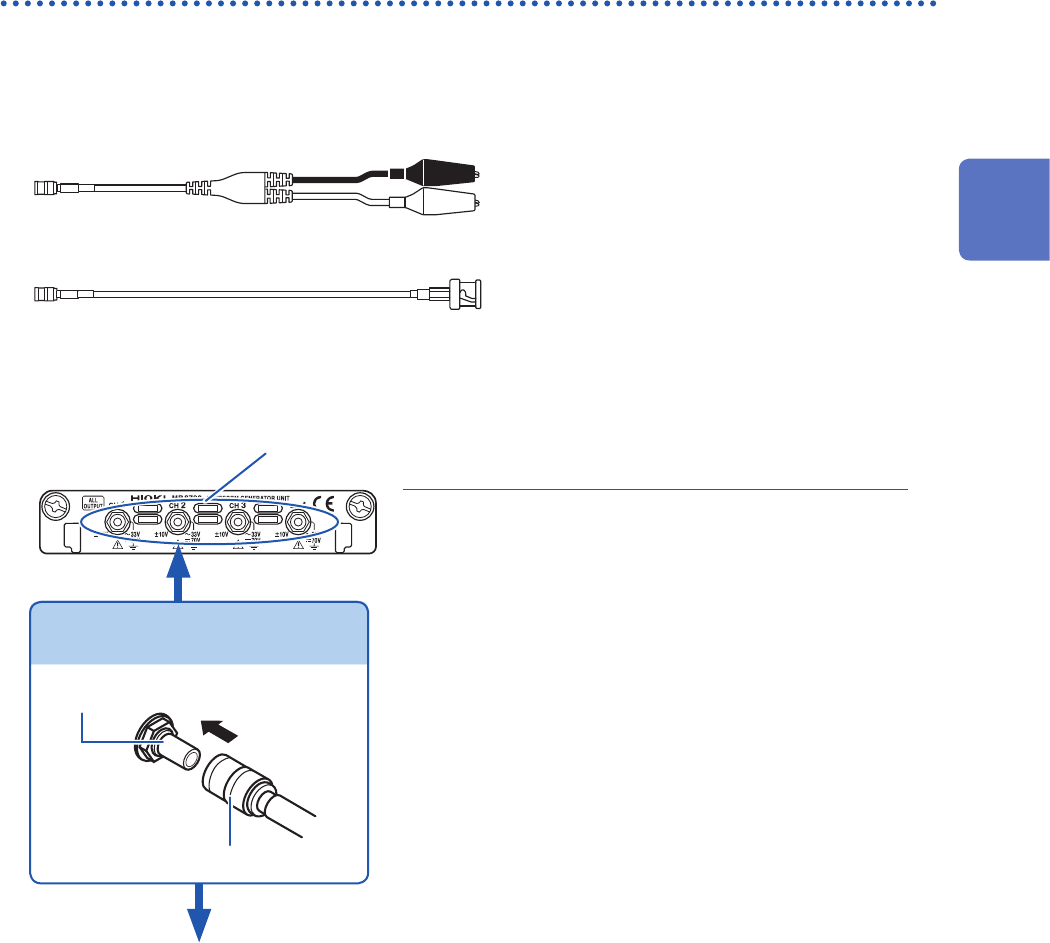
Connect the connection cable to an SMB terminal of Model MR8790.
Required item: Model L9795-01/L9795-02 Connection Cable
• Model L9795-01 Connection Cable (mini-alligator clip type)
• Model L9795-02 Connection Cable (BNC output type)
How to connect the cable to an output terminal
Example: Model MR8790 Waveform Generator Unit
Output terminal
SMB connector
Attach the connection cable.
2
Attach the connection cable to a target.
Output
terminal
1
Insert the SMB connector of the connection
cable to an output terminal until the connector
clicks.
3
Attach the clips of the connection cable to a
target.
How to disconnect the cable from the output
terminal
Hold the head of the SMB connector (other than the
cable) and pull it out.
1
2
Preparing for Measurement