MR8740T_Quick guide_eng_20191016H.pdf - 第154页
148 Message 6.3 Message If any problem is found, the screen will display an error message or a warning message. It also displays an information message with advice for usage. Action that should be taken after a message I…
147
Initializing the Instrument
6.2 Initializing the Instrument
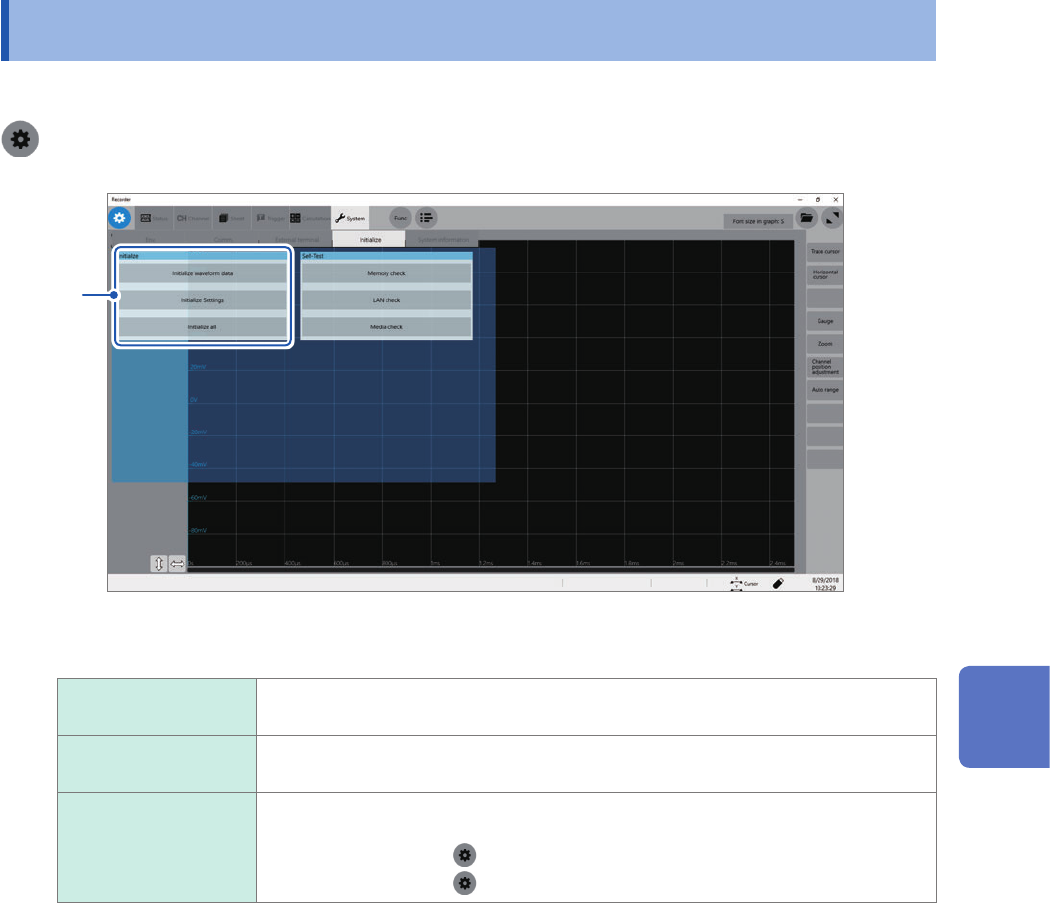
Choose settings congured on the instrument and restore them to the factory default.
> [System] > [Initialize]
1
1
Choose an item to be restored.
Initialize waveform
data
Discards the waveform data saved in the internal memory.
Initialize Settings Restores the settings for measurement, channels, sheets, triggers, and calculation
tabs.
Initialize all Restores all the settings to the factory default.
However, the following settings are not restored:
• Clock setting (
> [System] > [Date and time])
• Computer setting (
> [Comm.] > [Open PC settings])
2
Click [OK].
6
Maintenance and Service
148
Message
6.3 Message
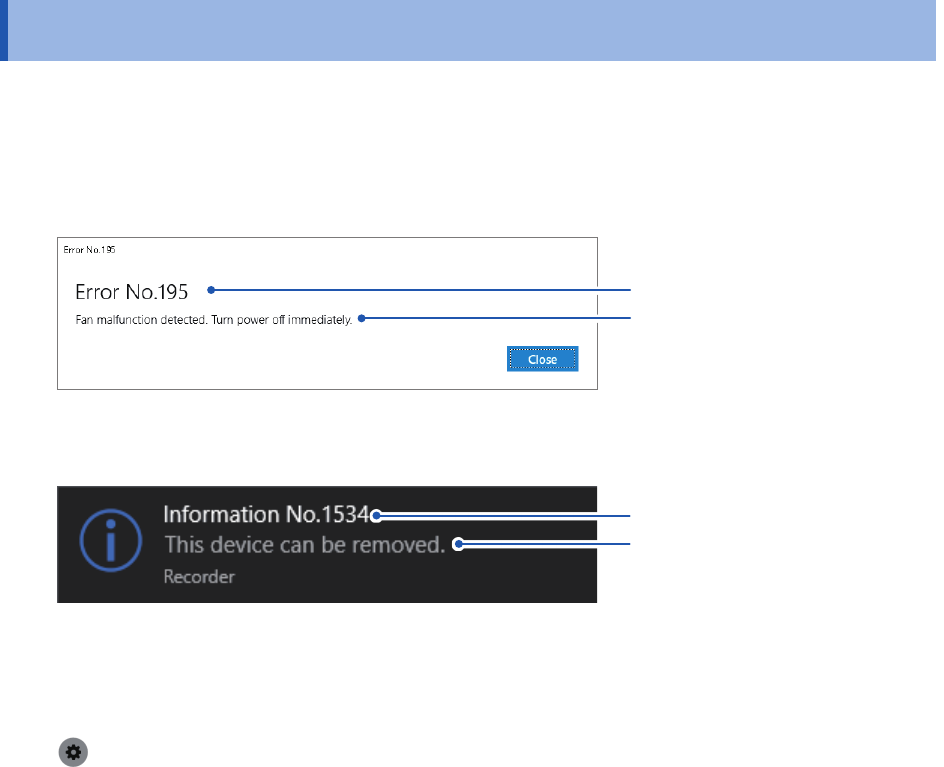
If any problem is found, the screen will display an error message or a warning message. It also
displays an information message with advice for usage.
Action that should be taken after a message
If a message remains
Message
Message No.
If an error or warning message is not cleared, check the details and click [Close].
If a message disappears in several seconds
Message
Message No.
Some of the warning and information messages disappear in a few seconds. Check the details
while the screen is displaying the message.
To inform of a message with a beep
Select [System] > [Env.], and set [Beep sound] to [Alert] or [Alert+Action].
Refer to “10 Specifying the System Environment Settings” of Instruction Manual.
149
Message
Error messages
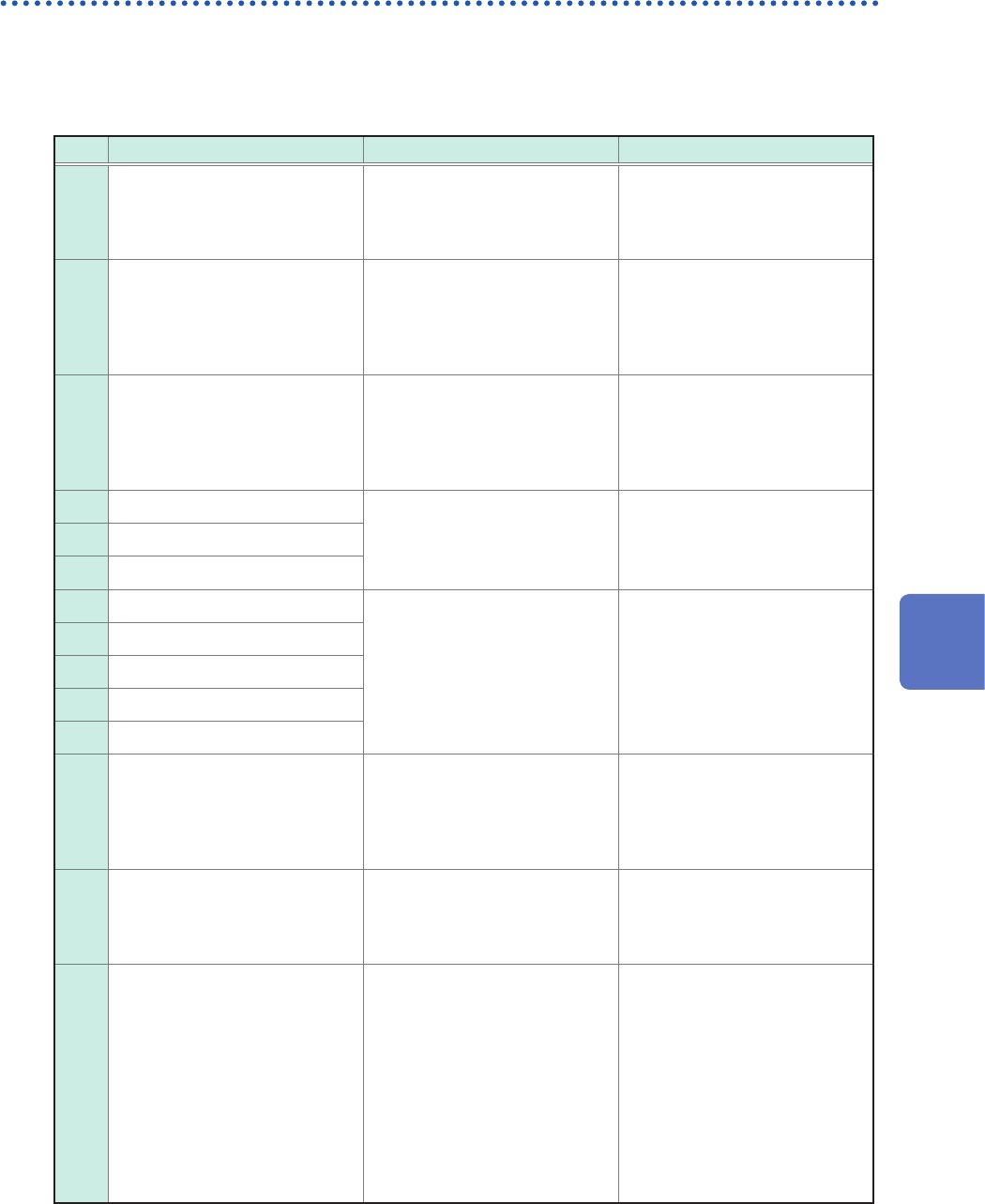
The list of error messages is as follows. Check the solution.
If an error is displayed on the screen at power-on, the instrument is necessary to be repaired.
Contact your authorized Hioki distributor or reseller.
No. Message Solution Reference page
176
Internal temperature is
abnormal. Please turn the
power off.
Check the operating
temperature environment and
the fan rotation. Send the
instrument for repair if needed.
–
195
Fan malfunction detected.
Power off immediately.
High internal temperature
may damage the instrument.
Immediately turn off the
instrument and send the
instrument for repair.
–
196
Change the input unit setup
so that the total number of
channels of Model 8971 does
not exceed 8.
Up to four modules of Model
8971 Current Unit can be
installed in the instrument. Turn
off the instrument and change
the module conguration.
“2.1 Installing and Removing
Modules” (p. 34)
639 Hardware error
A hardware error is detected.
Immediately turn off the
instrument and send the
instrument for repair.
–643 Hardware error
644 Hardware error
645 Hardware error
A hardware error is detected.
Immediately turn off the
instrument and send the
instrument with the modules for
repair.
–
646 Hardware error
647 Hardware error
648 Hardware error
649 Unit X ROM checksum error
651
System power supply error.
Power off immediately.
A system power supply
malfunction detected.
Immediately turn off the
instrument and send the
instrument for repair.
–
652 Hardware error
A hardware error is detected.
Immediately turn off the
instrument and send the
instrument for repair.
–
653
Processing could not be
successfully completed.
An error occurred during
an internal process of the
instrument. Click [Shutdown]
to turn off the instrument and
cycle the instrument. Replace
the storage device with another
or cycle the instrument.
Measurement can be continued
by clicking [Continue], but it
is recommended to turn off the
instrument once.
–
6
Maintenance and Service