MR8740T_user_manual_eng_20191016H.pdf - 第108页
103 Conguring the Pre-trigger settings 1 Click [Pre-T rigger 0%] . The setting dialog box appears. 2 3 2 Click the [Pre-trigger] box, and then enter a pre-trigger length. 0% to 100% Difference between [W aiting for Pr…
102
Conguring the Pre-trigger settings
5.4 Conguring the Pre-trigger settings
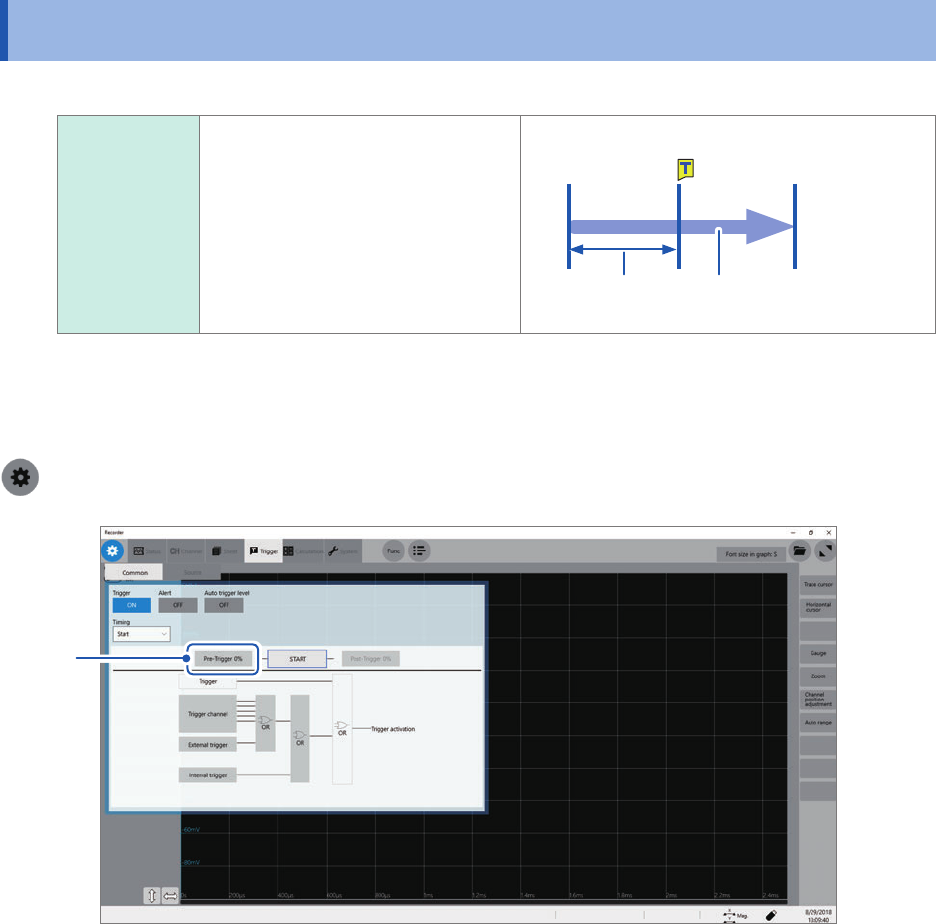
Pre-trigger You can record not only
waveforms that appear after a
start trigger has been activated,
but also those that appear before
the trigger is activated.
Also records data before the start trigger.
Start
Specied pre-
trigger length
Recording length or
recording time
The pre-trigger is set in percent (%) of the recording length.
Setting all the trigger sources (analog, interval triggers, etc.) to [Off] disables pre-trigger setting.
> [Trigger] > [Common]
1
103
Conguring the Pre-trigger settings
1
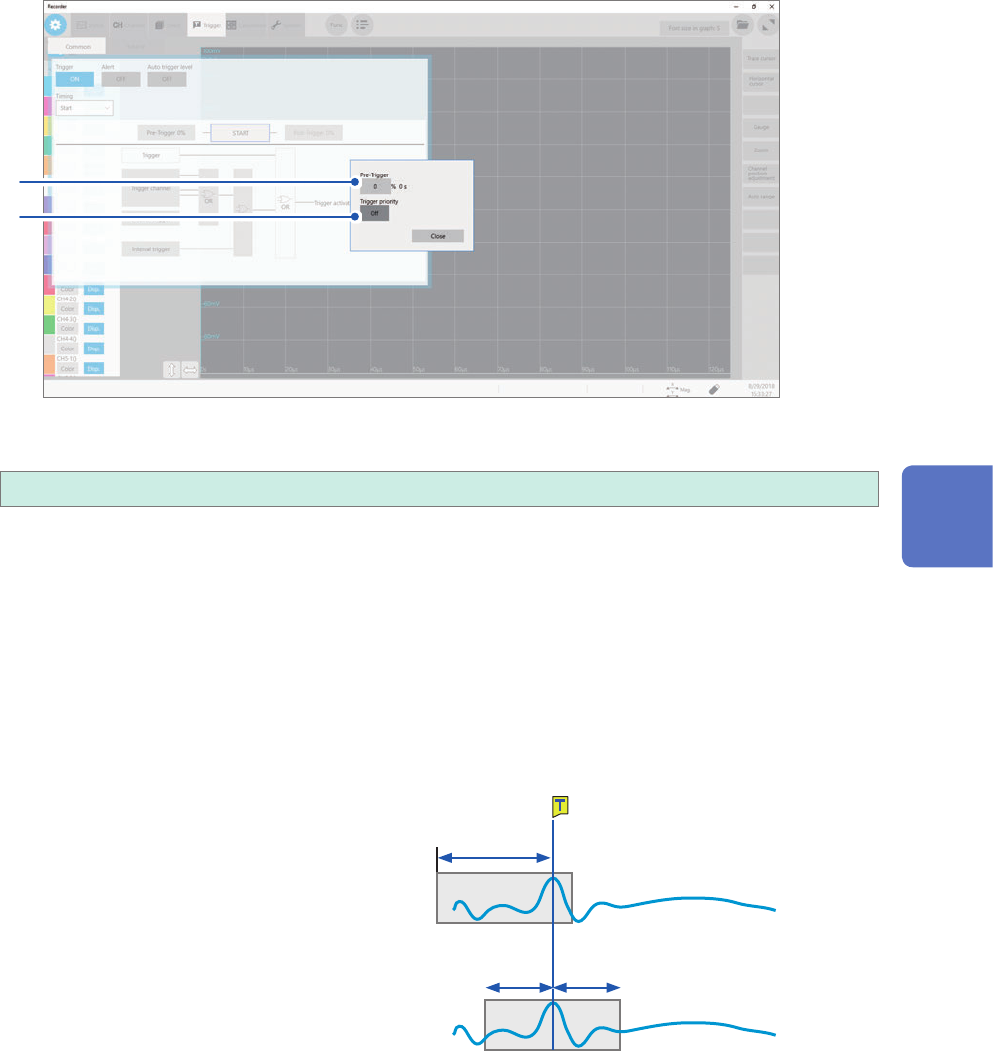
Click [Pre-Trigger 0%].
The setting dialog box appears.
2
3
2
Click the [Pre-trigger] box, and then enter a pre-trigger length.
0%
to 100%
Difference between [Waiting for Pre-Trigger] and [Waiting for Trigger]
When starting a measurement, the instrument starts lling the pre-trigger memory. During this
period, the instrument displays the message [Waiting for Pre-Trigger]. After having lled the pre-
trigger memory, the instrument displays the message [Waiting for Trigger] until it is triggered.
While displaying [Waiting for Pre-Trigger], the instrument is not triggered even when a trigger
condition is satised.
Pre-trigger and recording range
• Using the pre-trigger along with the start trigger setting
When the pre-trigger length is set at 95%:
Records the waveforms with the recording
length, 95% of which appear before the start
trigger point.
Start
50% 50%
95%
When the pre-trigger length is set at 50%
Records recording-length waveforms, 50% of
which appear before the start trigger point.
5
Conguring the Trigger Settings
104
Conguring the Pre-trigger settings
3
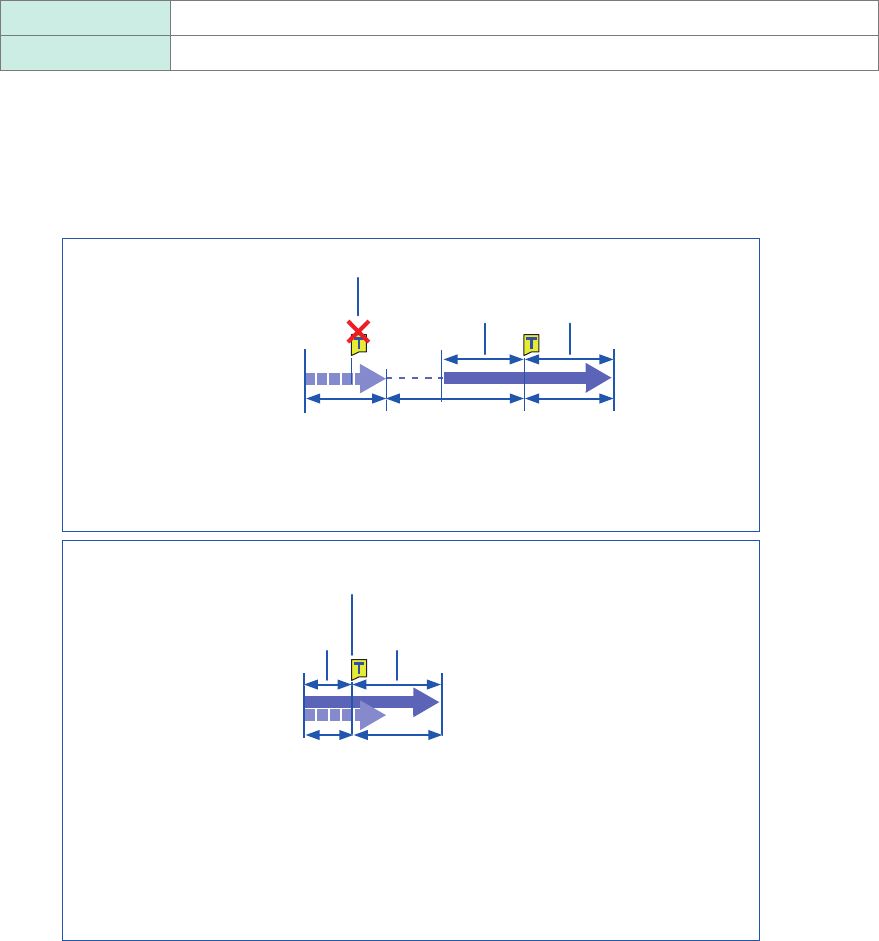
Click the [Trigger priority] button to choose a way to handle triggers activated while the
instrument is lling the pre-trigger memory.
You can choose whether the instrument is triggered when the trigger condition is satised while the instrument
is lling the pre-trigger memory.
• When the pre-trigger is enabled, the instrument is not triggered once the measurement has started until a
certain period has elapsed (while the instrument is lling the pre-trigger memory).
• The message [Waiting for Pre-Trigger] appears on the screen.
Off
Ignores triggers while lling the pre-trigger memory.
On Accepts a trigger while lling the pre-trigger memory.
When the trigger condition is satised while the message [Waiting for Pre-Trigger] is being
displayed
Example: When the pre-trigger length is set at 50%
Trigger priority: [Off]
Ignores triggers.
Recording length
before the trigger
50% of recording length
after the trigger
[Waiting for Pre-Trigger] [Waiting for
Trigger]
[Storing]
Starting a measurement
(After having internally recorded the 50%-recording-length -data,
displays [Waiting for Trigger].)
Trigger priority: [On]
When the instrument is triggered while it is lling the pre-trigger memory, the length
of the data actually recorded may be shorter than the specied recording length. (In
this case, the pre-trigger recording length is shortened. The recording length after a
trigger is calculated by subtracting the specied pre-trigger length from the specied
recording length.)
The instrument is triggered.
Recording length
before the trigger
50% of recording length
after the trigger
[Waiting for Pre-Trigger] [Storing]
(The instrument is triggered while 50%-recording-length data is
being internally recorded)
Starting a measurement