MR8740T_user_manual_eng_20191016H.pdf - 第109页
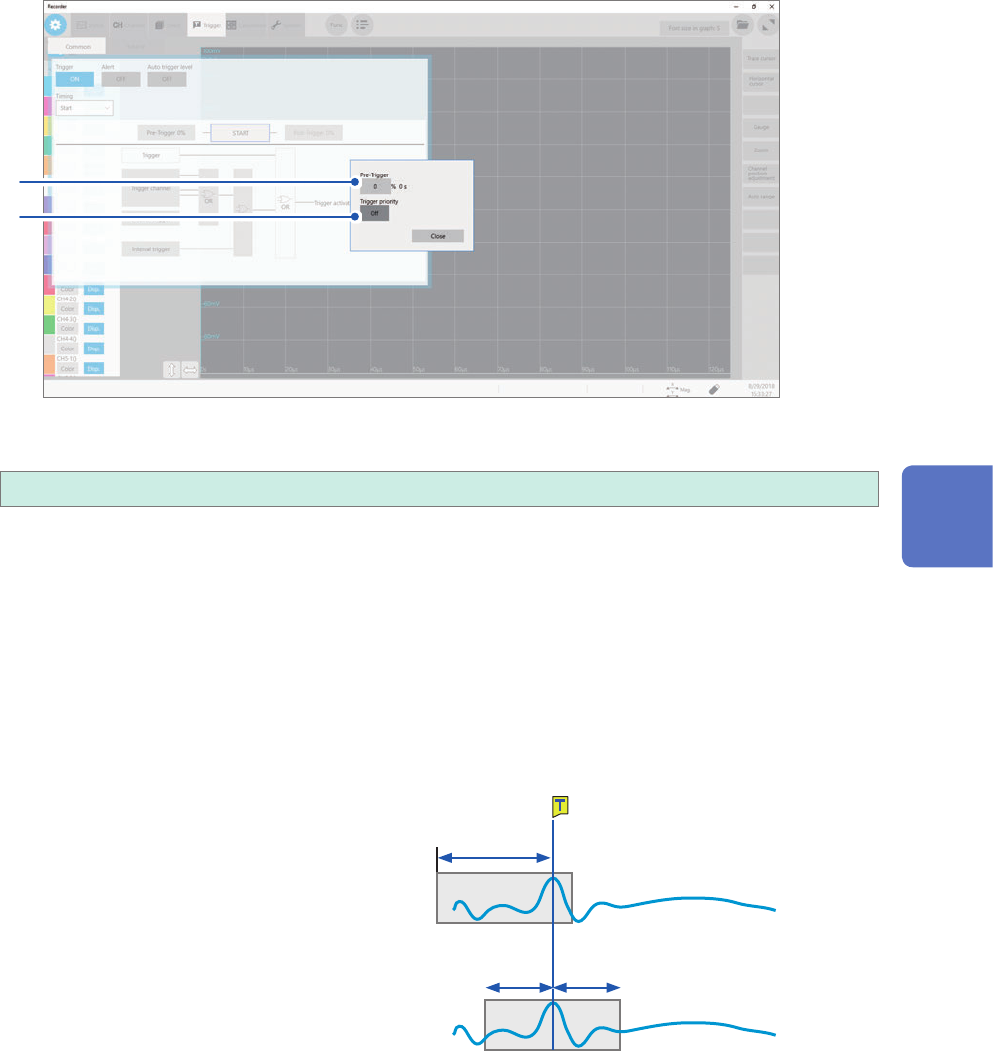
104 Conguring the Pre-trigger settings 3 Click the [ T rigger priority] button to choose a way to handle triggers activated while the instrument is lling the pre-trigger memory . Y ou can choose whether the instrument …
103
Conguring the Pre-trigger settings
1
Click [Pre-Trigger 0%].
The setting dialog box appears.
2
3
2
Click the [Pre-trigger] box, and then enter a pre-trigger length.
0%
to 100%
Difference between [Waiting for Pre-Trigger] and [Waiting for Trigger]
When starting a measurement, the instrument starts lling the pre-trigger memory. During this
period, the instrument displays the message [Waiting for Pre-Trigger]. After having lled the pre-
trigger memory, the instrument displays the message [Waiting for Trigger] until it is triggered.
While displaying [Waiting for Pre-Trigger], the instrument is not triggered even when a trigger
condition is satised.
Pre-trigger and recording range
• Using the pre-trigger along with the start trigger setting
When the pre-trigger length is set at 95%:
Records the waveforms with the recording
length, 95% of which appear before the start
trigger point.
Start
50% 50%
95%
When the pre-trigger length is set at 50%
Records recording-length waveforms, 50% of
which appear before the start trigger point.
5
Conguring the Trigger Settings
104
Conguring the Pre-trigger settings
3
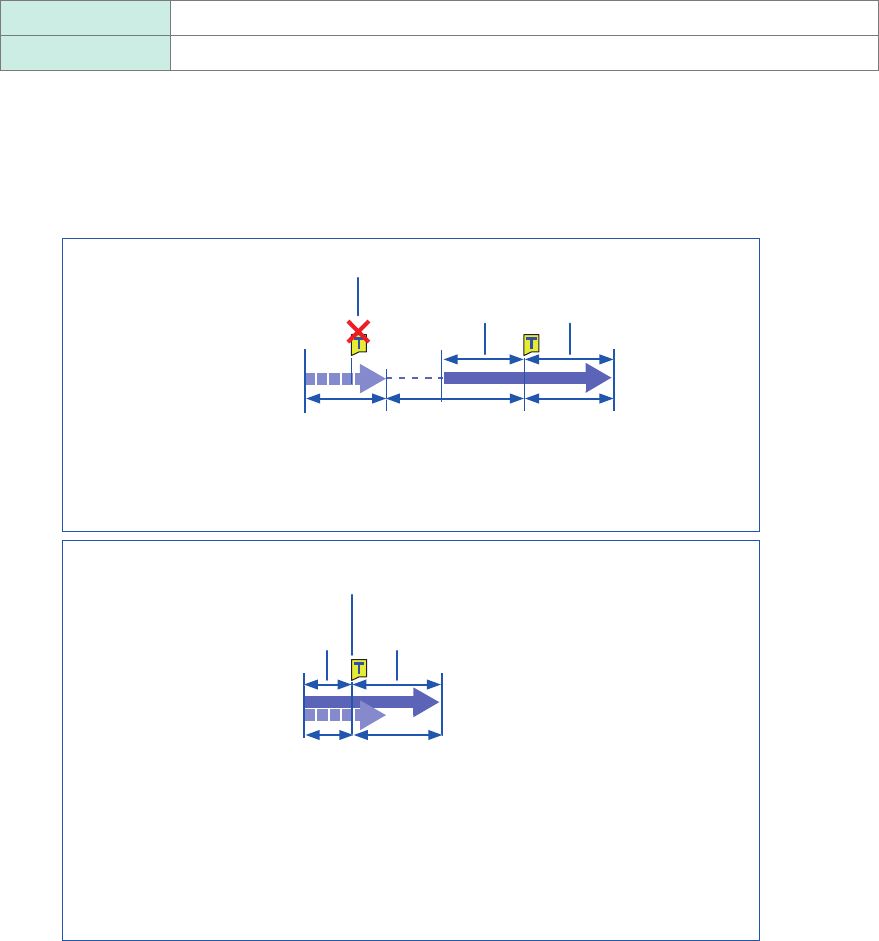
Click the [Trigger priority] button to choose a way to handle triggers activated while the
instrument is lling the pre-trigger memory.
You can choose whether the instrument is triggered when the trigger condition is satised while the instrument
is lling the pre-trigger memory.
• When the pre-trigger is enabled, the instrument is not triggered once the measurement has started until a
certain period has elapsed (while the instrument is lling the pre-trigger memory).
• The message [Waiting for Pre-Trigger] appears on the screen.
Off
Ignores triggers while lling the pre-trigger memory.
On Accepts a trigger while lling the pre-trigger memory.
When the trigger condition is satised while the message [Waiting for Pre-Trigger] is being
displayed
Example: When the pre-trigger length is set at 50%
Trigger priority: [Off]
Ignores triggers.
Recording length
before the trigger
50% of recording length
after the trigger
[Waiting for Pre-Trigger] [Waiting for
Trigger]
[Storing]
Starting a measurement
(After having internally recorded the 50%-recording-length -data,
displays [Waiting for Trigger].)
Trigger priority: [On]
When the instrument is triggered while it is lling the pre-trigger memory, the length
of the data actually recorded may be shorter than the specied recording length. (In
this case, the pre-trigger recording length is shortened. The recording length after a
trigger is calculated by subtracting the specied pre-trigger length from the specied
recording length.)
The instrument is triggered.
Recording length
before the trigger
50% of recording length
after the trigger
[Waiting for Pre-Trigger] [Storing]
(The instrument is triggered while 50%-recording-length data is
being internally recorded)
Starting a measurement
105
Setting the Trigger Satisfaction Conditions (AND/OR Operation) Among Trigger Sources
5.5 Setting the Trigger Satisfaction Conditions
(AND/OR Operation) Among Trigger Sources
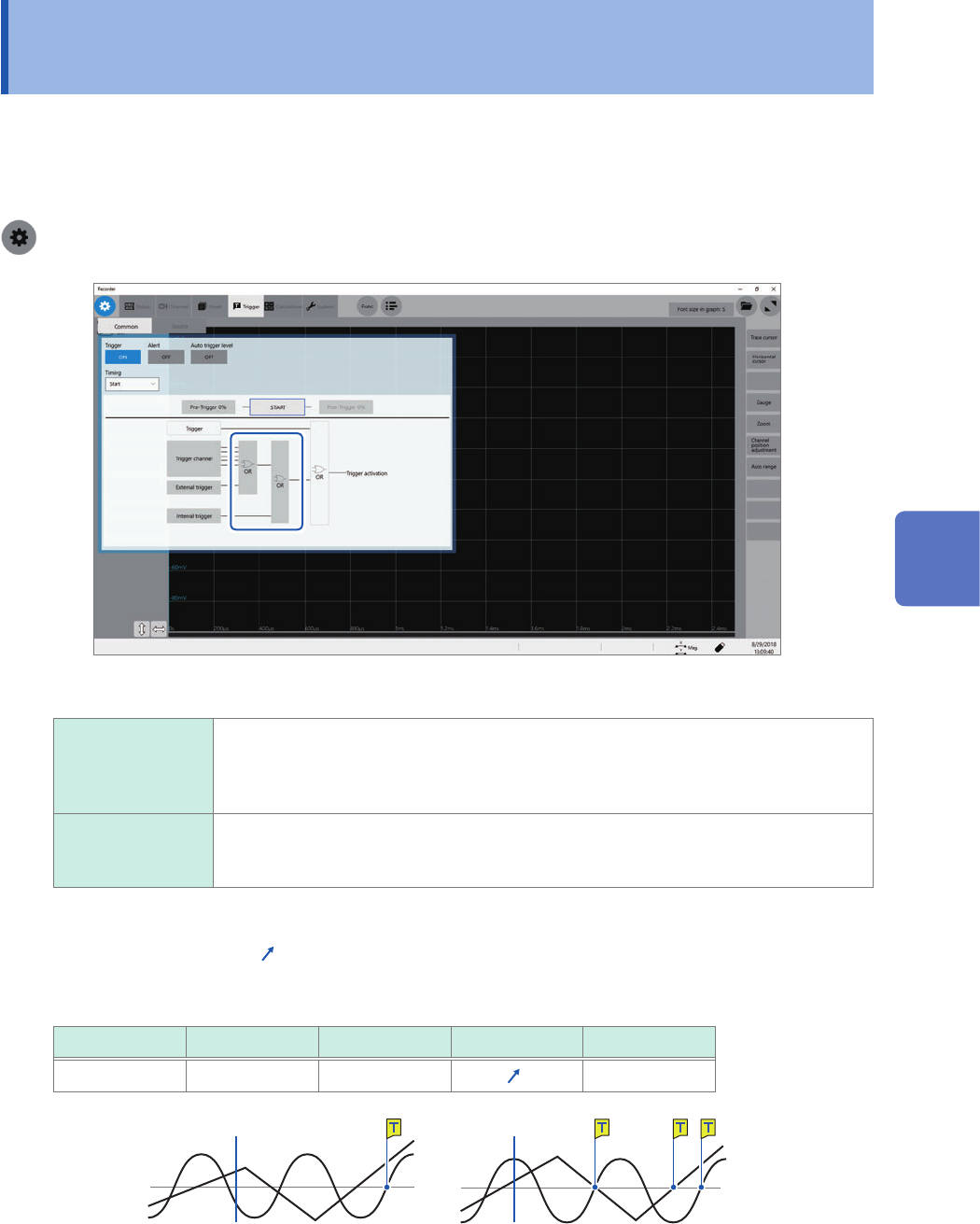
Set the trigger logical-conditions among the analog, logic, external, and interval triggers by
choosing between logical AND or OR operation.
The forcible trigger triggers the instrument regardless of the trigger logical-conditions setting. If all
trigger sources are set to off (i.e., with no trigger setting), recording starts immediately (free run).
> [Trigger] > [Common]
Click [AND] or [OR], whichever is displayed, to switch to the other.
OR
When any one of the specied trigger conditions changes from not being satised to
being satised (at a changing point), the instrument is triggered. Thus, even though
a trigger condition has been already satised at the start of waiting for a trigger, the
instrument is not triggered until a changing point is detected.
AND Only when all of the specied trigger conditions are satised, the instrument is
triggered. Thus, if all the specied trigger conditions have been already satised at the
start of waiting for a trigger, the instrument is immediately triggered.
Setting example: To trigger the instrument when a waveform crosses the zero-volt level in
the positive direction ([ ]*)
The instrument is triggered based on whether the trigger satisfaction condition is set to AND or OR
operation in the following ways:
Channel Trigger Level at time Slope Filter
CH1, CH2 Level 0.00 V
* Off
[AND] [OR]
One waveform is above 0 V,
and the other is also above 0 V.
Either waveform crosses 0 V
upwards.
Start Start
*: With the [AND] setting, the slope setting item appears as [HIGH].
5
Conguring the Trigger Settings